Skip to main content Explore View all products (200+) Microsoft Foundry Azure Copilot GitHub Copilot Azure Kubernetes Service (AKS) Azure Cosmos DB Azure Database for PostgreSQL Azure Arc Microsoft Fabric Linux virtual machines in Azure Foundry Models Foundry Agent Service Foundry IQ Foundry Tools Foundry Control Plane Observability in Foundry Control Plane Azure OpenAI in Foundry Models Azure Speech in Foundry Tools Azure Machine Learning View all databases Azure Cosmos DB Azure DocumentDB Azure SQL Azure Database for PostgreSQL Azure Managed Redis Microsoft Fabric Azure Databricks Linux virtual machines in Azure Windows Server on Azure Azure Functions Azure Virtual Machine Scale Sets Azure API Management Azure Container Apps Azure Kubernetes Service (AKS) Azure Kubernetes Fleet Manager Azure Container Registry Azure Red Hat OpenShift Azure Container Instances Azure Container Storage Azure Arc Azure Local Microsoft Defender for Cloud Azure Monitor Microsoft Sentinel Azure Migrate View all solutions (40+) Cloud solutions for small and medium businesses Cloud migration and modernization center Data analytics for AI Azure Databases AI apps and agents Microsoft Marketplace Microsoft Sovereign Cloud AI apps and agents Responsible AI with Azure AI Infrastructure Data analytics for AI Machine learning operations (MLOps) Low-code application development on Azure Integration Services Serverless computing DevOps Migration and modernization center .NET apps migration Databases on Azure Linux on Azure Oracle on Azure SAP on the Microsoft Cloud Adaptive cloud High-performance computing (HPC) Infrastructure as a service (IaaS) Resiliency Azure Essentials Frontier Accelerate for Azure FinOps on Azure Microsoft Marketplace Azure pricing overview Create an Azure account Free Azure services Flexible purchase options Pricing calculator FinOps on Azure Maximize ROI from AI Azure savings plans Azure reservations Azure Hybrid Benefit Virtual Machines Azure SQL Microsoft Foundry Microsoft Fabric Azure Kubernetes Service (AKS) Microsoft Defender for Cloud View more Software Development Companies Microsoft Marketplace Find a partner Resources for Azure partners Get started with Azure Customer stories Analyst reports, white papers, and e-books Videos Learn more about cloud computing Documentation Explore Azure portal Developer resources Quickstart templates Resources for startups Developer community Students Azure for partners Blog Events and Webinars Learn Support Contact Sales Get started with Azure Sign in

Built on the proven analytics engine in Microsoft SQL Server Analysis Services, Azure Analysis Services delivers enterprise-grade BI semantic modeling capabilities with the scale, flexibility, and management benefits of the cloud. The success of any modern data-driven organization requires that information is available at the fingertips of every business user, not just IT professionals and data scientists, to guide their day-to-day decisions. Azure Analysis Services helps you transform complex data into actionable insights. Users in your organization can then connect to your data models using tools like Excel, Power BI, and many others to create reports and perform ad-hoc interactive analysis.

Data visualization and consumption tools over Azure Analysis Services (Azure AS) sometimes store data caches to enhance report interactivity for users. The Power BI service, for example, caches dashboard tile data and report data for initial load for Live Connect reports. However, enterprise BI deployments where semantic models are reused throughout organizations can result in a great deal of dashboards and reports sourcing data from a single Azure AS model. This can cause an excessive number of cache queries being submitted to AS and, in extreme cases, can overload the server. This is especially relevant to Azure AS (as opposed to on-premises SQL Server Analysis Services) because models are often co-located in the same region as the Power BI capacity for faster query response times, so may not even benefit much from caching.

ClientCacheRefreshPolicy governance setting

The new ClientCacheRefreshPolicy property allows IT or the AS practitioner to override this behavior at the Azure AS server level, and disable automatic cache refreshes. All Power BI Live Connect reports and dashboards will observe the setting irrespective of the dataset-level settings, or which Power BI workspace they reside on. You can set this property using SQL Server Management Studio (SSMS) in the Server Properties dialog box. Please see the Analysis Services server properties page for more information on how to make use of this property.
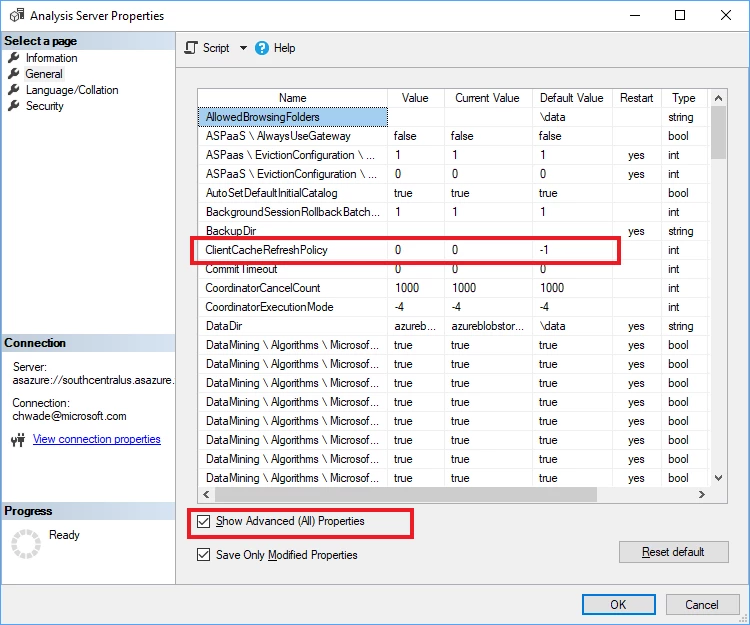

ClientCacheRefreshPolicy

WE ARE MICROSOFT

Explore Microsoft Foundry

The future of AI starts here. Envision your next great AI app with the latest technologies. Get started with Azure.





