
Azure HDInsight is a fully-managed cloud service that makes it easy, fast, and cost-effective to process massive amounts of data. Use the most popular open-source frameworks such as Hadoop, Spark, Hive, LLAP, Kafka, Storm, R & more. Azure HDInsight enables a broad range of scenarios such as ETL, Data Warehousing, Machine Learning, and IoT.
By default, when you provision a HDInsight cluster, you are required to create a local admin user and local SSH user that has full access to the cluster. The local admin user can access all the files, folders, tables, columns, etc. With a single local user, there is no need for role-based access control. However, as enterprise customers move to the cloud, they must enable strict security requirements in terms of authentication, authorization, auditing, and governance. This is especially important with larger or multiple teams that share the same cluster. Admins don’t want to create individual clusters for individual users. When we talked to customers, we received three main requests as part of enabling cluster access to multiple users:
- As a data scientist, I want to use my Active Directory domain credentials to run queries on the cluster.
- As a cluster admin, I want to configure role-based access control to restrict access to data only as needed.
- As a cluster admin, I want to view audit logs, in terms of who accessed what data, and whether access succeeded or failed.
To meet these requirements, the HDInsight team went with a preview of the HDInsight premium cluster tier for Hadoop cluster types. We received a tremendous response, and a lot of customers signed up to be part of the preview program. Based on the feedback, and customer interest, it became clear that this feature shouldn’t be part of different cluster tier but rather an add-on to the regular/standard HDInsight cluster. Creating the add-on the security package simplifies the cluster creation workflow and improves user experience.
Today, we are excited to announce that these features are available as part of the add-on (optional) Enterprise Security Package. As part of provisioning the HDInsight cluster, you can optionally select the Enterprise Security Package.
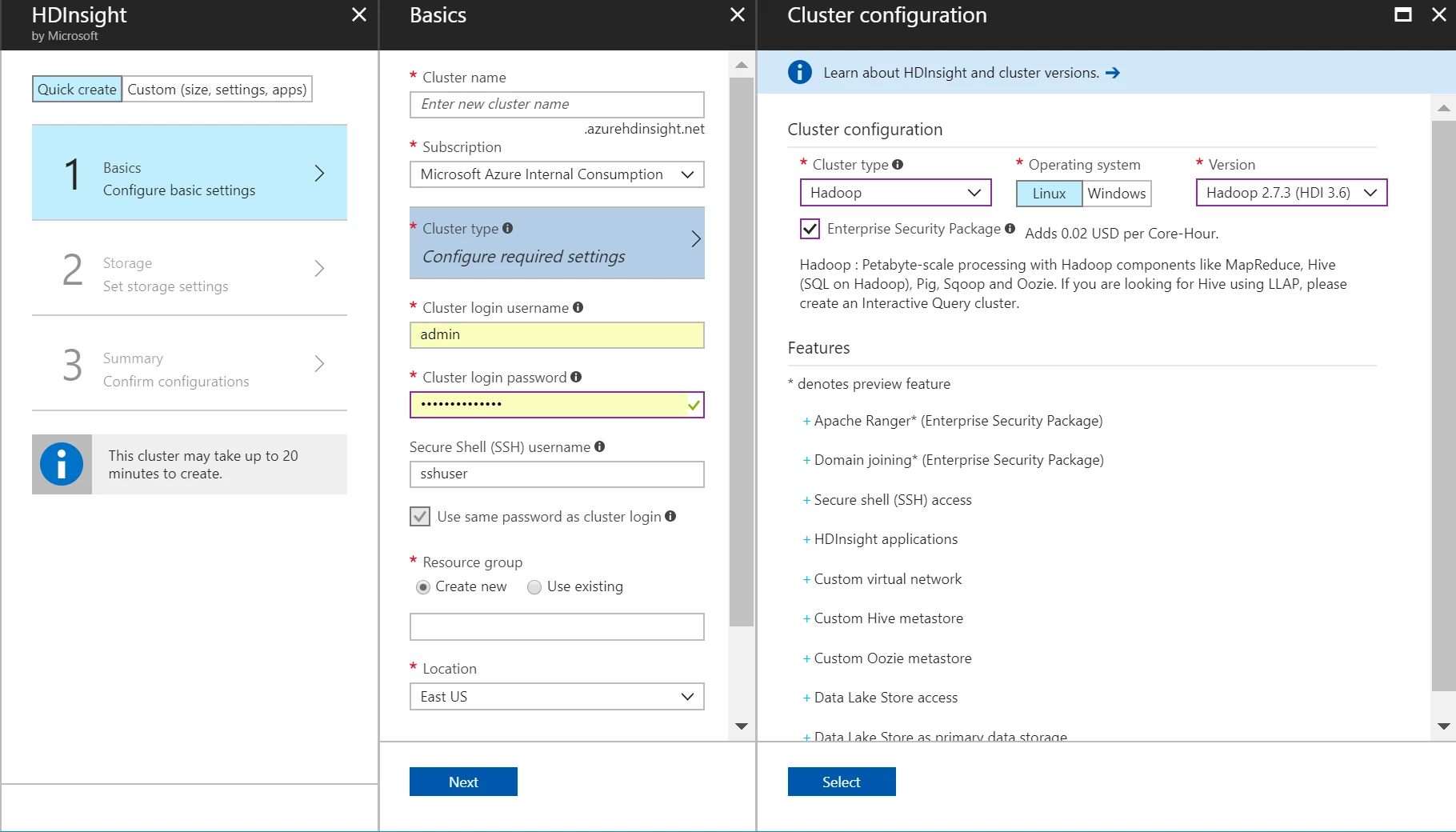
Once you select this add-on feature, you will be able to:
- Integrate the HDInsight cluster with Azure Active Directory Domain Services. As an admin, you can grant domain users access to the cluster This means, that users can use their own corporate (domain) user-name and password to access the cluster.
- Configure Role-Based Access Control for Hive, Spark, and Interactive Hive tables using Apache Ranger. Additionally, you can also set file and folder permissions for data stored in Azure Data Lake Store.
- View the audit logs to see who accessed what data and what policy was enforced as part of the access.
We have enabled this feature for Hadoop, Spark, and Interactive Query cluster types.
To learn more about the Enterprise Security Package, refer to the below helpful links:
- Configure Domain-joined HDInsight using Azure AD DS
- Configure Hive policies in Domain-joined HDInsight
- Overview of security options on Azure HDInsight
- An introduction to Hadoop security with domain-joined HDInsight clusters
- Plan for domain joined clusters in HDInsight
- Configure Domain-joined HDInsight sandbox environment
- Configure Domain-joined HDInsight clusters using Azure Active Directory Domain Services
- Configure Hive policies in Domain-joined HDInsight
- Manage Domain-joined HDInsight clusters






