
Azure Availability Zones are unique fault-isolated physical locations, within an Azure region, with independent power, network, and cooling. Each Availability Zone is comprised of one or more datacenters and houses infrastructure to support highly available, mission critical applications with fault tolerance to datacenter failures. For IaaS applications running on Azure Virtual Machines, you can build high availability into your business continuity strategy by deploying multiple virtual machines (VMs) across multiple zones within a region. In doing so, VMs are physically separated across zones, and a virtual network is created using load balancers at each site. These locations are close enough for high availability replication, so your applications stay running, despite any issues at the physical locations.
On rare occasions, an entire region could become unavailable due to major incidents such as natural disasters. Non-transient, large scale failures may exceed the ability of high availability (HA) features and require full-fledged disaster recovery (DR). Today, we are announcing the support for disaster recovery of virtual machines deployed in Availability Zones to another region using Azure Site Recovery (ASR). You can now replicate and failover zone pinned virtual machines to other regions within a geographic cluster using Azure Site Recovery. This new capability is generally available in all regions supporting Availability Zones. Along with Availability Sets and Availability Zones, Azure Site Recovery completes the resiliency continuum for applications running on Azure Virtual Machines.

Configuring DR for your zone pinned VMs is very simple. To get started, browse to your VM, select Disaster Recovery, select the target region of your choice, review settings, and click Enable replication. If the target region supports availability zones, you can configure your target VM to be deployed as a zone pinned VM. If not, you can configure the target VM to be deployed as a single instance or in an availability set. Once you failover to the target region and failback to the source region, the original zone configuration in source region stays intact. This ensures you can seamlessly failover to any supported target region, whether it supports availability zones or not, of your choice for DR and failback without any impact on the source region configuration.
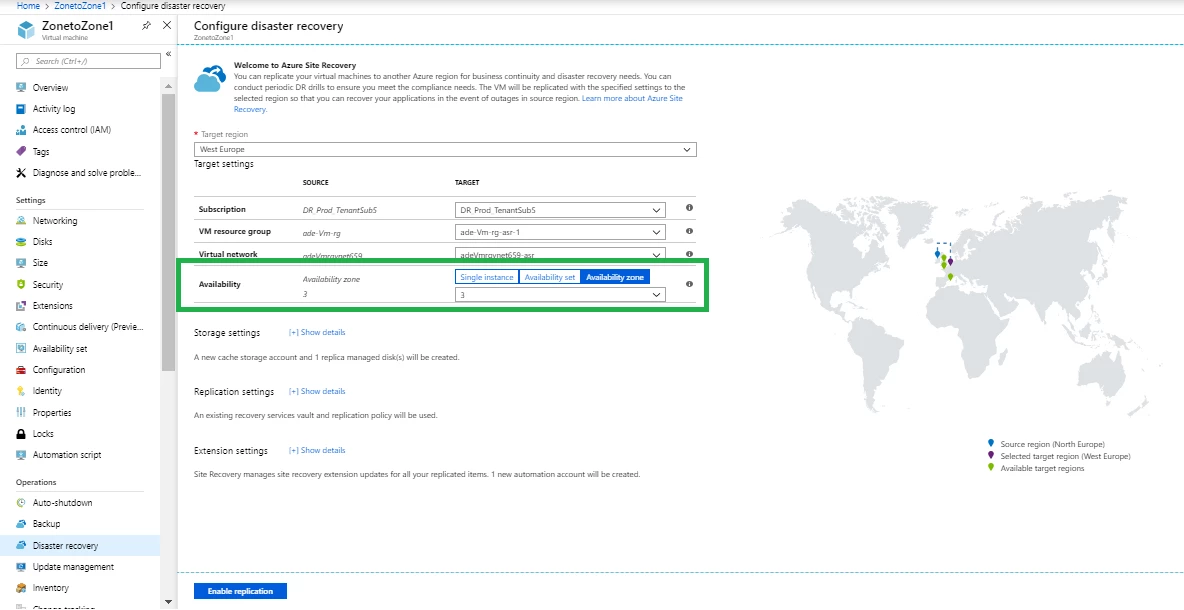
This feature is available in all Azure regions where ASR is available. Get started with Azure Site Recovery today.
Related links and additional content
- Get started by configuring disaster recovery for Azure VMs.
- Learn more about the supported configurations for replicating Azure VMs.
- Need help? Reach out to Azure Site Recovery forum for support.
- Tell us how we can improve Azure Site Recovery by contributing new ideas and voting up existing ones.






