In today’s cloud-driven world, employees are only allowed access to data that is absolutely necessary for them to effectively perform their job. This limited access is especially important in scenarios where it’s difficult to monitor access behaviors, like if you have many employees and/or engage vendors. Access is usually based on the job responsibility, authority, and capability. As a result, some job profiles will not have access to certain data or rights to perform specific actions if they do not need it to fulfill their responsibilities. The ability to hence control access but still be able to perform job duties aligning to the infrastructure administrator profile is becoming more relevant and frequently requested by customers.
You asked, we listened!
When we released the automatic update of agents used in disaster recovery (DR) of Azure Virtual Machines (VMs), the most frequent feedback we received was related to access control. Customers had DR admins who were given just enough rights to execute operations to enable, failover, or test DR. While they wanted to enable automatic updates and avoid the hassle of having to monitor for monthly updates and manually upgrade the agents, they didn’t want to give the DR admin contributor access to the subscription, which would allow them to create automation accounts. The request we heard from you was to allow customers to provide an existing automation account, approved and created by a person who is entrusted with the right access in the subscription. This automation account could then be used to execute the runbook, which checks for new updates and upgrades the existing agent every time there is a new release.
How to choose an existing automation account?
- Choose the virtual machine you want to enable replication for.
- In the Advanced Settings blade, under Extension Settings, choose a previously created Automation account.
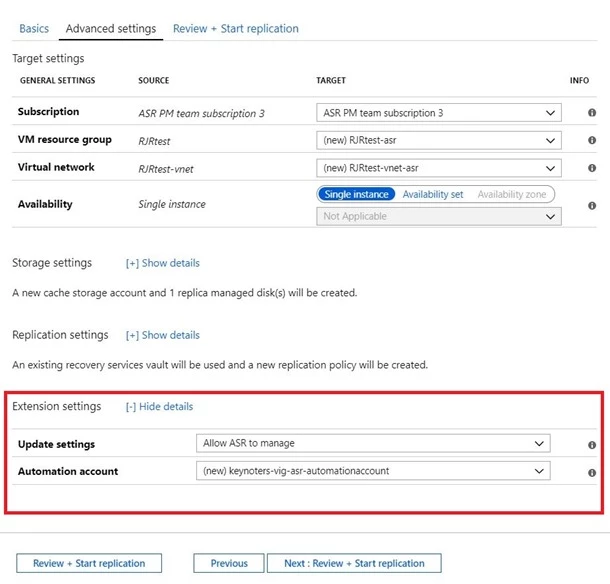
This automation account can be used to automatically update agents for all Azure virtual machines within the Recovery Services vault. If you change it for one virtual machine, the same will be applied to all virtual machines.
Please note that this capability is only applicable for disaster recovery of Azure virtual machines, and not for Hyper-V/VMware VMs
Related documents:
In addition to this, we recently announced one of the top customer requests we’ve received, which provides better control of your workloads:
Enable replication for a newly added disk – You can enable replication for a data disk that’s been newly added to an Azure VM that’s already configured for disaster recovery.
Azure natively provides you the high availability and reliability for your mission-critical workloads, and you can choose to improve your protection and meet compliance requirements using the disaster recovery provided by Azure Site Recovery. Getting started with Azure Site Recovery is easy, check out pricing information and sign up for a free Microsoft Azure trial. You can also visit the Azure Site Recovery forum on MSDN for additional information and to engage with other customers.