Do you want to analyze vast amounts of data, create Power BI dashboards and reports to help you visualize your data, and share insights across your organization? Azure Data Explorer (ADX), a lightning-fast indexing and querying service helps you build near real-time and complex analytics solutions for vast amounts of data. ADX can connect to Power BI, a business analytics solution that lets you visualize your data and share the results across your organization. The various methods of connection to Power BI allow for interactive analysis of organizational data such as tracking and presentation of trends.
Simple and intuitive native connector
The native connector to Power BI unlocks the power of Azure Data Explorer in only a minute. In a very intuitive process, add your cluster name and let the connector take care of the rest. Provide the database and table name to focus your analysis on specific data. You can use import mode for snappy interaction with the data or direct query mode for filtering large datasets and near real-time updates. To use the native connector method read our documentation, “Quickstart: Visualize data using the Azure Data Explorer connector for Power BI.”
Imported query
A specific Azure Data Explorer query can also be used to import data to Power BI. When copying a query from Kusto Explorer or Kusto Web UI, paste it in the blank query connector window and load the query’s data to Power BI. To use the imported query method read our documentation, “Quickstart: Visualize data using a query imported into Power BI.”
General purpose SQL (MS-TDS) connector
If you prefer running SQL queries to analyze your data, use the Azure SQL Database connector to connect to Azure Data Explorer. You can use the import mode or direct query mode to bring just the data needed for analysis. To use the SQL connector read our documentation, “Quickstart: Visualize data using the Azure Data Explorer connector for Power BI.”
Example
The following example depicts how the native Power BI connector is used to query GitHub public data that was pulled into the Demo11 ADX cluster and stored in the GitHub database.
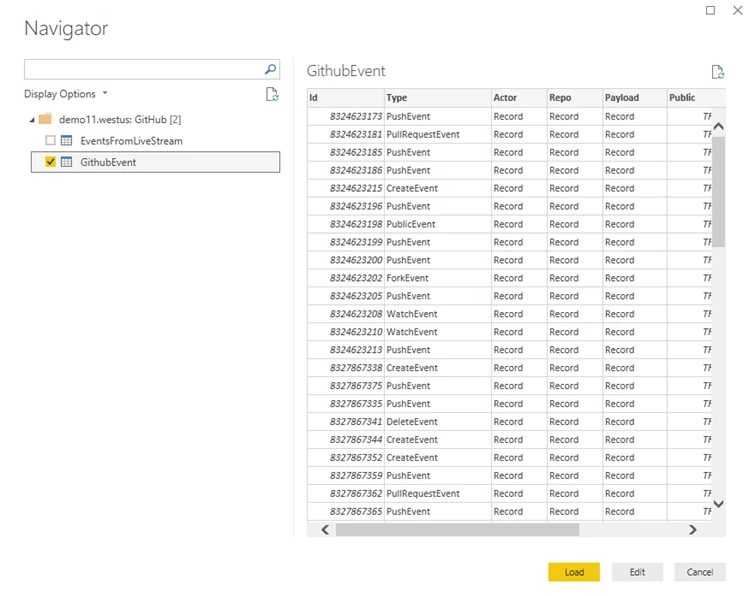
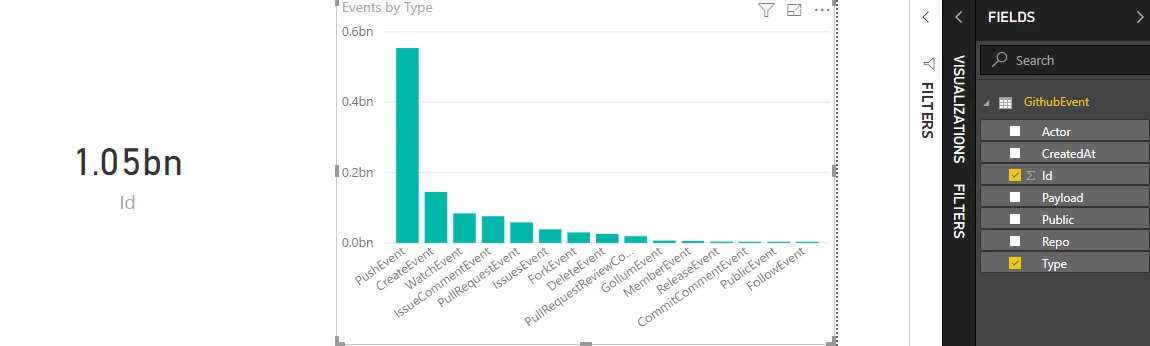
Once loaded to Power BI, you can build any report or dashboard to analyze and visually represent the GitHub event data.
Next steps
In this blog, we depict the various ways to query data from Azure Data Explorer to Power BI. Additional connectors and plugins to analytics tools and services will be added in the weeks to come. Stay tuned for more updates.
To find out more about Azure Data Explorer you can:
- Try Azure Data Explorer in preview now.
- Find pricing information for Azure Data Explorer.
- Access documentation for Azure Data Explorer.