Skip to main content Explore View all products (200+) Microsoft Foundry Azure Copilot GitHub Copilot Azure Kubernetes Service (AKS) Azure Cosmos DB Azure Database for PostgreSQL Azure Arc Microsoft Fabric Linux virtual machines in Azure Foundry Models Foundry Agent Service Foundry IQ Foundry Tools Foundry Control Plane Observability in Foundry Control Plane Azure OpenAI in Foundry Models Azure Speech in Foundry Tools Azure Machine Learning View all databases Azure Cosmos DB Azure DocumentDB Azure SQL Azure Database for PostgreSQL Azure Managed Redis Microsoft Fabric Azure Databricks Linux virtual machines in Azure Windows Server on Azure Azure Functions Azure Virtual Machine Scale Sets Azure API Management Azure Container Apps Azure Kubernetes Service (AKS) Azure Kubernetes Fleet Manager Azure Container Registry Azure Red Hat OpenShift Azure Container Instances Azure Container Storage Azure Arc Azure Local Microsoft Defender for Cloud Azure Monitor Microsoft Sentinel Azure Migrate View all solutions (40+) Cloud solutions for small and medium businesses Cloud migration and modernization center Data analytics for AI Azure Databases AI apps and agents Microsoft Marketplace Microsoft Sovereign Cloud AI apps and agents Responsible AI with Azure AI Infrastructure Data analytics for AI Machine learning operations (MLOps) Low-code application development on Azure Integration Services Serverless computing DevOps Migration and modernization center .NET apps migration Databases on Azure Linux on Azure Oracle on Azure SAP on the Microsoft Cloud Adaptive cloud High-performance computing (HPC) Infrastructure as a service (IaaS) Resiliency Azure Essentials Frontier Accelerate for Azure FinOps on Azure Microsoft Marketplace Azure pricing overview Create an Azure account Free Azure services Flexible purchase options Pricing calculator FinOps on Azure Maximize ROI from AI Azure savings plans Azure reservations Azure Hybrid Benefit Virtual Machines Azure SQL Microsoft Foundry Microsoft Fabric Azure Kubernetes Service (AKS) Microsoft Defender for Cloud View more Software Development Companies Microsoft Marketplace Find a partner Resources for Azure partners Get started with Azure Customer stories Analyst reports, white papers, and e-books Videos Learn more about cloud computing Documentation Explore Azure portal Developer resources Quickstart templates Resources for startups Developer community Students Azure for partners Blog Events and Webinars Learn Support Contact Sales Get started with Azure Sign in

Today, we’re very excited to announce support for two debugging features: Console Output and Screenshot support for Azure Virtual Machines v2. When bringing your own image to Azure or even booting one of the platform images, there can be many reasons why a Virtual Machine gets into a non-bootable state. These features enable you to easily diagnose and recover your Virtual Machines from boot failures.

For Linux Virtual Machines, you can easily view the output of your console log from the Portal:
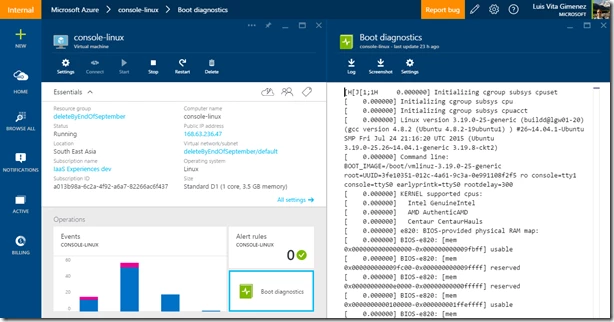
graphical user interface, text, application

However, for both Windows and Linux Virtual Machines, Azure also enables you to see a screenshot of the VM from the hypervisor:
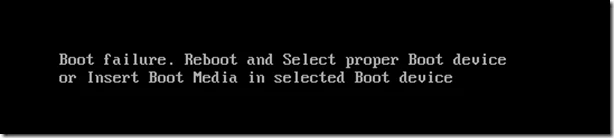
A screen shot of a black screen

Enable diagnostics on a new Virtual Machine

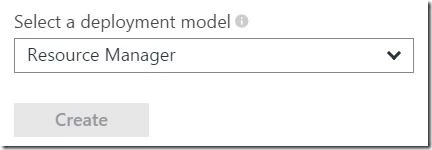
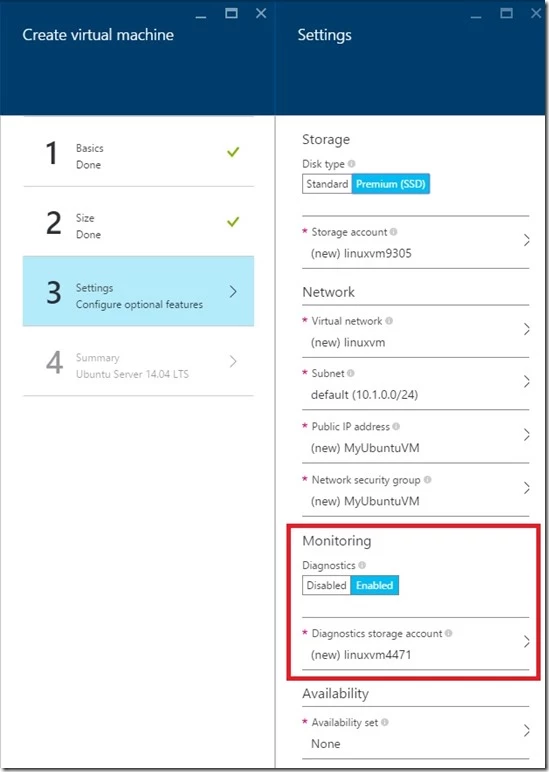
When creating a new Virtual Machine v2 from the Preview Portal, select the Azure Resource Manager from the deployment model dropdown:
A screenshot of a computer

Configure the Monitoring option to select the storage account where you would like to place these diagnostic files.
graphical user interface, application

If you are deploying from a Azure Resource Manager template, navigate to your Virtual Machine resource and append the diagnostics profile section. Remember to use the “2015-06-15” API version header.

{
      "apiVersion": "2015-06-15",
      "type": "Microsoft.Compute/virtualMachines",
      … 

The diagnostics profile enables you to select the storage account where you want to put these logs.

        "diagnosticsProfile": {
          "bootDiagnostics": {
            "enabled": true,
            "storageUri": "[concat('https://', parameters('newStorageAccountName'), '.blob.core.windows.net')]"
          }
        }
      }
    }

To deploy a sample Virtual Machine with boot diagnostics enabled, check out our repo here.

Update an Existing Virtual Machine

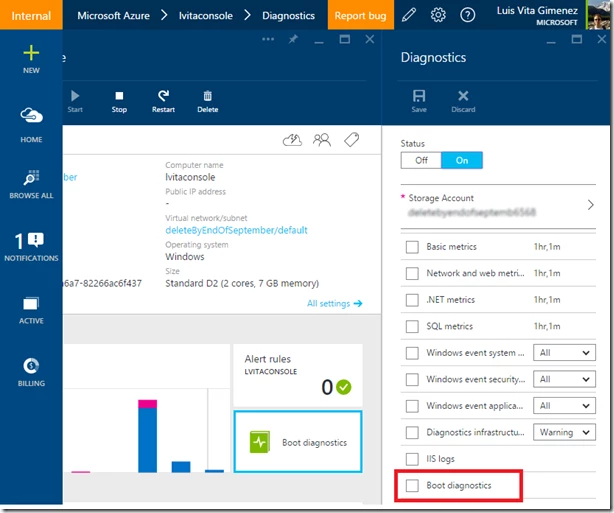
You can also update an existing V2 Virtual Machine through the Portal to enable boot diagnostics through the Portal. Select the Boot Diagnostics option and Save. Restart the VM to take effect.
graphical user interface, application

Support

Both of these features are supported for Azure Virtual Machines v2 in all regions. Note, screenshots and output can take up to 10 minutes to appear in your storage account.


WE ARE MICROSOFT

Explore Microsoft Foundry

The future of AI starts here. Envision your next great AI app with the latest technologies. Get started with Azure.