Today we are happy to announce that Azure SQL Database Threat Detection will be generally available in April 2017. Through the course of the preview we optimized our offering and it has received 90% positive feedback from customers regarding the usefulness of SQL threat alerts. At general availability, SQL Database Threat Detection will cost $15 / server / month. We invite you to try it out for 60 days for free.
What is Azure SQL Database Threat Detection?
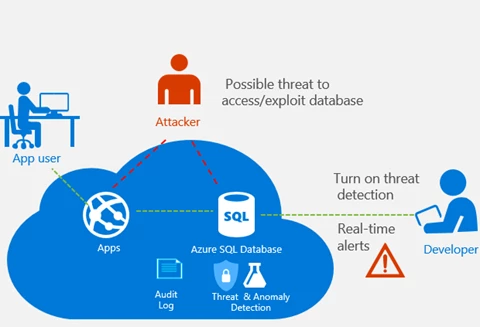
Azure SQL Database Threat Detection provides an additional layer of security intelligence built into the Azure SQL Database service. It helps customers using Azure SQL Database to secure their databases within minutes without needing to be an expert in database security. It works around the clock to learn, profile and detect anomalous database activities indicating unusual and potentially harmful attempts to access or exploit databases.
How to use SQL Database Threat Detection
- Just turn it ON – SQL Database Threat Detection is incredibly easy to enable. You simply switch on Threat Detection from the Auditing & Threat Detection configuration blade in the Azure portal, select the Azure storage account (where the SQL audit log will be saved) and configure at least one email address for receiving alerts.
- Real-time actionable alerts – SQL Database Threat Detection runs multiple sets of algorithms which detect potential vulnerabilities and SQL injection attacks, as well as anomalous database access patterns (such as access from an unusual location or by an unfamiliar principal). Security officers or other designated administrators get email notification once a threat is detected on the database. Each notification provides details of the suspicious activity and recommends how to further investigate and mitigate the threat.
- Live SQL security tile – SQL Database Threat Detection integrates its alerts with Azure Security Center. A live SQL security tile within the database blade in Azure portal tracks the status of active threats. Clicking on the SQL security tile launches the Azure Security Center alerts blade and provides an overview of active SQL threats detected on the database. Clicking on a specific alert provides additional details and actions for investigating and preventing similar threats in the future.
- Investigate SQL threat – Each SQL Database Threat Detection email notification and Azure Security Center alert includes a direct link to the SQL audit log. Clicking on this link launches the Azure portal and opens the SQL audit records around the time of the event, making it easy to find the SQL statements that were executed (who accessed, what he did and when) and determine if the event was legitimate or malicious (e.g. application vulnerability to SQL injection was exploited, someone breached sensitive data, etc.).
Recent customer experiences using SQL Database Threat Detection
During our preview, many customers benefited from the enhanced security SQL Database Threat detection provides.
Case #1: Anomalous access from a new network to production database
Justin Windhorst, Head of IT North America at Archroma
“Archroma runs a custom built ERP/e-Commerce solution, consisting of more than 20 Web servers and 20 Databases using a multi-tier architecture, with Azure SQL Database at its core. I love the built-in features that bring added value such as the enterprise level features: SQL Database Threat Detection (for security) and Geo Replication (for availability). Case in point: With just a few clicks, we successfully enabled SQL Auditing and Threat Detection to ensure continuous monitoring occurred for all activities within our databases. A few weeks later, we received an email alert that “Someone has logged on to our SQL server from an unusual location”. The alert was triggered as a result of unusual access from a new network to our production database for testing purposes. Knowing that we have the power of Microsoft behind us that automatically brings to light anomalous such as these gives Archroma incredible peace of mind, and thus allows us to focus on delivering a better service.”
Case #2: Preventing SQL Injection attacks
Fernando Sola, Cloud Technology Consultant at HSI
“Thanks to Azure SQL Database Threat Detection, we were able to detect and fix vulnerabilities to SQL injection attacks and prevent potential threats to our database. I was very impressed with how simple it was to enable threat detection using the Azure portal. A while after enabling Azure SQL Database Threat Detection, we received an email notification about ‘An application generated a faulty SQL statement on our database, which may indicate a vulnerability of the application to SQL injection.’ The notification provided details of the suspicious activity and recommended actions how to observe and fix the faulty SQL statement in our application code using SQL Audit Log. The alert also pointed me to the Microsoft documentation that explained us how to fix an application code that is vulnerable to SQL injection attacks. SQL Database Threat Detection and Auditing help my team to secure our data in Azure SQL Database within minutes and with no need to be an expert in databases or security.”
Summary
We would like to thank all of you that provided feedback and shared experiences during the public preview. Your active participation validated that SQL Database Threat Detection provides an important layer of security built into the Azure SQL Database service to help secure databases without the need to be an expert in database security.
Click the following links for more information to:
- Learn more about Azure SQL Database Threat Detection
- Learn more about Azure SQL Database Auditing
- Learn more about Azure SQL Database
- Learn more about Azure Security Center