IoT solutions can be complex, and we’re always working on ways to simplify them.
As we work with customers on real-world, enterprise-grade IoT solutions built on Azure IoT, one pattern we’ve noticed is how businesses route inbound messages to different data processing systems.
Imagine millions of devices sending billions of messages to Azure IoT Hub. Some of those messages need to be processed immediately, like an alarm indicating a serious problem. Some messages are analyzed for anomalies. Some messages are sent to long term storage. In these cases, customers have to build routing logic to decide where to send each message:
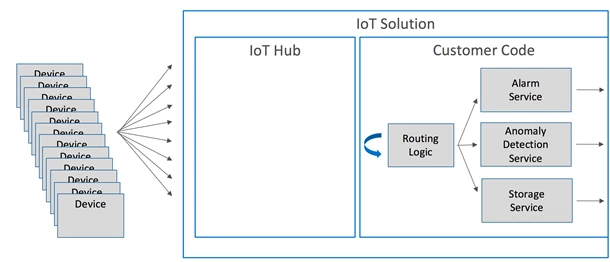
While the routing logic is straightforward conceptually, it’s actually really complex when you consider all of the details you have to handle when you build a dispatching system: handling transient faults, dealing with lost messages, high reliability, and scaling out the routing logic.
To make all this easier, we’ve made a great new feature to IoT Hub generally available: message routing. This allows customers to setup automatic routing to different systems via Azure messaging services and routing logic in IoT Hub itself, and we take care of all of the difficult implementation architecture for you:
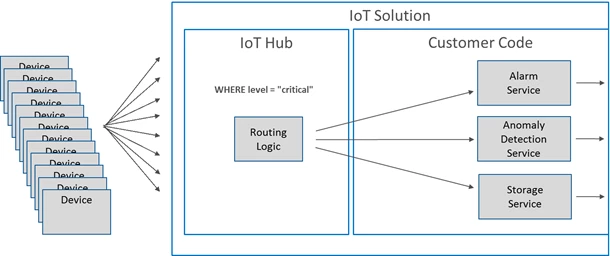
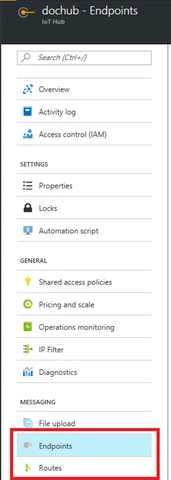
You can configure your IoT hub to route messages to your backend processing services via Service Bus queues, topics, and Event Hubs as custom endpoints for routing rules. Queuing and streaming services like Service Bus queues and Event Hubs are used in many if not all messaging applications. You can easily set up message routing in the Azure portal. Both endpoints and routes can be accessed from the left-hand info pane in your IoT Hub:
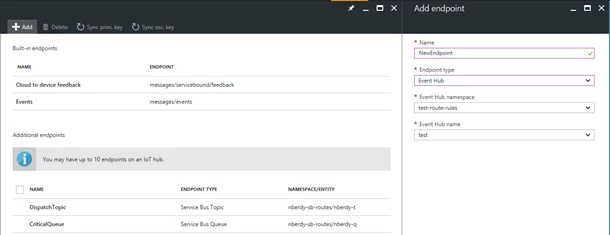
You can add routing endpoints from the Endpoints blade:
You can configure routes on your IoT Hub by specifying the data stream (device telemetry), the condition to match, and the endpoint to which matching messages are written.
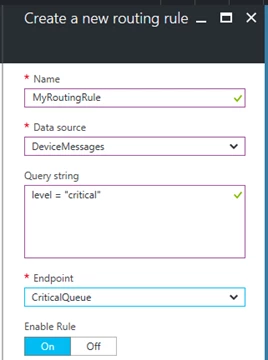
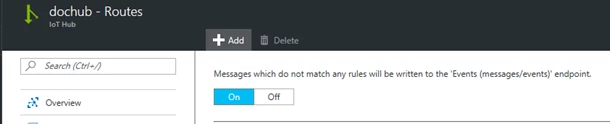
Message routing conditions use the same query language as device twin queries and device jobs. IoT Hub evaluates the condition on the properties of the messages being sent to IoT Hub and uses the result to determine where to route messages. If messages don’t match any of your routes, the messages are written to the built-in messages/events endpoint just like they are today.
We have also enhanced our metrics and operations monitoring logs to make it easy for youto tell when an endpoint is misbehaving or whether a route was incorrectly configured. You can learn about the full set of metrics that IoT Hub provides in our documentation including how each metric is used.
Azure IoT is committed to offering our customers high availability message ingestion that is secure and easy to use. Message routing takes telemetry processing to the next step by offering customers a code-free way to dispatch messages based on message properties. Learn more about today’s enhancements to Azure IoT Hub messaging by reading the developer guide. We firmly believe in customer feedback, so please continue to submit your suggestions through the Azure IoT User Voice forum or join the Azure IoT Advisors Yammer group.