
Many organizations ask us for a convenient way to review and visualize usage and billing information across multiple subscriptions. Today, this is a complicated problem to solve due to access restrictions on billing information. Last year, we announced the availability of the Azure Resource Usage and RateCard APIs. These APIs provide programmatic access to the usage information for a subscription as well as the billing rates for Azure usage for different rate codes. Used in conjunction, these APIs enable you to see not just what your consumption of different services over time are, but also to see how much that consumption costs. Until now, it’s been up to you as developers to bridge these APIs to acquire this level of intelligence.
The Azure usage and billing portal
Some months ago, a small group within the Developer Experience team began working on a project to enable visibility of Azure usage across multiple subscriptions to keep track of billing as well as to ensure resources weren’t left running after projects and events had finished. Just like any developer out there, we didn’t want to leave 1,000 machine clusters up and running if we didn’t need to! That project became the Azure Usage and Billing Portal. Today we’re happy to announce that the project has been open sourced and is now available on GitHub. Once deployed, you’ll be able to register any subscriptions that are used by your organization so that their usage will be polled on a daily basis. From there, that usage and billed amount is displayed in an easy to use, and very configurable, Power BI dashboard:
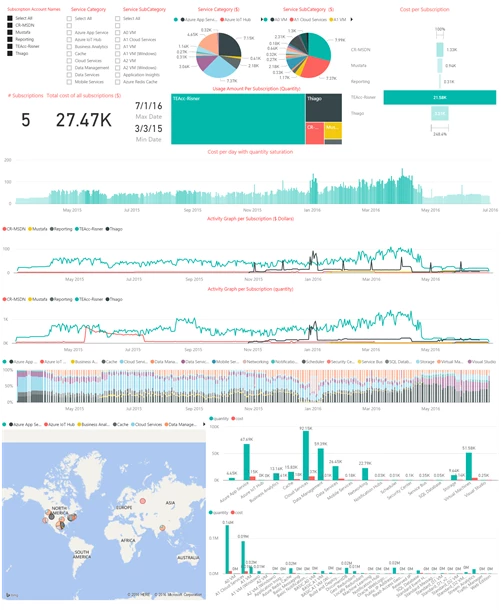
This release is just the start of what we’re hoping to accomplish with this project. In the future, we plan to add the ability to trigger alerts based off unusual Azure usage, provide additional reporting, enable per-subscription rate codes, simplify deployment, and much more. As you begin using the Azure Usage and Billing Portal, we hope you’ll provide feedback and contribute any improvements you work on.
Getting started
The Azure Usage and Billing Portal consists of multiple pieces:
- Registration website for providing the system access to Azure subscriptions
- Dashboard website for reviewing the subscriptions that have granted access, viewing the state of job requests, and starting unscheduled jobs to pull usage data
- SQL Database for storing usage and billing data
- Storage Queue for storing requests to pull data from the Usage and RateCard APIs
- Scheduled webjob to trigger a daily pull request for each subscription
- Continuous webjob to pull data whenever a request enters the Queue
- Power BI Dashboard to display the results
Fortunately, we’ve done the work of creating a Powershell script which will generate all the necessary Azure resources you’ll need to deploy your own version of the Portal. You can follow along with step-by-step instructions to generate those resources, update the necessary configuration files in Visual Studio, and deploy all of your projects into Azure.
More information
If you’d like to understand more about how the project was built, you can review the following resources:
- The Azure Billing REST API Reference provides details of the two APIs used to pull usage and RateCard information.
- The Azure Billing API Code Samples contain examples of using those APIs.
- Of particular importance is the Multi-Tenant Web Application sample which demonstrates how the consent process for the Registration website works.






