It has been an exciting last few months since we announced the public preview of Azure Files share snapshot as we see our customers experiencing out-of-the-box snapshot capabilities for their Azure file shares. Today, we are excited to announce the general availability of Azure Files share snapshots globally in all Azure clouds. Share snapshots provide a way to make incremental backups of Server Message Block (SMB) shares in Azure Files. Storage administrators can use snapshots directly and backup providers can now leverage this capability to integrate Azure Files backup and restore capabilities into their products.
Key value proposition
Incremental and fast – Only changes made to the base data are stored in the snapshot. If the data is available on the base share, it will not be duplicated in any snapshot. If nothing changes after you create the snapshot, the size of the snapshot remains zero. This is true even for the very first snapshot, which means that it never duplicates any data. This makes snapshots time, space, and cost efficient. This also minimizes the time required to create the snapshot. One can create a snapshot of the share instantaneously. While snapshot can be taken at share level, you can still restore individual files. Being able to restore at the item level makes your recovery fast and cost efficient.
Familiar experiences – There are many ways to browse and restore data from snapshots including “previous versions” in Windows, Azure portal, storage explorer, Storage SDK, and REST APIs. Once the snapshot is created, you will be able to view all your previous versions from Windows explorer. You can even use your favorite diff utility to view changes between file versions in Windows. Azure is the very first public cloud provider to enable capabilities like creating an instantaneous file share snapshot, browsing of snapshots with the native Volume Shadow Copy Service (VSS) like experience in Windows Explorer, and restore from Windows Explorer. We have also added support for share snapshots in the Azure portal and storage explorer which enables a UI experience in Windows, Linux, and macOS.
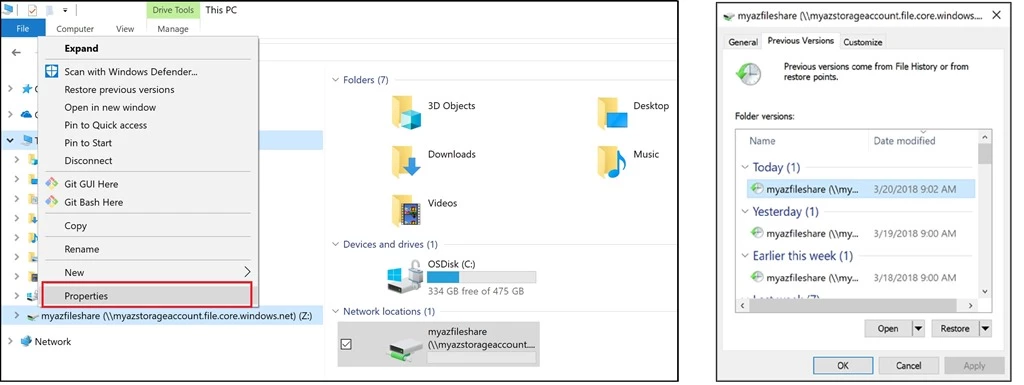
Backup integration – Azure Files is a true born in cloud file share and natively supports REST API to be able to provide higher flexibility of tooling and scripting. Backup providers can now leverage REST API to provide a true native backup story. As an example, a few days back, Azure Backup announced preview support for Azure Files. Azure File Sync customers can also now use Azure Backup to protect their file shares in the cloud. In addition to native Windows integration, we have added support for snapshots to Azure Powershell, .Net, Python, Node, and Java SDK. You can use these for scripting or programmatically accessing data from your snapshots.
Conclusion and next steps
Capacity consumed by share snapshots is charged at the same rate as data storage prices. During public preview, capacity charged by snapshots was not billed. You will start seeing this on your bill in the next few weeks. Since snapshots are incremental in nature, this change should be minimal.
We hope Azure Files share snapshots will be a key addition to your cloud storage management toolkit. To learn more about snapshots, please visit the Azure File share snapshot documentation.
If you have any questions about Azure Files, please leave a comment below. In addition, if you have any feature request, we are always listening to your feedback on our User Voice.