This post was co-authored by Qi Ke, Corporate Vice President, Azure Kubernetes Service.
Today, we are thrilled to announce the general availability of Azure CNI Overlay. This is a big step forward in addressing networking performance and the scaling needs of our customers.
As cloud-native workloads continue to grow, customers are constantly pushing the scale and performance boundaries of our existing networking solutions in Azure Kubernetes Service (AKS). For Instance, the traditional Azure Container Networking Interface (CNI) approaches require planning IP addresses in advance, which could lead to IP address exhaustion as demand grows. In response to this demand, we have developed a new networking solution called “Azure CNI Overlay”.
In this blog post, we will discuss why we needed to create a new solution, the scale it achieves, and how its performance compares to the existing solutions in AKS.
Solving for performance and scale
In AKS, customers have several network plugin options to choose from when creating a cluster. However, each of these options have their own challenges when it comes to large-scale clusters.
The “kubenet” plugin, an existing overlay network solution, is built on Azure route tables and the bridge plugin. Since kubenet (or host IPAM) leverages route tables for cross node communication it was designed for, no more than 400 nodes or 200 nodes in dual stack clusters.
The Azure CNI VNET provides IPs from the virtual network (VNET) address space. This may be difficult to implement as it requires a large, unique, and consecutive Classless Inter-Domain Routing (CIDR) space and customers may not have the available IPs to assign to a cluster.
Bring your Own Container Network Interface (BYOCNI) brings a lot of flexibility to AKS. Customers can use encapsulation—like Virtual Extensible Local Area Network (VXLAN)—to create an overlay network as well. However, the additional encapsulation increases latency and instability as the cluster size increases.
To address these challenges, and to support customers who want to run large clusters with many nodes and pods with no limitations on performance, scale, and IP exhaustion, we have introduced a new solution: Azure CNI Overlay.
Azure CNI Overlay
Azure CNI Overlay assigns IP addresses from the user-defined overlay address space instead of using IP addresses from the VNET. It uses the routing of these private address spaces as a native virtual network feature. This means that cluster nodes do not need to perform any extra encapsulation to make the overlay container network work. This also allows this overlay addressing space to be reused for different AKS clusters even when connected via the same VNET.
When a node joins the AKS cluster, we assign a /24 IP address block (256 IPs) from the Pod CIDR to it. Azure CNI assigns IPs to Pods on that node from the block, and under the hood, VNET maintains a mapping of the Pod CIDR block to the node. This way, when Pod traffic leaves the node, VNET platform knows where to send the traffic. This allows the Pod overlay network to achieve the same performance as native VNET traffic and paves the way to support millions of pods and across thousands of nodes.
Datapath performance comparison
This section sneaks into some of the datapath performance comparisons we have been running against Azure CNI Overlay.
Note: We used the Kubernetes benchmarking tools available at kubernetes/perf-tests for this exercise. Comparison can vary based on multiple factors such as underlining hardware and Node proximity within a datacenter among others. Actual results might vary.
Azure CNI Overlay vs. VXLAN-based Overlay
As mentioned before, the only options for large clusters with many Nodes and many Pods are Azure CNI Overlay and BYO CNI. Here we compare Azure CNI Overlay with VXLAN-based overlay implementation using BYO CNI.
TCP Throughput – Higher is Better (19% gain in TCP Throughput)
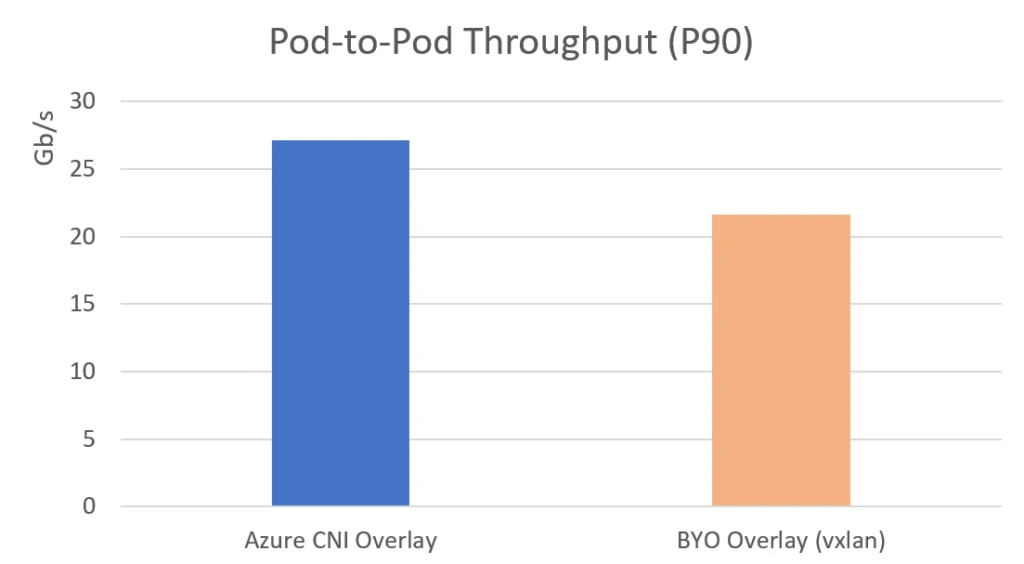
Azure CNI Overlay showed a significant performance improvement over VXLAN-based overlay implementation. We found that the overhead of encapsulating CNIs was a significant factor in performance degradation, especially as the cluster grows. In contrast, Azure CNI Overlay’s native Layer 3 implementation of overlay routing eliminated the double-encapsulation resource utilization and showed consistent performance across various cluster sizes. In summary, Azure CNI Overlay is a most viable solution for running production grade workloads in Kubernetes.
Azure CNI Overlay vs. Host Network
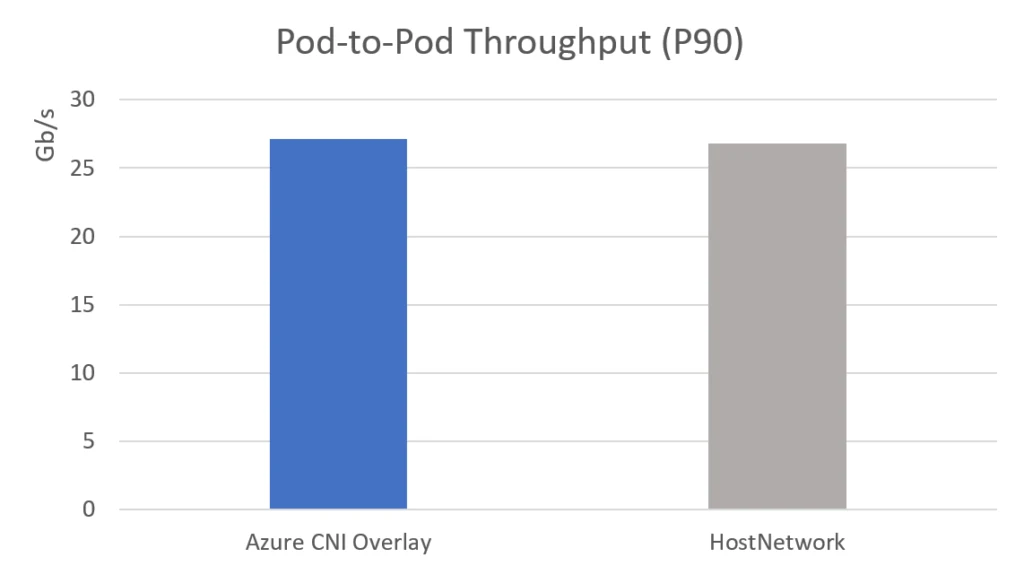
This section will cover how pod networking performs against node networking and see how native L3 routing of pod networking helps Azure CNI Overlay implementation.
Azure CNI Overlay and Host Network have similar throughput and CPU usage results, and this reinforces that the Azure CNI Overlay implementation for Pod routing across nodes using the native VNET feature is as efficient as native VNET traffic.
TCP Throughput – Higher is Better (Similar to HostNetwork)
Azure CNI Overlay powered by Cilium: eBPF dataplane
Up to this point, we’ve only taken a look at Azure CNI Overlay benefits alone. However, through a partnership with Isovalent, the next generation of Azure CNI is powered by Cilium. Some of the benefits of this approach include better resource utilization by Cilium’s extended Berkeley Packet Filter (eBPF) dataplane, more efficient intra cluster load balancing, Network Policy enforcement by leveraging eBPF over iptables, and more. To read more about Cilium’s performance gains through eBPF, see Isovalent’s blog post on the subject.
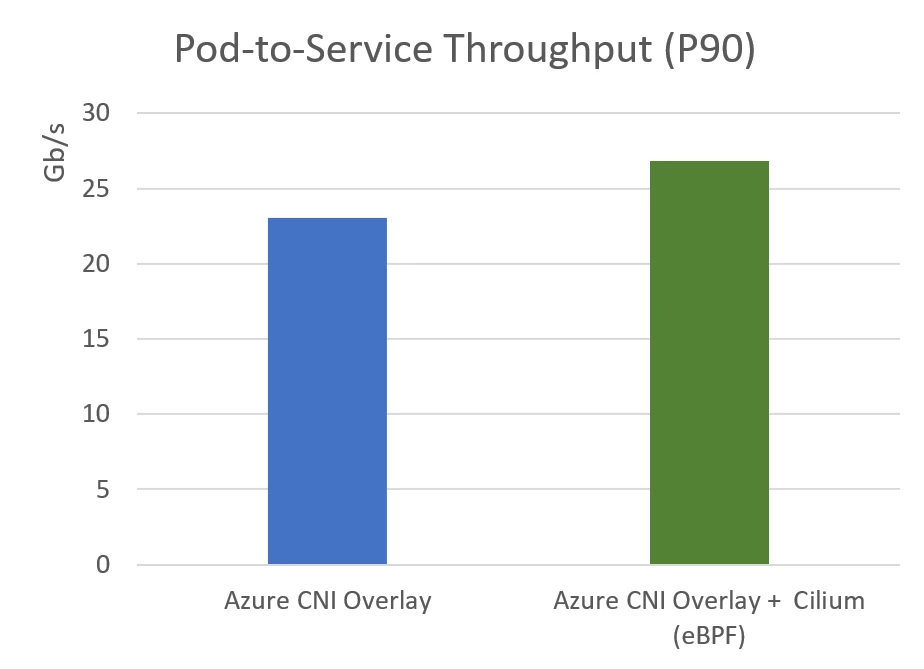
In Azure CNI Overlay Powered by Cilium, Azure CNI Overlay sets up the IP-address management (IPAM) and Pod routing, and Cilium provisions the Service routing and Network Policy programming. In other words, Azure CNI Overlay Powered by Cilium allows us to have the same overlay networking performance gains that we’ve seen thus far in this blog post plus more efficient Service routing and Network Policy implementation.
It’s great to see that Azure CNI Overlay powered by Cilium is able to provide even better performance than Azure CNI Overlay without Cilium. The higher pod to service throughput achieved with the Cilium eBPF dataplane is a promising improvement. The added benefits of increased observability and more efficient network policy implementation are also important for those looking to optimize their AKS clusters.
TCP Throughput – Higher is better
To wrap up, Azure CNI Overlay is now generally available in Azure Kubernetes Service (AKS) and offers significant improvements over other networking options in AKS, with performance comparable to Host Network configurations and support for linearly scaling the cluster. And pairing Azure CNI Overlay with Cilium brings even more performance benefits to your clusters. We are excited to invite you to try Azure CNI Overlay and experience the benefits in your AKS environment.
To get started today, visit the documentation available.