
We are pleased to announce support for Alias records in Azure DNS for public zones. This feature allows customers to reference other Azure resources from within their DNS zones such that the DNS records get updated automatically when there is a lifecycle event on the referenced Azure resources. At this time, we support Alias record references to two Azure resources, Public IP and Azure Traffic Manager, with more resources planned in future.
A common scenario where Alias record is tremendously useful, is keeping DNS zones up to date when the Public IP of an Azure-hosted application changes. There is a common set up with Azure DNS zones where applications fronted by a Public IP are referenced via A records within the DNS zone. When the IP address changes for any reason or is deleted, the customer is forced to manually update the DNS zone to update the A record, traffic could also be blackholed or go to a non-intended destination. With Alias records support, all the customer has to do is to create such records as alias records, such that when the Public IP address changes, Azure DNS will automatically update the A record to point to the correct IP.
Another common scenario that is solved by Alias records is running load balanced applications at the zone apex without forcing customers to do redirects. DNS protocol allows only A or AAAA records to be supported for the zone apex. With the Alias records feature, customers can run a load balanced application behind Azure Traffic Manager where the application endpoints are added as external endpoints on Traffic Manager. Customers can then directly alias to the Traffic Manager profile from their zone apex. In this way, the same load balanced application can be pointed at from both the zone apex as well as any subdomain such as www.contoso.com.
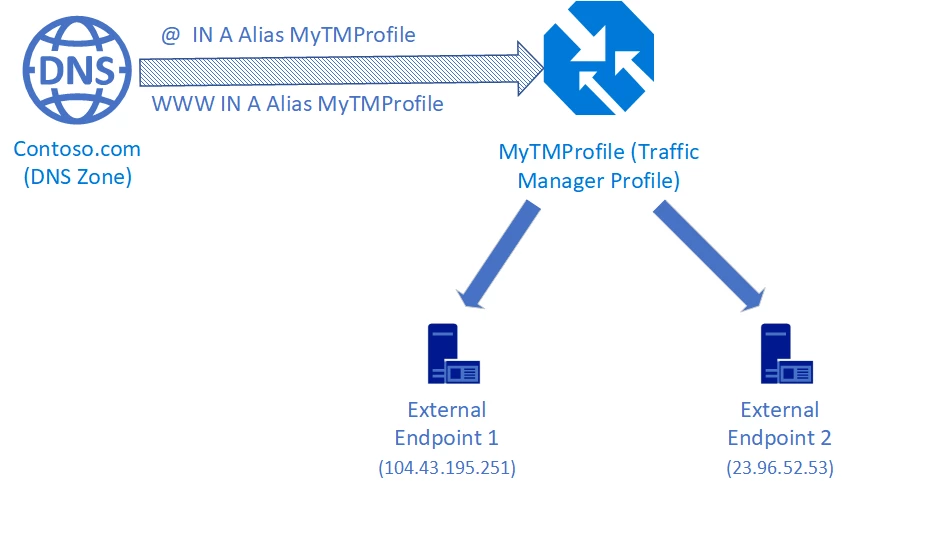
A similar scenario can be realized with other load balancers that are fronted by Public IP resources, such as Azure Application Gateway, or any NVA in the Azure marketplace.
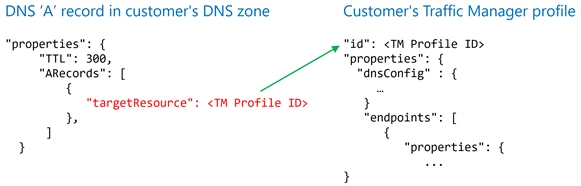
Alias records are implemented by adding a reference from DNS zones to the Azure Resource Manager ID of the target resource, Public IP or Traffic Manager profile. In normal DNS zones, there is no explicit references to Azure resources. The targets are “static” as far as the DNS records are concerned, in that there is no tracking of the underlying target resources. Alias changes that by introducing the lifecycle tracking of the underlying target resource. This is illustrated below:
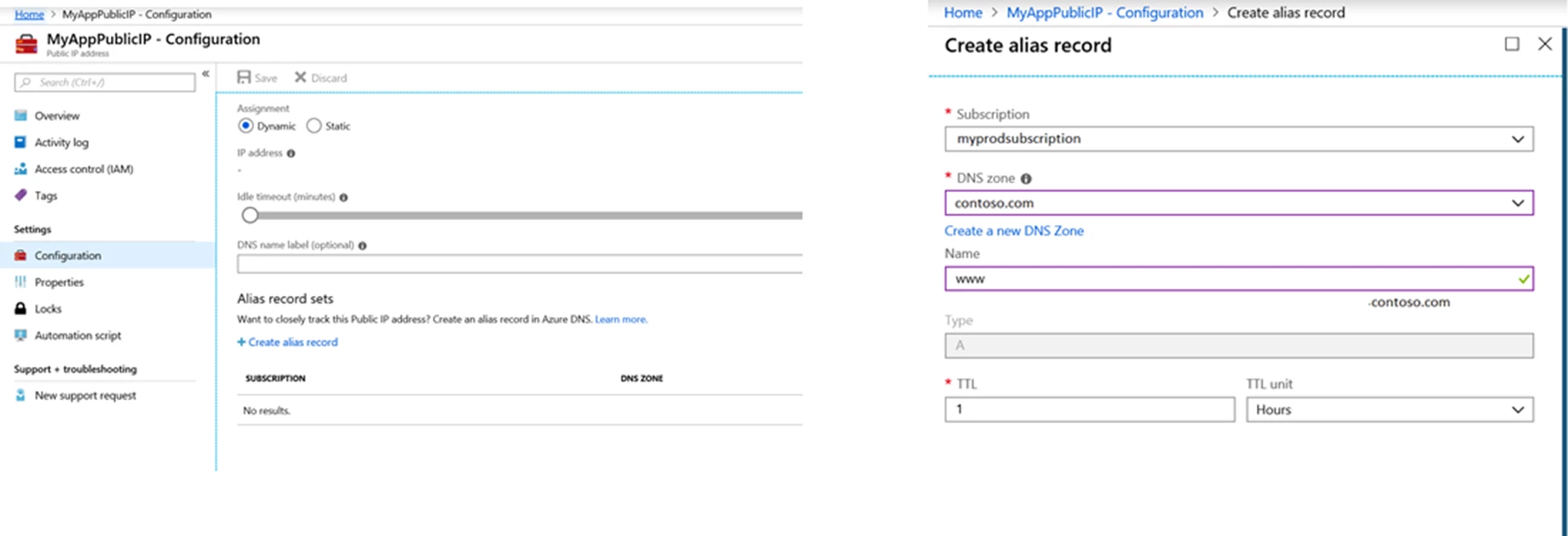
Alias records can be created via the Azure Portal, SDKs, APIs, PowerShell and CLI. Apart from configuring Alias records on the DNS Zone blade on the Azure Portal, you also have the option to add an Alias record to a Public IP right from the Public IP Portal blade. The below screenshots illustrate this flow.
Please see the overview for more details on how to configure and use Alias records. We also have tutorials for you for creating Alias records with Public IP and Traffic Manager. These tutorials are linked off the overview doc.
As always, we love getting your feedback. You can submit your suggestions and feedback on our feedback channel.






