
Exploring data is like solving a puzzle. You create queries and receive instant satisfaction when you discover insights, just like adding pieces to complete a puzzle. Imagine you have to repeat the same analysis multiple times, use libraries from an open-source community, share your steps and output with others, and save your work as an artifact. Notebooks helps you create one place to write your queries, add documentation, and save your work as output in a reusable format.
Jupyter Notebook allows you to create and share documents that contain live code, equations, visualizations, and explanatory text. Its includes data cleaning and transformation, numerical simulation, statistical modeling, and machine learning.
We are excited to announce KQL magic commands which extends the functionality of the Python kernel in Jupyter Notebook. KQL magic allows you to write KQL queries natively and query data from Microsoft Azure Data Explorer. You can easily interchange between Python and KQL, and visualize data using rich Plot.ly library integrated with KQL render commands. KQL magic supports Azure Data Explorer, Application Insights, and Log Analytics as data sources to run queries against.
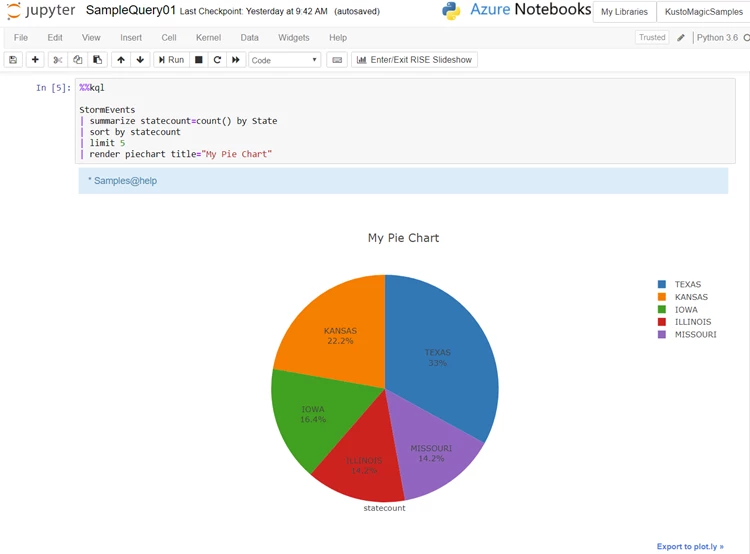
Use a single magic “%kql” to run a single line query, or use cell magic “%%kql” to run multi-line queries. In the following example we run a multi-line query and render a pie chart using the ploy.ly Python library:
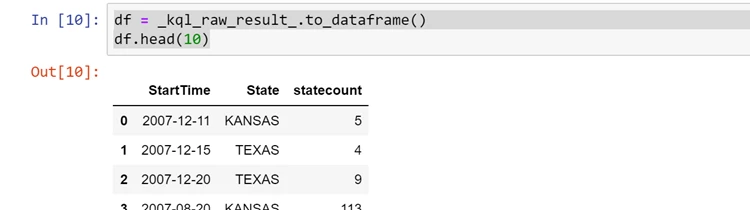
If you are a Python user, you can place the result set into a pandas dataframe.
Common use cases
- Data science: Data scientists use KQL magic to analyze and visualize data from Azure Data Explorer, easily interchange Python code with KQL queries to experiment, train, score machine learning models, and also save notebooks as artifacts.
- Data analytics: Use KQL magic to query, analyze, and visualize data, with no Python knowledge needed. For Python users, easily query data from Azure Data Explorer and use various open-source libraries from the Python ecosystem.
- Business reviews: Use KQL magic for business and product reviews. Create the notebook once and refresh with new values every time you use it.
- Incident response: Use KQL magic to create operational documents, chain-up your queries for easy investigation, save the notebook for reproducibility and artifacts for remote connectivity analyzer (RCA).
- Security analytics: Query data from Azure Data Explorer and use the rich Python ecosystem for security analytics to analyze and visualize your data. For example, one of the internal Microsoft security teams uses KQL magic with Juypter for standard analysis patterns to triage security alerts, they have been transforming incident response playbooks into parameterized Jupyter Notebooks to automate repetitive investigation workflows. A sample notebook is available in the Azure Data Explorer KQL magic Demo and in GitHub Repo under Threat-hunting-with-notebooks.
Getting started
Our exciting capabilities will allow you to have fun with your data analytics. You can see additional documentation and examples of KQL magic by visiting our documentation, “Analyze data using Jupyter Notebook and KQL magic.”






