We are thrilled to introduce support for Azure Data Lake (ADL) Python and R extensions within Visual Studio Code (VSCode). This means you can easily add Python or R scripts as custom code extensions in U-SQL scripts, and submit such scripts directly to ADL with one click. For data scientists who value the productivity of Python and R, ADL Tools for VSCode offers a fast and powerful code editing solution. VSCode makes it simple to get started and provides easy integration with U-SQL for data extract, data processing, and data output.
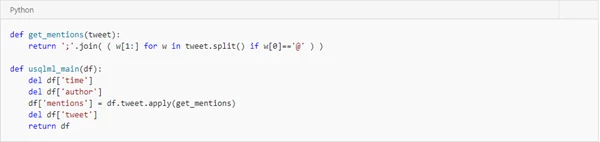
With ADL Tools for VSCode, you can choose your preferred language and use already familiar techniques to build your custom code. For example, developers using Python can now use REFERENCE ASSEMBLY to bring in the needed Python libraries and leverage built-in reducers to run Python code on each job execution vertex. You can also embed your Python code, which accepts a pandas DataFrame as input and returns a pandas DataFrame as output, into your U-SQL script. For data scientist using R, you can perform massively parallel execution of R code for data science scenarios such as merging various data files, parallel feature engineering, partitioned data model building, and so on. To facilitate code clarity and reuse, the tools also allow to write code behind using different languages for a U-SQL file.
Key customer benefits
- Local editor authoring and execution experience for Python Code-Behind to support distributed analytics.
- Local editor authoring and execution experience for R Code-Behind to support distributed analytics.
- Flexible mechanism to allow you to write single or multiple Python, R, and C# Code-Behind as part of a single U-SQL file.
- Dynamic Code-Behind to embed Python and R script into your U-SQL script.
- Integration with Azure Data Lake for Python and R with easy U-SQL job submissions.
How to develop U-SQL with Python and R
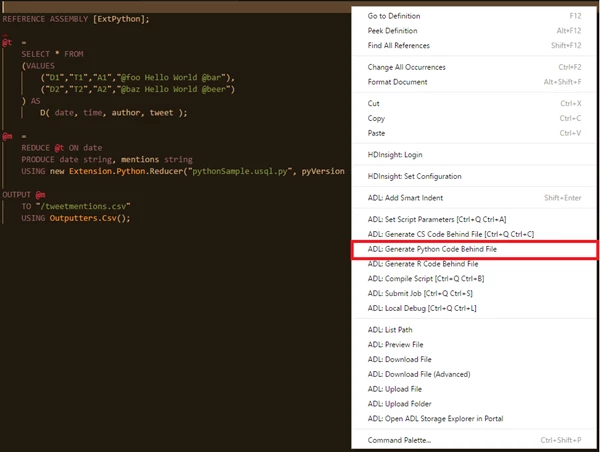
- Right-click the U-SQL script file, select ADL: Generate Python Code Behind File, and a xxx.usql.py file is generated in your working folder. Then write your Python code.
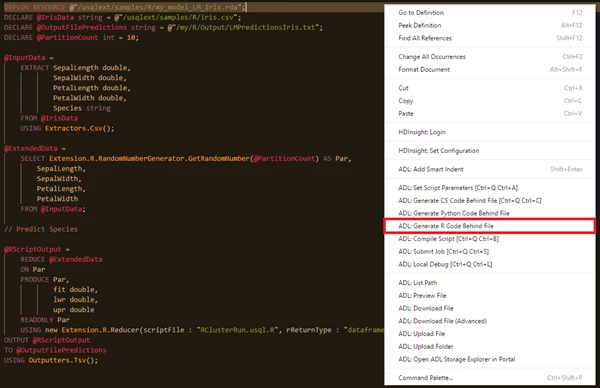
- Right-click the U-SQL script file, select ADL: Generate R Code Behind File, and a xxx.usql.r file is generated in your working folder. Then write your R code.

How to install or update
First, install Visual Studio Code and download Mono 4.2.x (for Linux and Mac). Then get the latest Azure Data Lake Tools by going to the VSCode Extension repository or the VSCode Marketplace and searching “Azure Data Lake Tools“.
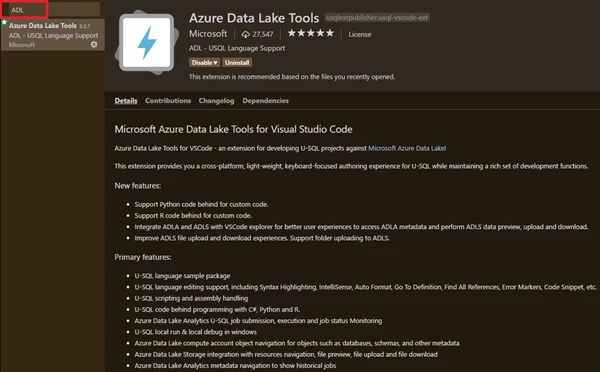
Second, please complete the one-time set up to register Python and R extensions assemblies for your ADL account. See instructions at Develop U-SQL with Python, R, and CSharp for Azure Data Lake Analytics in Visual Studio Code.
For more information about Azure Data Lake Tool for VSCode, please use the following resources:
- Get more information on using Data Lake Tools for VSCode.
- Watch the ADL Tools for VSCode User instructions video.
- Learn how to develop U-SQL assemblies for Azure Data Lake Analytics jobs.
- Learn how to develop U-SQL with Python, R, and CSharp for Azure Data Lake Analytics in Visual Studio Code.
- Learn more about how to get started on Data Lake Analytics.
- Tutorial: Get started with extending U-SQL with Python
- Tutorial: Get started with extending U-SQL with R
- Python Sample Code: Azure Data Lake Python Client Sample
Learn more about today’s announcements on the Azure blog and the Big Data blog. Discover more on the Azure service updates page.
If you have questions, feedback, comments, or bug reports, please use the comments below or send a note to hdivstool@microsoft.com.