Today, we’re announcing the release of a new series of VM sizes for Microsoft Azure Virtual Machines called the G-series. G-series sizes provide the most memory, the highest processing power and the largest amount of local SSD of any Virtual Machine size currently available in the public cloud. This extraordinary performance will allow customers to deploy very large scale-up enterprise applications. G-series offers up to 32 vCPUs using the latest Intel® Xeon® processor E5 v3 family, 448GB of memory, and 6.59 TB of local Solid State Drive (SSD) space. This powerful VM size easily handles deployments of mission critical applications such as large relational database servers (SQL Server, MySQL etc.,) and large NoSQL databases (MongoDB, Cloudera, Cassandra etc.).
“The new G-series on Azure offers unparalleled performance and scale: top-end CPUs coupled to the largest memory, fastest network fabric and the most local SSD capacity of any virtualized hardware in the public cloud. The simplicity of provisioning and managing clusters on Azure is well-matched by the simplicity of using XtremeData’s database engine, dbX: just load data and start analyzing in standard SQL. Deploying the scale-out dbX engine on this infrastructure will offer customers the fastest, most scalable and least expensive Big Data analytics platform on the market.” – Ravi Chandran, Founder and CTO, XtremeData
G-Series Size Details
|
VM Size |
Cores |
RAM |
Local SSD storage |
Persistent Data Disks Max |
|
Standard_G1 |
2 |
28 GiB |
412 GB |
4 |
|
Standard_G2 |
4 |
56 GiB |
824 GB |
8 |
|
Standard_G3 |
8 |
112 GiB |
1,649 GB |
16 |
|
Standard_G4 |
16 |
224 GiB |
3298 GB |
32 |
|
Standard_G5 |
32 |
448 GiB |
6596 GB |
64 |
In the above table GB is 10003 and GiB is 10243
Today, these Virtual Machine sizes are available only in West US. We will continue to add support for other regions.
Note: At this time G-Series VMs cannot be in the same Cloud Service as A-Series, D-Series or DS-Series VMs. These different VMs can be place into the same Virtual Network as long as it is a Regional Virtual Network . Additionally, resizing an existing Virtual Machine of any other series to a G-Series size is not supported at this time. Please delete and recreate the Virtual Machine using existing disks to change the size of an existing Virtual Machine.
The pricing details for the new VM sizes can be found on our pricing page, here.
Creating a G-Series Virtual Machine
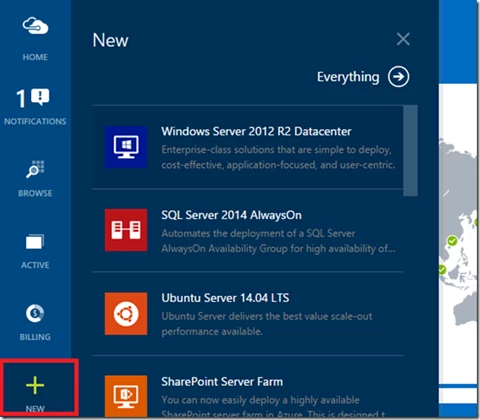
Navigate to the Azure Preview Portal. Select New(+) and select your favorite OS or VM Image.
Click through the Pricing Tier and select the Standard_G5 Virtual Machine size.
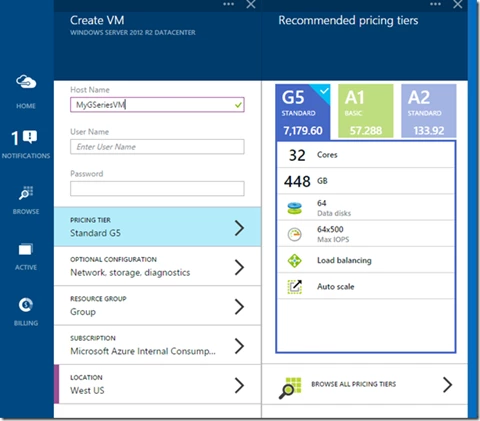
Specify required configuration information and hit Create.
Linux Update for Standard_G4 and Standard_G5 Sizes
In some circumstances a Linux VM will not properly format the temporary disk of the standard_G4 or standard_G5 VM sizes. This will only be seen on Linux VMs running with a Microsoft Azure Linux Agent that is from before December 2014. This includes a small number of the Linux images in Azure currently, and some Linux images that are available from outside locations such as images from VM Depot. This problem can also be seen if you move a Linux VM that was deployed before December 2014 to one of the new G-Series VM sizes.
The symptom of this problem is that the 3.25 TB temporary storage disk or 6.5 TB temporary storage disk will not be mounted on a Standard_G4 or Standard G_5 virtual machine.
Please see the instructions in the following article to update the Azure Linux Agent on these VMs which will bring back the temporary storage disk for the VM affected: Linux Resource Disk not Present on Standard_G4 or Standard_G5.
Learn More
If you would like more information on the G-Series VM sizes as well as other Azure VM Sizes then please see the following page for additional details: Virtual Machine and Cloud Service Sizes for Azure
–Drew