We are excited to announce the preview of Azure Active Directory authentication for Azure Files SMB access leveraging Azure AD Domain Services (AAD DS). Azure Files offers fully managed file shares in the cloud that are accessible via the industry standard SMB protocol. Integration with AAD enables SMB access to Azure file shares using AAD credentials from AAD DS domain joined Windows VMs. In addition Azure Files supports preserving, inheriting, and enforcing Microsoft file system NTFS ACLs on all folders and files in a file share.
With this capability, we can extend the traditional identity-based share access experience that you are most familiar with to Azure Files. For lift and shift scenarios, you can sync on-premises AD to AAD, migrate existing files with ACLs to Azure Files, and enable your organization to access file shares with the same credentials with no impact to the business.
In addition to this, we have enhanced our access control story by enforcing granular permission assignment on the share, folder, and file levels. You can use Azure Files as the storage solution for project collaboration, leveraging folder or file level ACLs to protect your organization’s sensitive data.
Previously, when you imported files to Azure file shares, only the data was preserved, not the ACLs. If you used Azure Files as a cloud backup, all access assignments would be lost when you restored your existing file shares from Azure Files. Now, Azure Files can preserve your ACLs along with your data, providing you a consistent storage experience.
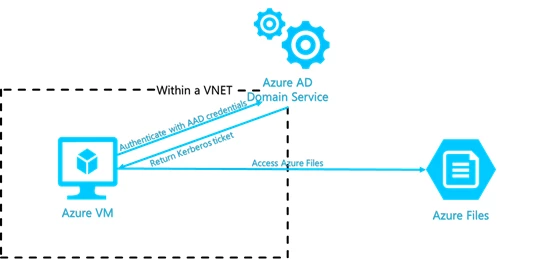
Here are the key capabilities introduced in this preview:
- Support share Level permission assignment using Role Based Access Control (RBAC).
Similar to the traditional Windows file sharing schema, you can give authorized users share level permissions to access your Azure File Share.
- Enforce NTFS folder and file level permission.
Azure Files enforces standard NTFS file permission on the folder and file level, including the root directory. You can simply use the icacls or Powershell command tool to set or change permissions over mounted file shares.
- Continue to support storage account key for Super User experience.
Mounting Azure file shares using the storage account key will continue to be supported for Super User scenario. It will surpass all access control restrictions configured on share, folder, or file level.
- Preserve NTFS ACLs for data import to Azure Files.
We support preserving NTFS ACLs for data import to Azure Files over SMB. You can copy the ACLs on your directory/file simply with robocopy command.
Getting started
You can read more about the benefits of Azure Files AAD Authentication and follow this step by step guidance to get started. We support Azure Files AAD Integration Public Preview in a couple of in selected regions. Also, refer to Azure Preview guidelines for general information on using preview features.
Feedback
We look forward to hearing your feedback on this feature, please email us at AzureFiles@microsoft.com.