We are excited to provide several updates for the QnA Maker service. To see previous releases for Conversational AI from Microsoft in March, see this post.
New Bot Framework v4 Template for QnA Maker
The QnA Maker service lets you easily create and manage a knowledge base from your data, including FAQ pages, support URLs, PDFs, and doc files. You can test and publish your knowledge base and then connect it to a bot using a bot framework sample or template. With this update we have simplified the bot creation process by allowing you to easily create a bot from your knowledge base, without the need for any code or settings changes. Find more details on creating a QnA bot on our tutorials page.
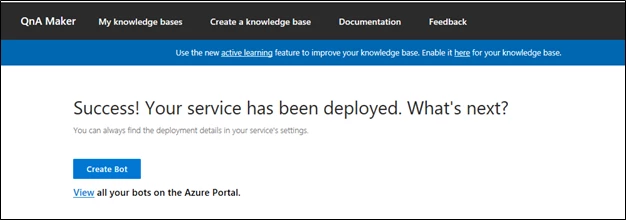
After you publish your knowledge base, you can create a bot from the publish page with the Create Bot button. If you have previously created bots, you can click on “View all” to see all the bots that are linked to your current subscription.
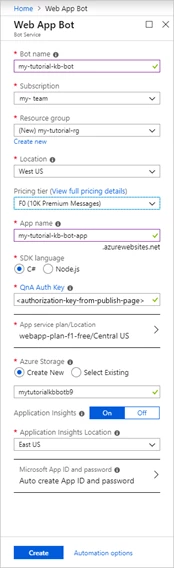
This will lead you to a create template in the Azure portal with all your knowledge base details pre-filled in. Your KB ID is connected to the template automatically, and your endpoint key is pre-populated and should not be changed. You can choose to change some of your pre-filled settings (location, resource name, etc). With the single click of a button your bot can now be deployed. Once you have hit create, wait for a few minutes till your web app bot is deployed.
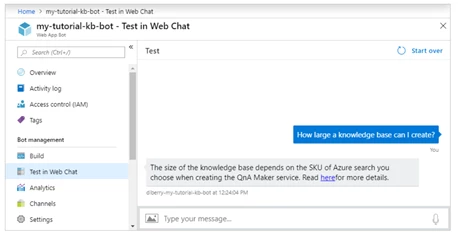
Once created, you can now test your bot by opening your bot resource and clicking on “Test in Web Chat”. At this point you can chat with your bot and see answers show up from your knowledge base.
QnA Maker supports extraction from SharePoint files
Add secured SharePoint data sources to your knowledge base to enrich the knowledge base with questions and answers that may be secured with Active Directory. You can now easily collaborate with others in your organization on source data and connect it to your QnA Maker knowledge base.
You can add all currently supported QnA Maker file types from a SharePoint location, instead of loading offline files. From your SharePoint file select the appropriate file’s URL and add that as a source to your knowledge base in the settings page, or during creation.
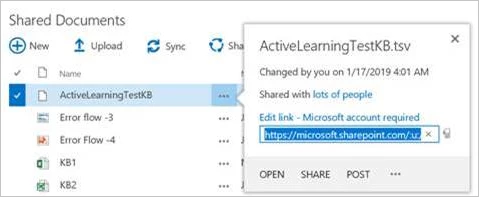
The first time you add a SharePoint secured file you will need to explicitly authenticate your Active Directory account and grant permission to QnA Maker through your Active Directory manager.
Find more details on adding SharePoint Sources in QnA Maker in “Add a secured Sharepoint data source to your knowledge base” documentation.
QnA Maker help bot
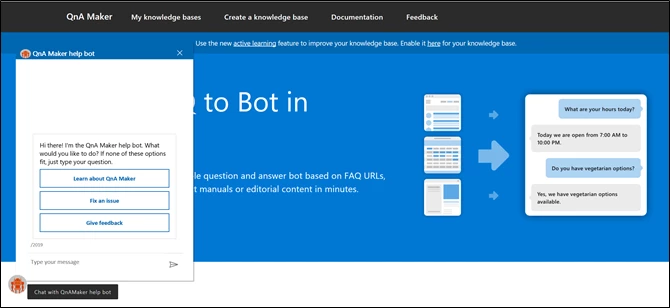
We are also excited to announce we recently added the QnA Maker help bot to our QnA Maker page. If you have any questions on QnA Maker you can now ask the help bot which is pinned on the left corner on the QnA Make homepage. If you’d like to see what is behind this bot the sample code is available on GitHub.
QnA Maker support in Healthcare Bot
The Microsoft Healthcare Bot empowers Microsoft partners to build and deploy compliant, AI-powered Virtual Health Assistants. This allows them to offer their users intelligent, personalized access to health-related information and interactions through a natural conversation experience.
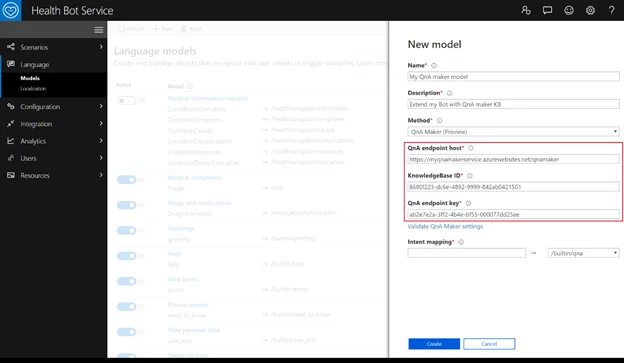
The QnA Maker service is now integrated with Healthcare Bot, allowing you to extend the Healthcare Bot experience by connecting it to your knowledgebase (KB) or easily add a set of chit-chat as a starting point for your Healthcare Bot’s personality.
Find more details on adding QnA Maker model to Healthcare Bot in “Extend your Healthcare Bot with QnA Maker” documentation.
Get Started
View our quick start guide to start creating your QnA Maker knowledge base, and then publish and deploy it in a bot (more information on our tutorials page here). You can also give your bot a personality using chit-chat and make it more intelligent with time using Active Learning.
And if you have any questions or feedback please go ahead and chat with the QnA Maker help bot!