Lower your deployment cost, while improving client performance with Server Message Block (SMB) Multichannel on premium tier.
Today, we are announcing the preview of Azure Files SMB Multichannel on premium tier. SMB 3.0 introduced the SMB Multichannel technology in Windows Server 2012 and Windows 8 client. This feature allows SMB 3.x clients to establish multiple network connections to SMB 3.x servers for greater performance over multiple network adapters and over network adapter with Receive Side Scaling (RSS) enabled. With this preview release, Azure Files SMB clients can now take advantage of SMB Multichannel technology with premium file shares in the cloud.
Benefits
SMB Multichannel allows multiple connections over the optimum network path that allows for increased performance from parallel processing. The increased performance is achieved by bandwidth aggregation over multiple NICs or with NIC support for Receive Sides Scaling (RSS) that enables distributed IOs across multiple CPUs and dynamic load balance.
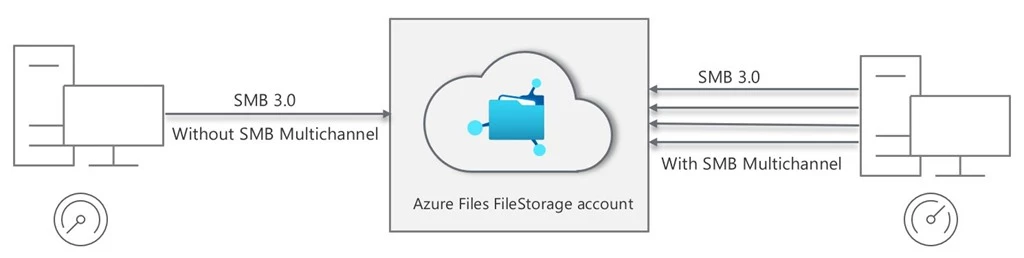
Benefits of Azure Files SMB Multichannel include:
- Higher throughput: Makes this feature suitable for applications with large files with large IOs such as media & entertainment for content creation/transcoding, genomics, and financial services risk analysis.
- Increased IOPS: This is particularly useful for small IO scenarios such as database applications.
- Network fault tolerance: Multiple connections mitigate the risk of disruption despite the loss of a network connection.
- Automatic configuration: Dynamic discovery and creation of multiple network paths.
- Cost optimization: Achieve higher scale from a single virtual machine (VM) client by utilizing full VM limits. To reach Azure Files premium bandwidth and IOPS scale, applications now require fewer VM clients to achieve the required scale.
Below is a sample test result that demonstrates the performance improvements of up to three times with SMB Multichannel feature enabled.
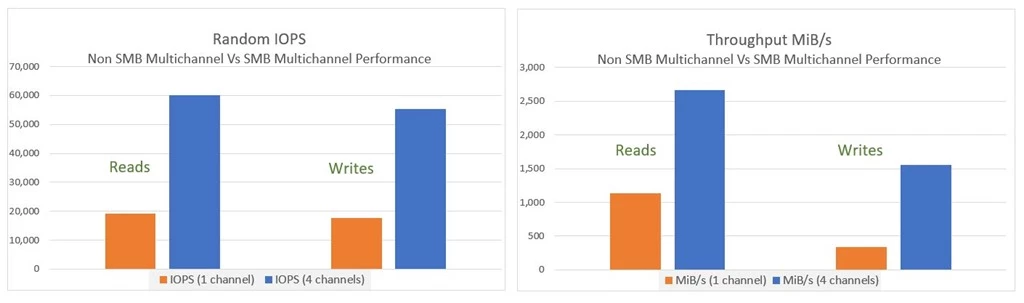
The above sample test results are based on internal testing performed by generating random IO load with a single virtual machine client (Standard_D32s_v3 with a single RSS enabled NIC) connected to a premium file share. Diskspd tool was used to generate load against ten files with 64 queue depth to simulate multiple threaded workload patterns against multiple files in a share. The IOPS results are based on 4 KiB read and write IO sizes, while throughput test is based on 512 KiB read and write IO sizes to optimize for the performance. A larger percentage gain was observed in write throughput versus read throughput.
To learn more about this feature, see how to Manage SMB Multichannel guide in Windows documentation.
Pricing and availability
SMB Multichannel for Azure Files premium storage accounts come at zero additional cost. In addition, as part of our continued commitment to provide the most cost-effective file storage for your workloads, we recently announced a more than 33 percent price reduction on Azure Files premium tier. Refer to the pricing page for further details on premium tier pricing.
Currently, SMB Multichannel preview on premium shares is available in limited regions for Windows SMB 3.x clients. We are quickly expanding the coverage to all Azure regions with premium tier. Stay up to date on region availability for SMB Multichannel by visiting the Azure Files documentation.
Getting started
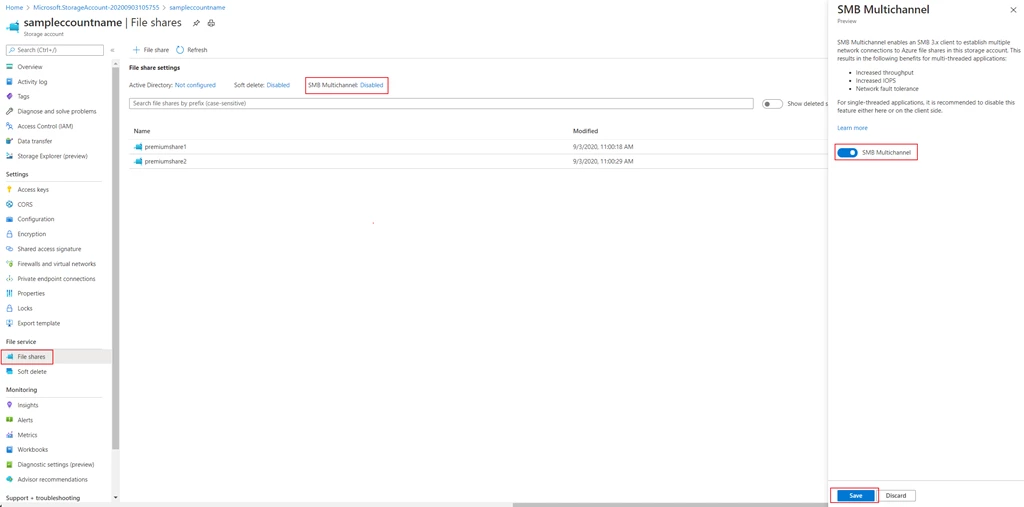
Learn more about feature capability and SMB Multichannel performance in the Azure Files documentation. To get started, you will need to register your subscription for SMB Multichannel feature preview. Once the registration is complete, you can enable or disable SMB Multichannel on premium storage accounts (FileStorage) in one of the supported regions with a click of a button. Please refer to step-by-step guidance on how to enroll in the preview program.
Try our preview and share your feedback by sending us an email at AzureFiles@microsoft.com. You can also post your ideas and suggestions about Azure Storage on our feedback forum.
Happy sharing.