
In May 2018, we launched the limited preview of Shared Image Gallery. We observed very encouraging adoption levels and we have further improved Shared Image Gallery based on your feedback. Today, we are excited to announce the public preview of Shared Image Gallery.
Shared Image Gallery provides an Azure-based solution to make the custom management of virtual machine (VM) images easier in Azure. Shared Image Gallery provides a simple way to share your applications with others in your organization, within or across regions, enabling you to expedite regional expansion or DevOps processes, simplify your cross-region HA/DR setup and more. Shared Image Gallery also enables you to quickly deploy thousands of VMs concurrently from a custom image.
Management of images
Shared Image Gallery introduces three new resources that help with managing customer images. In order of hierarchy, these are:
- Shared Image Gallery
- Image Definition
- Image Version
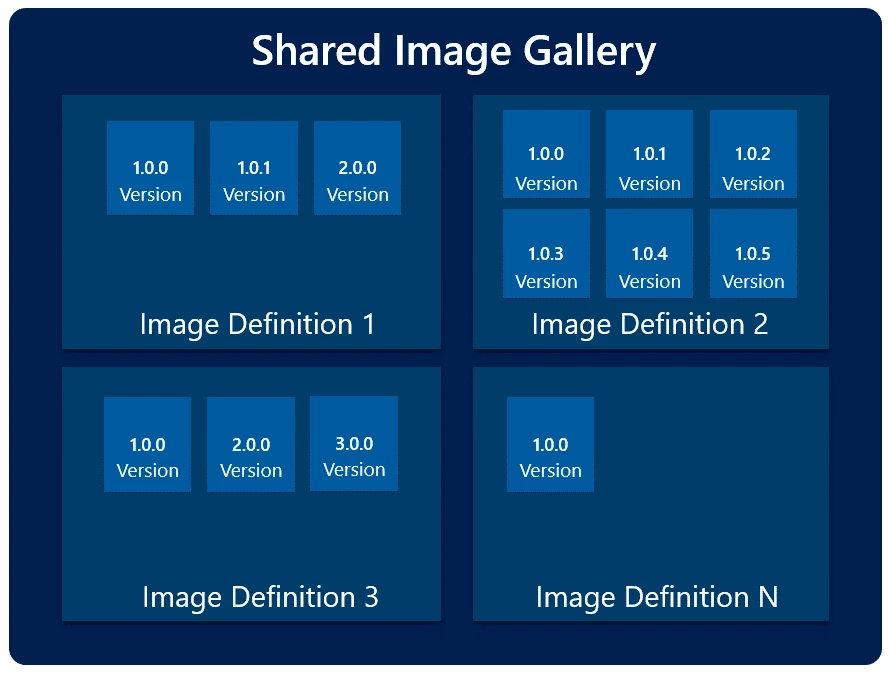
Using these three resources, it is possible to organize various custom images that might be used in an organization. For example, it is possible to define a common Image Definition for all the versions that are updated regularly.
Sharing of Images across subscriptions
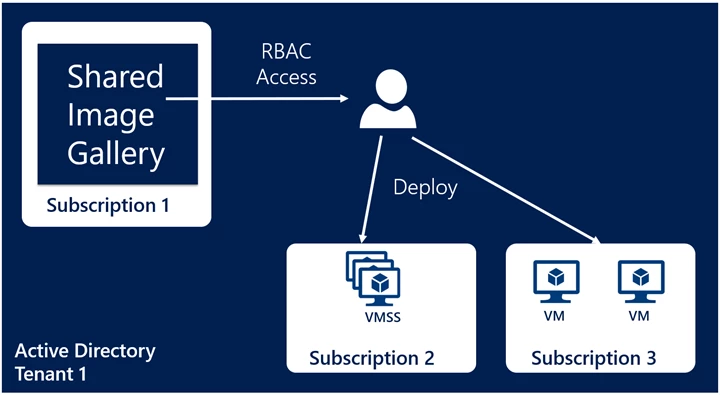
Each of the three new resource types introduced with Shared Image Gallery can be shared with another user, service principal or an AD group through Role Based Access Control. Once shared, a VM or virtual machine scale sets (VMSS) can be created in any subscription within the same AD tenant as the image.
Replicating to different Azure regions
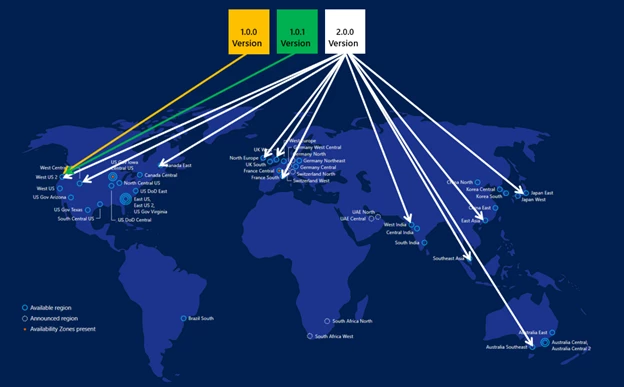
Shared Image Gallery allows you to replicate your Image Versions across different regions. This means you can publish all your Image Versions in one region and then replicate them to different regions as needed. Once the replication is complete, you can deploy a VM or VMSS in that region. Shared Image Gallery also allows you to replicate the versions to different regions independently of each other. One example of this scenarios is where the latest versions are always replicated globally while the older versions are only replicated in one region to save storage costs as shown below.
Scale of VM/VMSS deployments
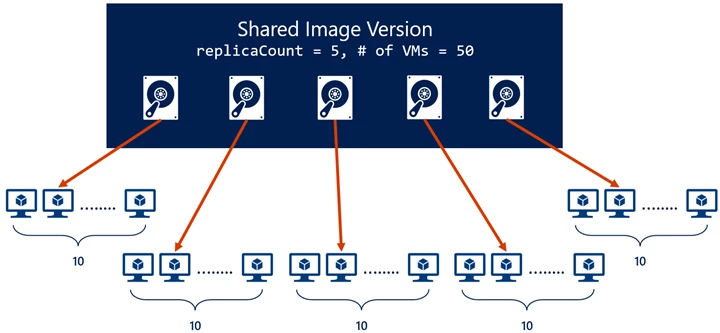
Shared Image Gallery introduces a concept of a replicaCount which is the number of copies to keep for the image in a region. This can help in scenarios where you are trying to create 100s/1000s of VMs from the same image concurrently. A Managed Image can be the bottleneck as all the VMs try to read data from the same storage blob. With additional replicas, now you can ensure the reads are spread to different replicas thereby reducing the chance of a single replica being the bottleneck for your VM deployment set. You can specify a global replica count to be used as the default for all the regions and a way to override the regional replica count in a specific region. In the example below, the Image Version has a replica count of five. So, when you try to create 50 concurrent VMs from it, they are spread to each of the replicas.
Regional availability
Shared Image Gallery introduces the concept of “source” and “target” regions.
- Source region – Source region is where the original Image Version is created.
- Target region – These are the regions where you tell Azure to replicate the image to. These can be updated after the Image Version has been created. These are the regions where you can create a VM or VMSS from the Image Version.
Here are the regions you can use currently:
| Create Gallery in i.e. “source region” | Replicate Version to i.e. “target region” |
| West Central US | All Azure Public Cloud regions |
| South Central US | |
| East US 2 | |
| Southeast Asia | |
| West Europe |
Getting Started with CLI
Shared Image Galleries is in preview, but you need to register the feature before you can use it. To register the Shared Image Gallery feature:
az feature register --namespace Microsoft.Compute --name GalleryPreview
az provider register -n Microsoft.Compute
It might take a few minutes to register the feature. You can check the progress using:
az provider show -n Microsoft.Compute
Create an image gallery
az group create -n rg -l westcentralus
az sig create -g myGalleryRG --gallery-name myGallery
Create an Image Definition
az sig image-definition create -g myGalleryRG --gallery-name myGallery --gallery-image-definition myImageDefinition --publisher myPublisher --offer myOffer --sku myLinux1--os-type Linux
Create an Image Version
az sig image-version create -g sig1 --gallery-name gal1 --gallery-image-definition image1 --gallery-image-version 1.0.2 --target-regions "West Central US" "South Central US=1" "East US 2=1" --replica-count 5 --managed-image
Create a VM
az vm create -g rg -n rg-vm --image /subscriptions//resourceGroups/rg/providers/Microsoft.Compute/galleries/gallery1/images/gallery-image1/versions/1.0.0
Create a VMSS
az vmss create --resource-group myResourceGroup --name myScaleSet --admin-username azureuser --generate-ssh-keys --image /subscriptions//resourceGroups/rg/providers/Microsoft.Compute/galleries/gallery1/images/gallery-image1/versions/1.0.0






