The Azure App Service team is happy to announce the global deployment of support for the HTTP/2 protocol for all apps hosted on App Service. HTTP/2 has been the top customer request we have received, and we are excited to light up support!
What is HTTP/2?
HTTP/2 is a rework of how HTTP semantics flow over TCP connections, and HTTP/2 support is present in Windows 10 and Windows Server 2016. HTTP/2 is a major upgrade after nearly two decades of HTTP/1.1 use and reduces the impact of latency and connection load on web servers.
The major advance of HTTP/1.1 was the use of persistent connections to service multiple requests in a row. In HTTP/2, a persistent connection can be used to service multiple simultaneous requests. In the process, HTTP/2 introduces several additional features that improve the efficiency of HTTP over the network.
One connection for multiple requests
Every TCP connection requires a round trip to set up. If you’re using encryption, the TLS handshake takes another 1-2 round trips. All this happens before the first byte of the first response can be sent. By reusing an existing connection instead of setting up a new one, this overhead can be shared by many requests. HTTP/2 sharply reduces the need for a request to wait while a new connection is established, or wait for an existing connection to become idle. Because a single connection is multiplexed between many requests, the request can usually be sent immediately without waiting for other requests to finish.
Header compression with HPACK
HTTP has supported compression of data for ages. Headers, however, are sent as uncompressed text, with a lot of redundancy between requests. (Many of the longest headers are sent with exactly the same value on every request!) HTTP/2 introduces HPACK, a compression scheme for HTTP headers which reduces the redundancy between requests.
Compression also helps multiplexing, because requests are smaller. This enables clients to make many requests in their first packets on a connection, while TCP flow control windows are still small.
What are the key differences from HTTP/1.x?
- HTTP/2 is binary
- Fully multiplexed, instead of ordered and blocking
- Ability to use one connection for parallelism
- Has one TCP/IP connection
- Uses header compression to reduce overhead
What action do App Service users need to take?
All you need is a just a simple configuration! HTTP/2 is disabled by default for all customers. However, if you would like to opt-in and apply HTTP/2 for your site, follow the steps below:
Through the Azure portal, browse to your app and search for the “Application settings”, where you will find the setting called “HTTP Version”. Select 1.1 or 2.0 by your needs.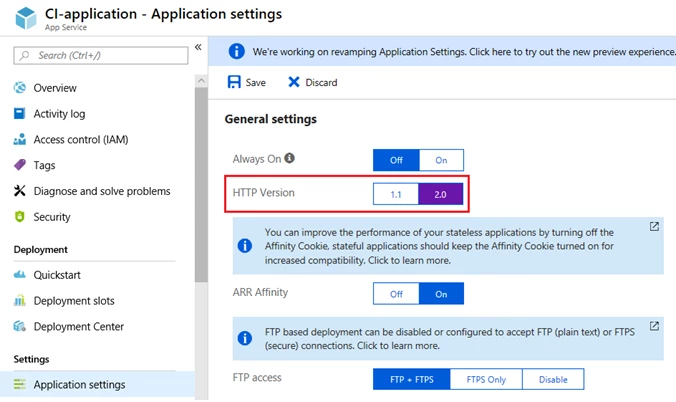
You may also browse to the Azure Resource Explorer using one of the following steps:
1. In the Azure portal, select “Resource explorer” in your App Service app’s menu.
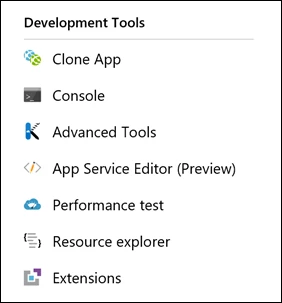
Then select “Go.”

2. Alternatively, browse directly to Resource Explorer (https://resources.azure.com/).
The advantage of going through the Azure portal route is that the browser will be automatically navigated to your requested app’s configuration, then you just have to navigate to config > web, where you will find the needed value to update.
If browsing directly to Resource Explorer, drill down through the tree hierarchy to your site using the following path:
Subscription > Resource Group > your site name > Providers > Microsoft.Web > sites > your site name > config > web
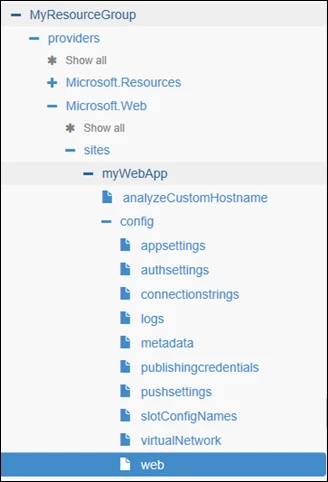
On the top of the page make sure you’re in Read/Write mode:

Select Edit:

Find the parameter for HTTP/2:

Type in ‘true’ in place of ‘false’:

On the top, select ‘PUT’:

You’re done!
- Support for HTTP/2 in App Service Environments and the Azure National Clouds is available as well!
HTTP/2 Browser Support Requires SSL
Most modern browsers only support using the HTTP/2 protocol over SSL, while non-SSL traffic continues to use HTTP/1.1. App Service makes it easy to get up and running with SSL. Learn how to configure a new SSL cert for your app, or learn how to bind an existing SSL cert to your app. App Service also provides a default level of SSL functionality for all apps via a common wildcard SSL certificate bound to the *.azurewebsites.net domain. Regardless of which approach you choose, your apps will need to run over SSL to enjoy the benefits of HTTP/2 with modern browsers.
- Ask a question on the developer forums: MSDN or Stack Overflow
- Open a support ticket