
Selecting the right combination of virtual machines (VMs) and disks is extremely important as the wrong mix can impact your application’s performance. One way to choose which VMs and disks to use is based on your disk performance pattern, but it’s not always easy. For example, a common scenario is unexpected or cyclical disk traffic where the peak disk performance is temporary and significantly higher than the baseline performance pattern. We frequently get asked by our customers, “should I provision my VM for baseline or peak performance?” Over-provisioning can lead to higher costs, while under-provisioning can result in poor application performance and customer dissatisfaction. Azure Disk Storage now makes it easier for you to decide, and we’re pleased to share VM bursting support on your Azure virtual machines.
Get short-term, higher performance with no additional steps or costs
VM bursting, which is enabled by default, offers you the ability to achieve higher throughput for a short duration on your virtual machine instance with no additional steps or cost. Currently available on all Lsv2-series VMs in all supported regions, VM bursting is great for a wide range of scenarios like handling unforeseen spiky disk traffic smoothly, or processing batched jobs with speed. With VM bursting, you can see up to 8X improvement in throughput when bursting. Additionally, you can combine both VM and disk bursting (generally available in April) to get higher performance on your VM or disks without overprovisioning. If you have workloads running on-premises with unpredictable or cyclical disk traffic, you can migrate to Azure and take advantage of our VM bursting support to improve your application performance.
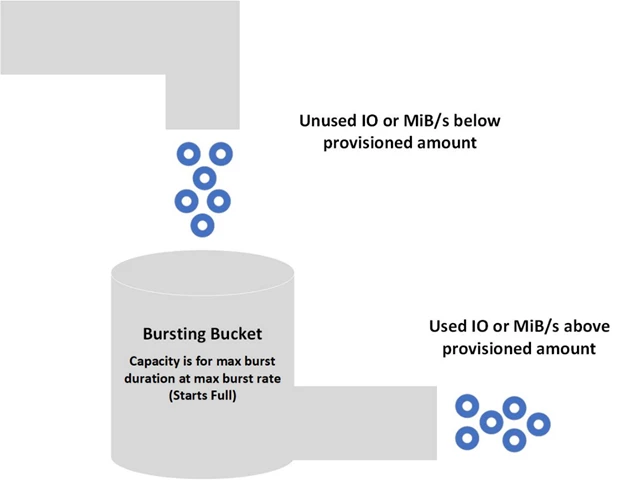
Bursting flow
VM bursting is regulated on a credit-based system. Your VM starts with a full amount of credits and these credits allow you to burst for 30 minutes at the maximum burst rate. Bursting credits accumulate when your VM instance is running under their performance disk storage limits. Bursting credits are consumed when your VM instance is running over their performance limits. For detailed examples on how bursting works, check out the disk bursting documentation.
Benefits of virtual machine bursting
- Cost savings: If your daily peak performance time is less than the burst duration, you can use bursting VMs or disks as a cost-effective solution. You can build your VM and disk combination so the bursting limits match the required peak performance and the baseline limits match the average performance.
- Preparedness for traffic spikes: Web servers and their applications can experience traffic surges at any time. If your web server is backed by VMs or disks using bursting, the servers are better equipped to handle traffic spikes.
- Handling batch jobs: Some application’s workloads are cyclical in nature and require a baseline performance for most of the time and require higher performance for a short period of time. An example of this would be an accounting program that processes transactions daily that require a small amount of disk traffic, but at the end of the month does reconciling reports that need a much higher amount of disk traffic.
Get started with disk bursting
Create new virtual machines on the burst supported virtual machines using the Azure portal, PowerShell, or command-line interface (CLI) now. Bursting comes enabled by default on VMs that support it, so you don’t need to do anything but deploy the instance to get the benefits. Any of your exisiting VMs that support bursting will have the capability enabled automatically. You can find the specifications of burst eligible virtual machines in the table below. Bursting feature is available in all regions where Lsv2-series VMs are available.
|
|
|
Standard_L8s_v2 | 160 | 1280 |
Standard_L16s_v2 | 320 | 1280 |
Standard_L32s_v2 | 640 | 1280 |
Standard_L48s_v2 | 960 | 2000 |
Standard_L64s_v2 | 1280 | 2000 |
Standard_L80s_v2 | 1400 | 2000 |
Next steps
Support for more VM types as well as IOPS bursting on VMs will be available soon.
If you’d like to learn more about how the bursting feature works for both our virtual machines and disks, check out the disk bursting documentation.
Please email us at AzureDisks@microsoft.com to share your feedback on our bursting feature, or leave a post in the Azure Storage feedback forum.






