
We are excited to announce the general availability (GA) of Azure Elastic SAN, the industry’s first fully-managed and cloud-native storage area network (SAN) offering that simplifies deploying, scaling, managing, and configuring a SAN in the cloud. Azure Elastic SAN responds to the vital need for seamless migration of extensive SAN environments to the cloud, bringing a new level of efficiency and ease. This enterprise-class offering stands out by adopting a SAN-like resource hierarchy, provisioning resources at the appliance level, and dynamically distributing these resources to meet the demands of diverse workloads across databases, virtual desktop infrastructure (VDIs), and business applications. Beyond that, it delivers cloud native benefits with scale on demand, policy-based service management, and cloud native security enforcements across encryption and network access. It’s a thoughtful innovation combining the efficiency at scale of on-premises SAN systems and the flexibility of cloud storage.
Since initially announcing the preview of Elastic SAN, we have added a robust suite of features to truly make this an enterprise class solution:
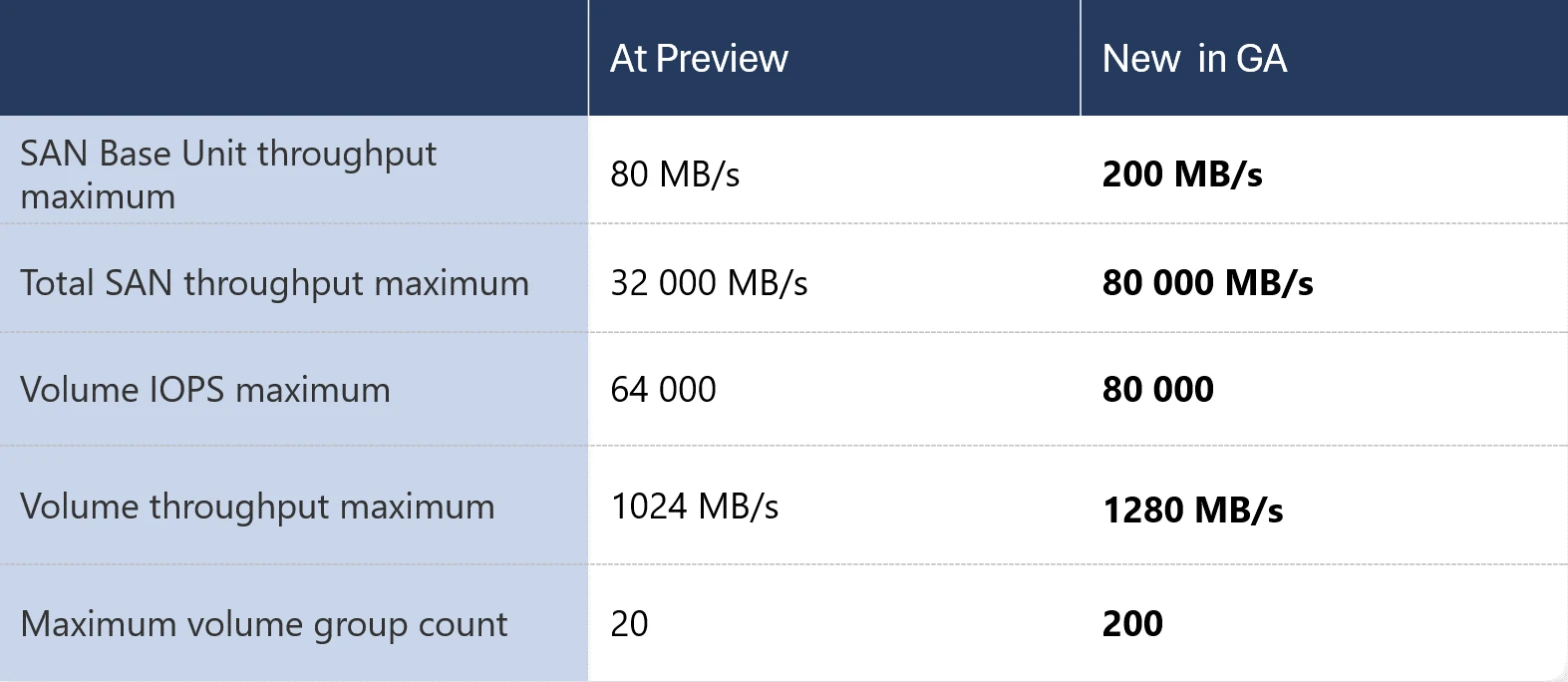
- Get even more out of your Elastic SAN performance with multi-session connectivity and increased performance and scale up to 80,000 IOPS and 1,280 MBps on single volume, even higher on the entire SAN.
- Easily migrate a clustered application (like SQL Failover Cluster Instances) to Elastic SAN volumes with shared volume support.
- Control which applications can consume your data, and which clients can access your volumes with Server-Side Encryption with Customer Managed Keys and private endpoint support.
- Confidently run even your most critical workloads with the addition of snapshot support.
The Elastic SAN GA release will be available in more regions, while adding a few new features as well:
- Investigate performance and capacity metrics with Azure Monitor Metrics.
- Prevent incidents due to misconfigurations with the help of Azure Policy.
This release also marks the removal of the sign-up process for the snapshot export feature, making it publicly available.
When to use Azure Elastic SAN
Get the most out of throughput and IOPS intensive workloads—Elastic SAN allows you to drive higher storage throughput over compute network bandwidth with the iSCSI protocol. This helps you optimize various database workloads, like SQL Servers. SQL Server deployments on Azure Virtual Machines (VMs) occasionally require overprovisioning a VM to reach the target VM-level disk throughput. You can avoid this with Elastic SAN, as noticed by one of our preview customers, de Goudse verzekeringen:
“Our SQL Server data warehouse workloads required a solution that could eliminate input/output (IO) bottlenecks on both the VM and managed data disks. The Azure Elastic SAN solution provides this benefit by removing the VM bandwidth bottleneck and enabling higher IO throughput. The Elastic SAN performance allowed us to reduce the VM size and implement constrained cores to save substantial costs on SQL server core licensing.”
—Peter van Noort, Cloud Engineer, de Goudse verzekeringen and
Michiel Kuip, SQL Server DBA, de Goudse verzekeringen.
Migrate your on-premises SAN to the Cloud—Not only does Elastic SAN use a familiar resource hierarchy to on-premises SANs; it also allows provisioning of input/output operations per second (IOPS) and throughput at the Elastic SAN resource level, dynamically sharing the provisioned performance across your workloads, and managing security policies at the workload level as you would on SAN appliances. This makes migrating from on-premises SANs to the cloud a lot more straight-forward than trying to right-size hundreds or thousands of individual disks to serve the many workloads running on your SAN(s).
View products
To further simplify the migration process, you can plan and execute your data migration using the Azure-Sponsored migration tool by Cirrus Data Solutions, which you can find in the Azure Marketplace. Cirrus Migrate Cloud now makes it even easier to migrate and save with their cost optimization wizard:
“We are excited for the launch of Azure Elastic SAN and see a real opportunity for companies to lower their storage total cost of ownership (TCO). Over the last 18 months, we have worked closely with the Azure team to develop enhanced functionality in Cirrus Migrate Cloud that enables enterprises to move their live workloads to Azure Elastic SAN with just a click. Offering Cirrus Migrate Cloud to not only accelerate Elastic SAN adoption, but to analyze the enterprise’s storage performance and accurately recommend the best Azure storage is an exciting expansion of our partnership with Microsoft and extends our vision of real-time block data mobility to Azure and Elastic SAN,”
—Wayne Lam, Chairman and CEO, Cirrus Data Solutions.
We have partnered with Cirrus Data Solutions to ensure their recommendations cover all Azure Block Storage offerings (Disks and Elastic SAN) and accounts for your specific storage needs. For example, if you are looking to run single queue depth workloads that are extremely latency sensitive (such as an online transaction processing (OLTP)-type workload), the wizard will recommend Ultra Disk—with the lowest sub-ms latency on Azure.
Consolidate storage and achieve cost efficiency at scale—Since Elastic SAN lets you dynamically share the provisioned performance across volumes, you can easily achieve high performance at an efficient rate. With a shared performance pool to handle IO spikes, you can avoid overprovisioning just to handle the peak traffic levels of your individual workloads. Similarly, because Elastic SAN allows scaling of capacity independently from performance, you can right-size to efficiently meet your storage requirements. For example, if your workloads’ performance requirements are met but you need more storage capacity, you can purchase just that—at a 25% lower cost than if you had to add more performance as well.
Get the lowest per GiB storage cost for Azure VMware Solution—With this recently announced preview integration, you can expand your Azure VMware Solution (AVS) storage capacity without having to add more vSAN storage nodes, by exposing an Elastic SAN volume as an external datastore to your AVS cluster. With Elastic SAN, you can provision additional storage in 1 TiB increments for as little as 6 to 8 cents per GiB per month1, the lowest per GiB cost available for AVS storage. As a first party service, it provides a native Azure Storage experience, so you can deploy and connect an Elastic SAN datastore through the Azure Portal in a matter of minutes.
Learn more
Utilize fast attach and detach for Azure Container Storage—Azure Container Storage is the industry’s first platform-managed container native storage service in the public cloud providing highly scalable, cost-effective persistent volumes, built natively for containers. You can use Elastic SAN as the backing storage for Azure Container Storage, and benefit from the fast attach and detach made possible by the iSCSI protocol. Using Elastic SAN also lets you take advantage of the dynamic resource sharing it offers to lower your storage costs—and because your data will persist on the volumes, you could even spin down your cluster for further savings. This makes it a great choice as storage for containerized applications running general purpose database workloads, streaming and messaging services, or continuous integration and continuous delivery (CI/CD) environments.
Explore
Price and performance of Azure Elastic SAN
Elastic SAN is a good fit for most throughput and IOPS intensive workloads, like various databases. We recently raised several performance limits to be able to serve even more demanding use cases:
An example of a database solution where we have seen great results during our Preview is SQL Servers. SQL Server deployments on Azure Virtual Machines (VMs) occasionally require overprovisioning a VM to reach the target VM-level disk throughput. You can avoid this with Elastic SAN, since you can drive higher storage throughput over compute network bandwidth with the iSCSI protocol.
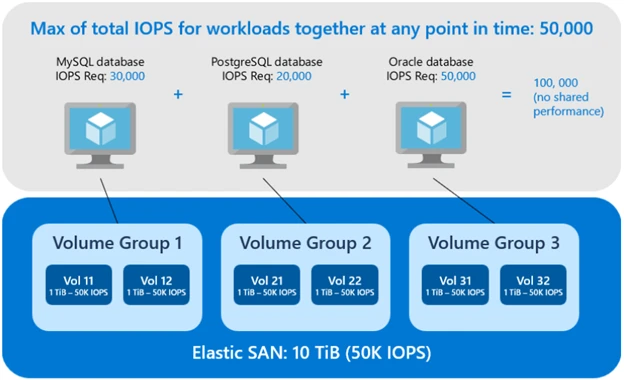
Combined with the benefit you can get from dynamic performance sharing, you can save significantly on your monthly bill. For example, another customer during preview was writing data to multiple different databases. In the simplified graphic below, you can see these databases require a total of 100,000 IOPS for peak performance if you provision for the max IOPS required per database. However, from what we observe in real life scenarios not all database instances will spike at the same time where some are more active during business hours for inquiries, and others off business hours for reporting. If you measure the peak IOPS aggregated across these workloads, it was only 50,000 at any given time. Since Elastic SAN allows its volumes to share the total performance provisioned at the SAN level, it lets you account for the combined maximum performance required by your workloads, rather than the sum of the individual requirements—which frequently means you can provision (and pay for) less performance to serve your needs. In the example provided, you would provision 50% less IOPS at 50,000 IOPS than if you were to cater to the individual workloads, significantly lowering your costs.
Get started today with Elastic SAN
You can deploy an Elastic SAN1 by following our instructions on how to get started or refer to our documentation to learn more. Pricing for Azure Elastic SAN has not been revised for general availability. You can find the most up to date pricing on our pricing page.
If you have any feedback or questions about Azure Elastic SAN, you can email us at AzElasticSAN-ex@microsoft.com—we are happy to help!
1Not available in all regions. For a list of available regions please refer to our documentation.