
Windows 10 client machines can now be backed up seamlessly to cloud by Azure Backup service. Customers with machines running Windows 10 (64-bit) operating systems can protect their important file-folder data to Azure in a secure manner and restore data on any machine. Below are the capabilities of Azure Backup:
- Granular backup of the files and/or folders from your machines to Azure.
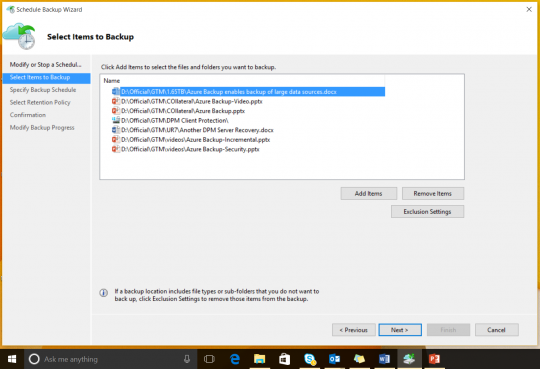 Windows 10 files and folder backup using Azure Backup
 - Customizable backup schedules with backups happening as frequently as three times a day.
- Efficient utilization of bandwidth by transferring incremental backup copies, a.k.a- transferring only changed data from previous backup point.
- Encryption of data even before it leaves your machine boundary.
- Retain the backup copies at Azure for almost 99 years.
- Easily browse files and folders of the backup copies at Azure and restore only the desired files.
- Restore files from backup copies at Azure to any other machines seamlessly.
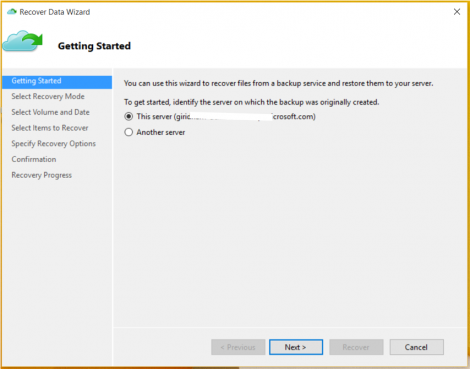 Windows 10 backed up files restore using Azure Backup
 - Monitor all the above activities like scheduling backup times, backup and recovery jobs in a familiar MMC console as shown below.
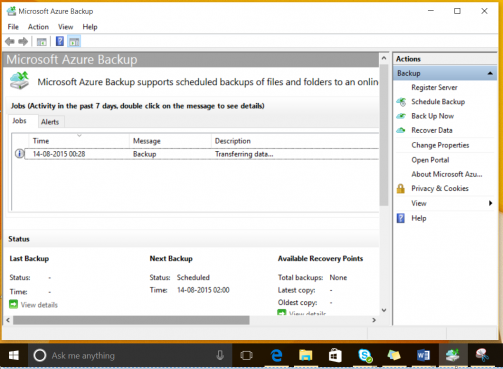 Windows 10 backup jobs monitoring using Azure Backup
 - Leverage the Azure Backup service across 17 different regions world-wide to back up files to the nearest region in your vicinity.
Watch the below ‘How-to’ videos on Azure Backup to learn the configuration of backup and restores using Azure Backup.
To get started and learn more about Azure Backup browse the ‘Getting started with Azure Backup blog’. To know more about the best practices for protecting Windows client machines browse the Azure Backup announcement on support for client operating systems.
Install the latest Azure Backup agent on your windows 10 client machines to start protecting your files and folders to Azure.
Related links/content:
- Learn more about Azure Backup
- Click for a free Azure trial subscription, and download the latest Azure Backup agent to get started
- Need help? Reach out to the Azure Backup forum for support
- Tell us how we can improve Azure Backup: contribute new ideas and up-vote existing ones
- Follow us on Twitter and Channel9 to get latest news and updates






