We are excited to announce the general availability (GA) of Entra-Only identities for Azure Files SMB. With native Microsoft Entra ID authentication, organizations can now grant secure, identity-based access to SMB file shares using cloud-only identities.
This means no Active Directory, hybrid sync, or managed domain controllers required, significantly simplifying architecture while reducing ongoing management and maintenance costs. Entra-Only identities elevate Azure Files with a highly integrated, modern identity experience—delivering a leading, best-in-class standard for secure, seamless and comprehensive cloud native access.
As customers look to migrate to Azure Files, reliance on on-premises Active Directory authentication has been seen as a key blocker to a complete cloud-native experience. Entra-Only identities support for Azure Files SMB removes that blocker, enabling organizations to authenticate users and devices directly through Microsoft Entra ID, helping modernize storage, compute and identity, while aligning with Zero-Trust principles.
Entra-Only identities enable seamless virtual desktop infrastructure (VDI) profile management on Azure Files while meeting modern security standards. In Azure Virtual Desktop (AVD), built-in B2B support extends this further, allowing external partners to use their existing identities with FSLogix profiles, without creating duplicate accounts.
For general-purpose scenarios, this unlocks migration of on-prem Windows-based workloads to a fully cloud-native platform, retaining native SMB compatibility while delivering a highly integrated identity, security, and management experience. Users can securely access files from anywhere without domain setup, VPNs, or complex networking requirements. Together, these capabilities help organizations reduce operational complexity while strengthening their security posture.
Why choose Entra-Only identities with Azure Files
- Modern, cloud-native identity with simplified operations. Access to Azure Files is secured using native Entra ID authentication with client-side Intune integration, eliminating overhead of identity lifecycle maintenance and compliance, VPNs, and hybrid sync—simplifying deployment, reducing maintenance overhead, and streamlining management.
- Co-existence with hybrid identities setup. Organizations with a mix of hybrid and cloud-native identities can use this feature concurrently while in the journey to retire active directory.
- Secure access from anywhere. Users can access file shares via Entra-joined clients, enabling seamless remote work without duplicating identities.
- Extended support to MacOS clients (limited preview). Secure file share access is extended to modern MacOS clients, Entra-joined via Platform SSO, enabling creative and cross-platform workloads to integrate with Azure Files using Entra-based identity.
What’s new with Entra-Only identities
- Portal-based NTFS permissions management: Granular file and directory ACLs for Entra-Only (and hybrid) users and groups can be configured directly from the Azure portal, eliminating the need for domain-joined clients or legacy tools. This is now available for all users across all regions.
- Expanded RBAC support for secure authorization: Adding share-level RBAC for specific users and groups is now available for Entra only users and groups in limited regions. For regional availability, please check here.
How Entra-Only identities work with Azure Files
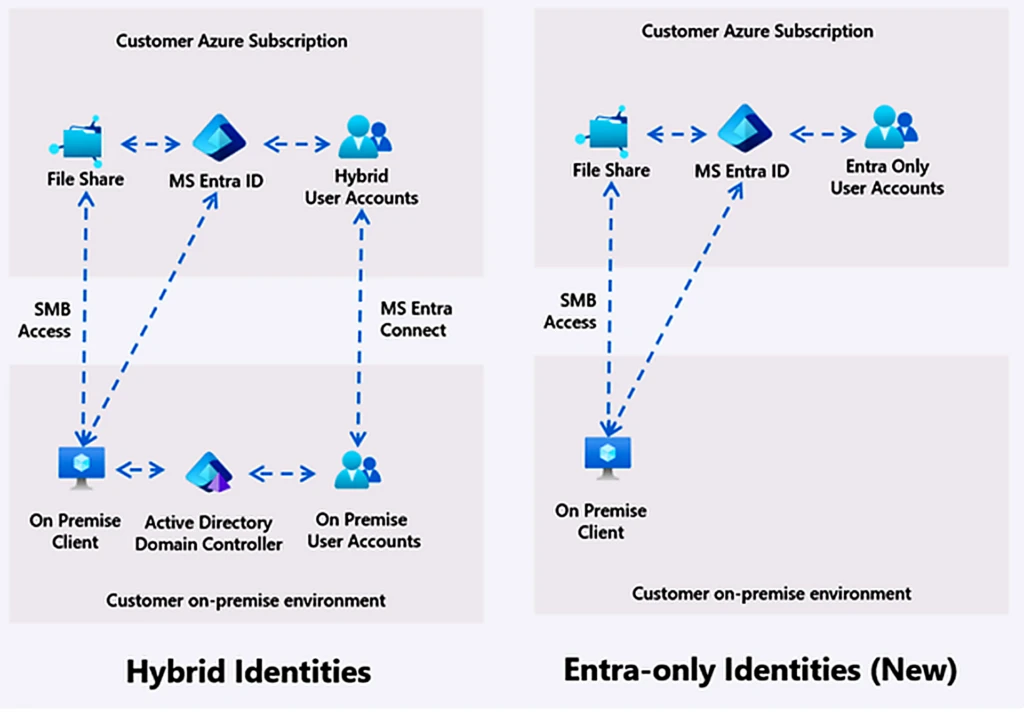
This feature modernizes SMB authentication by making Microsoft Entra ID the primary Kerberos Key Distribution Center (KDC). Clients authenticate directly with Microsoft Entra ID to obtain Kerberos tickets for cloud identities, eliminating the need for Active Directory or Entra Connect sync. While the SMB protocol remains unchanged for compatibility, ticket issuance and identity validation are completely handled by Entra.
How it works:
- When accessing the file share, the client requests a Kerberos ticket from Entra ID for Azure Files.
- This ticket, containing cloud-based security identifiers (SIDs), is presented during the SMB session setup.
- Azure Files validates the ticket and establishes the session—enabling secure, identity-based access. Authorization continues to use NTFS ACLs, now extended to Entra-Only users and groups. Permissions can be managed directly in the Azure portal, removing reliance on domain-joined clients or legacy tools.
Together, this preserves Kerberos security and scale while shifting identity control entirely to Entra, enabling a clean transition to cloud-native file access.
Hero workloads modernized with Entra-Only identities
Re-imagining VDI deployments with Azure Files and Entra-Only identities
Entra-Only identities simplify and modernize VDI deployments with Azure Files by enabling a fully cloud-native identity, compute and storage stack for user profile management. In Azure Virtual Desktop (AVD), FSLogix profile containers can be stored on Azure Files Premium and accessed using Microsoft Entra-based users via Kerberos, preserving secure, seamless SMB access.
Why this matters:
- It removes dependencies on hybrid identity infrastructure.
- It simplifies deployments.
- It reduces operational overhead, especially for distributed or remote workforces.
With Entra ID as the authentication authority, users can sign in to their virtual desktops and access profiles using cloud-native identities, enabling end-to-end single sign-on without line-of-sight to on-premises systems.
By adopting Entra-Only identity access with Azure Files, WTW has been able to deliver insurance applications to customers on AVD using their existing Entra identities. FSLogix profile containers stored on Azure File Shares ensure users receive a consistent profile experience across any AVD host they connect to. This solution removes the dependency on legacy domain controllers and file share infrastructure, replacing it with a fully Entra-joined environment backed by AVD hosts and Azure File Shares—resulting in a more secure, streamlined, and less complex architecture.
—Gordon Griffin, Technical Director, Willis Tower Watson
B2B identities support further extends VDI scenarios by allowing external users to access desktops, loading their profiles securely using existing identities. Together, this enables organizations to deliver a consistent, scalable, and secure VDI experience while accelerating their transition to a fully cloud-native architecture.
Entra-Only identities with Azure Files mark a major step forward in simplifying and securing modern desktop and application environments. By enabling Kerberos-based Entra user access, we can deliver a truly cloud-native experience for our customers, with identity, compute and storage all in Azure, while maintaining seamless SMB compatibility. This significantly reduces deployment complexity and allows organizations to adopt secure, scalable VDI and file access solutions faster than ever before.
—Chuck Mikuzis, Product Manager, Nerdio
Simplifying file sharing for the modern workforce
Entra-Only identities streamline general-purpose file sharing and information worker (IW) collaboration. Access to shared folders is governed directly through Entra ID, enabling consistent, identity-driven access across distributed teams without requiring domain-joined devices or network connectivity to on-premises infrastructure.
This simplifies onboarding and day-to-day operations—new users can be granted access through Entra groups, and permissions are enforced consistently across locations. Combined with NTFS ACL portal support, organizations can maintain familiar file-level security while modernizing their access model.
The result:
- Faster onboarding.
- Reduced helpdesk overhead.
- Seamless collaboration across geographies.
Seamless cloud native access for remote and distributed energy workforces
Entra-Only identities enable oil and gas organizations to securely access critical datasets from remote and field locations without relying on complex multi-domain/multi-forest Active directory configuration or hybrid infrastructure. Engineers and geoscientists working across offshore rigs, exploration sites, and global offices can authenticate directly with Entra ID and access Azure Files, eliminating VPN dependencies and improving reliability in low-connectivity environments.
This approach simplifies deployment and operations while maintaining enterprise-grade security and compliance. Combined with support for thin clients and remote access, teams can collaborate in real-time on large datasets without managing distributed infrastructure.
Continued investments in Azure Files identity
Secure Entra-native application access with Managed Identities (GA)
Managed Identities support brings Entra-native application access to Azure Files, removing the need for shared keys or secrets. Applications, virtual machines, or Azure services use Managed Identities with Entra-issued OAuth tokens establishing secure SMB sessions, reducing credential sprawl and simplifying access. This helps simplify DevOps workflows and enables scalable integration across Azure Kubernetes Service (AKS) and enterprise applications.
Bringing secure, cloud-native access to MacOS workloads (limited preview)
Secure Azure Files support over MacOS clients allows creative design teams and educational institutions to work seamlessly across operating system (OS) platforms with un-interrupted access. Designers, media professionals, and higher education professionals can authenticate directly with Entra ID and access SMB file shares, aligning Mac workflows with the same enterprise-grade identity used organization-wide.
What’s next with Azure Files Entra-Only Identities
Native NTFS ACL editing experience
We are continuing to enhance the permissions management experience by bringing native support for editing NTFS ACLs directly through familiar client workflows. This closes a key gap between cloud and traditional file server environments, enabling administrators and users to manage fine-grained file and directory permissions using the same tools and experiences they rely on today.
Adding support in sovereign cloud environments
We are working to expand Entra-Only identities for Azure Files to sovereign cloud regions, enabling organizations in highly regulated environments to adopt cloud-native identity for SMB workloads. This unlocks the same benefits of SMB Kerberos-based authentication, and centralized identity management, while meeting compliance and enterprise grade regulatory requirements.
Get started with Entra-Only identities and other Azure Files investments
Entra-Only identities for Azure Files SMB is generally available today, supported across HDD and SSD shares and all billing models, at no additional cost. Explore our documentation for step-by-step guidance. Make your workload ready for the future!
For questions on enabling on MacOS platforms, please register here. For other questions, reach out to azurefiles@microsoft.com.
Explore the documentation
Enable Microsoft Entra Kerberos authentication for hybrid and cloud-only identities (preview) on Azure Files.