Last week we announced the general availability of Windows Azure Infrastructure Services and Virtual Network. Virtual Network is a service that allows you to create a private, isolated network in Windows Azure and treat it as an extension of your datacenter. You can assign private IP addresses to virtual machines inside a virtual network, specify DNS, and connect it to your on-premises infrastructure using a Cisco or Juniper hardware VPN device in a ‘site-to-site’ manner.
Today, we’re excited to announce that we’re expanding the capabilities of Virtual Network and stepping beyond cross-premises connectivity using hardware VPN devices.
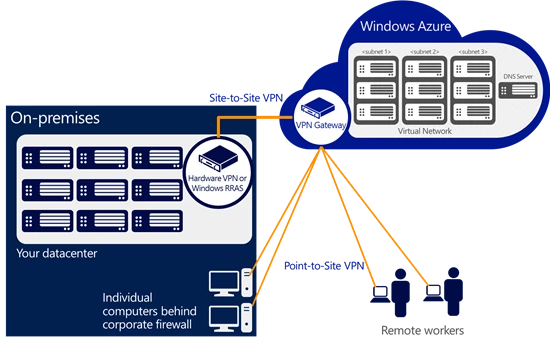
First, we’re enhancing the existing ‘Site-to-Site VPN’ connectivity so you can use Windows Server 2012 RRAS (Routing and Remote Access) as an on-premises VPN server. This gives you the flexibility of using a software based VPN solution to connect your on-premises network to Windows Azure. Of course, if you prefer the more traditional route, you can still connect a virtual network to your hardware based VPN and we will continue to expand the list of supported VPN devices.
Second, we’ve added a new capability called Point-to-Site VPN which allows you to setup VPN connections between individual computers and a virtual network in Azure. We built this capability based on customer requests and learnings from a preview feature called Windows Azure Connect. Point-to-Site VPN greatly simplifies setting up secure connections between Azure and client machines, whether from your office environment or from remote locations.
Here is an illustration:
Using Point-to-Site VPN enables some new and exciting ways to connect to Windows Azure that are not possible from other cloud providers. Here are a few examples:
- You can securely connect to your Windows Azure environment from any location. You can connect your laptop to a Windows Azure test and development environment and continue to code away while sipping coffee at an airport café!
- Small businesses or departments within an enterprise who don’t have existing VPN devices and/or network expertise to manage VPN devices can rely on the Point-to-Site VPN feature to securely connect to workloads running in Windows Azure virtual machines.
- You can quickly set up secure connections to Windows Azure even if your computers are behind a corporate proxy or firewall.
- Independent Software Vendors (ISVs) wanting to provide secure access to their cloud apps can leverage the Point-to-Site VPN feature to offer a seamless application experience.
Windows Azure Virtual Network continues to deliver the power of ‘AND’ by providing you the ability to integrate your on-premises environment with Windows Azure. If you want to learn more about Windows Azure Virtual Network, its capabilities and scenarios, you can find more information here. Also, check out Scott Guthrie’s blog for a deeper dive on the new features.
Check out our Free Trial and try it for yourself.