Azure Active Directory (Azure AD) is now Microsoft Entra ID. Learn more.
When you’re setting up your disaster recovery environment, you also need to think about how Active Directory needs to be setup. It should not come as an afterthought.
Most applications depend on AD and DNS infrastructure to function correctly. In this post, we will discuss how to setup Active Directory in different scenarios so that the applications continue to function properly following a failover event.
The following factors control how a domain controller should be replicated to the recovery site. The table following this section would talk about how these factors impact the decision.
- Recovery Site: Configuring protection between on-premises sites or directly to Microsoft Azure
- Type of Failover: Depending on whether you are trying to do a Test Failover, a Planned Failover or an Unplanned Failover the recommended way to replicate domain controllers and the recovery steps may change
- Failover Unit: Whether you want the flexibility to failover partial site or if the only scenario that you are interested in is full site failover
- Number of domain controllers in forest: Recommended replication technology would vary depending on if you are a small or medium enterprise and have just one domain controller or if you have more than one domain controller in the environment. If you already have two or more sites, it is likely that you would have multiple domain controllers
The following table summarizes how the domain controllers should be replicated in different scenarios.
| Scenario | Failover Type | Failover Unit | Current Number of Domain Controllers in the Forest | Recommended Replication Technology |
|---|---|---|---|---|
| On-premises to On-premises | Test Failover | N/A | One | Replication technology of your choice from the technologies supported by Azure Site Recovery |
| On-premises to On-premises | Test Failover | N/A | Multiple | Replication technology of your choice from the technologies supported by Azure Site Recovery OR Snapshot of vhd file of domain controller on recovery site |
| On-premises to On-premises | Planned/Unplanned Failover | Full Site | One | Replication technology of your choice from the technologies supported by Azure Site Recovery |
| On-premises to On-premises | Planned/Unplanned Failover | Full Site | Multiple | AD Replication |
| On-premises to On-premises | Planned/Unplanned Failover | Partial Site | N/A | AD Replication |
| On-premises to Azure | Test Failover | N/A | N/A | Replication technology of your choice from the technologies supported by Azure Site Recovery |
| On-premises to Azure | Planned/Unplanned Failover | Full Site | One | Replication technology of your choice from the technologies supported by Azure Site Recovery |
| On-premises to Azure | Planned/Unplanned Failover | Full Site | Multiple | AD Replication |
| On-premises to Azure | Planned/Unplanned Failover | Partial Site | N/A | AD Replication |
Below are the reasons why we provide the above recommendations:
- If there is more than one domain controller in your environment already and you use a replication technology such as Hyper-V replica for replicating a domain controller. In the event on an unplanned failover (failover with data loss of up to 15 minutes), the domain controller that is failed over will go back to an older point in time. In such a scenario it’s possible that different domain controllers become inconsistent with each other. Therefore, it’s recommended that whenever there is more than one domain controller in your environment you use AD replication to replicate the domain controller to the recovery site.
- If AD replication is used then you would need to run a virtual machine on the recovery site as well. If you already have both sites being actively used then it is likely that you would have domain controllers running on both sites. But if the recovery site has solely been used for disaster recovery purposes then always running a virtual machine on recovery site would add to the cost. Therefore, if you have just one active site and only one domain controller then you can use replication technologies other than AD replication to replicate domain controllers.
- If you intend to do failover of partial site then there would be situations when some of the applications would be running on the primary site and some other applications, which have been failed over, would be running on the recovery site. In such a scenario active domain controllers would be required on both sites. Therefore, if you ever intend to do failover of partial site, it’s recommended that you use AD replication and keep active domain controllers on both the sites.
- For doing a Test Failover an instance of a domain controller would be required in the isolated test environment. This instance can be created by using Test Failover gesture provided by Azure Site Recovery on one of the domain controller virtual machines. To accomplish this, you would need to replicate the domain controller virtual machine using the replication technology of your choice from the technologies supported by Azure Site Recovery.
If your recovery site is on-premises and you already have a domain controller running on the recovery site then you can also create test domain controller by taking snapshot of the virtual machine and using the vhd to create test instance of the domain controller
You can read up more about setting up networking for disaster recovery to understand how a Test Failover should be done when an application depends on Active Directory.
There are some more things that you need to keep in mind.
- In case the there are multiple domains in your enterprise then each domain should be represented in the recovery site. You must ensure that at least one domain controller for each of your domains in your forest is located in the recovery site.
- You should also ensure that the DNS role is installed on at least one domain controller on both primary and the recovery site.
Till now we have looked at how to setup the replication for the domain controller in different scenarios. Now the question is whether some post failover recovery steps would be required in any of the scenarios.
The answer to this question would depend on whether the domain controller on the primary is still available post failover or not. In the event of a full site planned failover where the primary site is completely shut down or in case of an unplanned failover where the primary site might no longer be available, on domain controller(s) on recovery site you might need to seize FSMO Active Directory roles and do metadata cleanup for the missing domain controller(s).
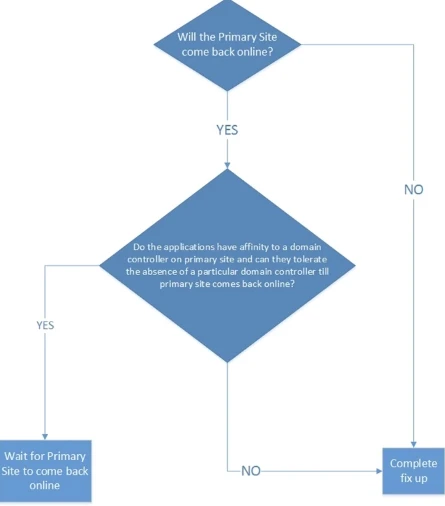
Some of the legacy applications might not work in absence of an FSMO role as these application might be bound to a particular domain controller. In such a case you might have complete fix up on the recovery site domain controller even if the primary site will come back up later. To conclude whether these fix-ups are required to be done on the recovery site, follow the decision tree shown below.
In this post, we reviewed how active directory can be setup when we are setting up one or application on a site for disaster recovery to another site. We looked at what are the different replication technologies that can be used in different scenarios. And then we concluded with if any post failover fix ups that would be required to be done in case the primary site is no longer available.
If you have further questions, please visit the Azure Site Recovery forum on MSDN for additional information and to engage with other customers.
You can also check out additional product information, and sign-up for a free Azure trial to start trying out Microsoft Azure using Azure Site Recovery.