
Azure Data Lake Analytics (ADLA) is a serverless PaaS service in Azure to prepare and transform large amounts of data stored in Azure Data Lake Store or Azure Blob Storage at unparalleled scale.
ADLA now offers some new, unparalleled capabilities for processing files of any formats including Parquet at tremendous scale.
Previously: Handling tens of thousands of files is painful!
Many of our customers tell us that handling a large number of files is challenging – if not downright painful in all the big data systems that they have tried. Figure 1 shows the distribution of files in common data lake systems. Most files are less than one GB, although a few may be huge.
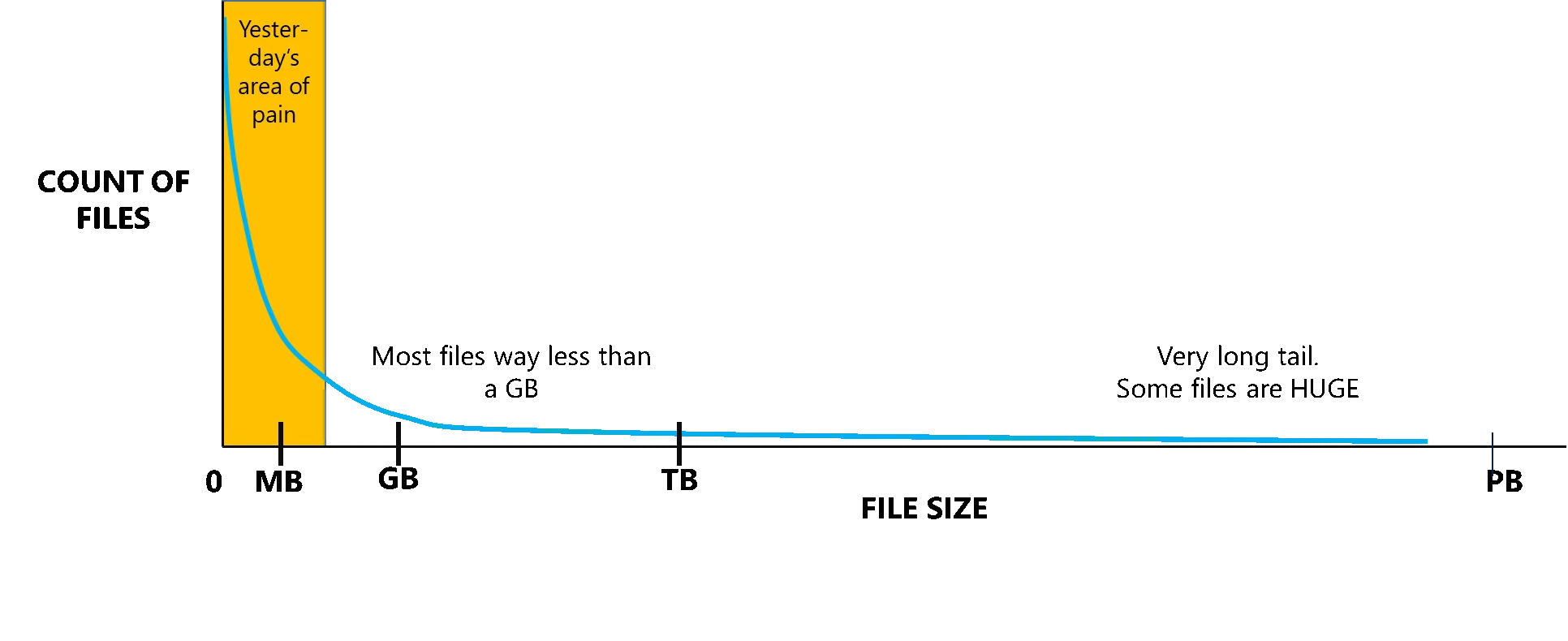
Figure 1: The pain of many small files
ADLA has been developed from a system that was originally designed to operate on very large files that have internal structure that help with scale-out, but it only operated on a couple of hundred to about 3,000 files. It also over-allocated resources when processing small files by giving one extract vertex to a file (a vertex is a compute container that will execute a specific part of the script on a partition of the data and take time to create and destroy). Thus, like other analytics engines, it was not well-equipped to handle the common case of many small files.
Process hundreds of thousands of files in a single U-SQL job!
With the recent release, ADLA takes the capability to process large amounts of files of many different formats to the next level.
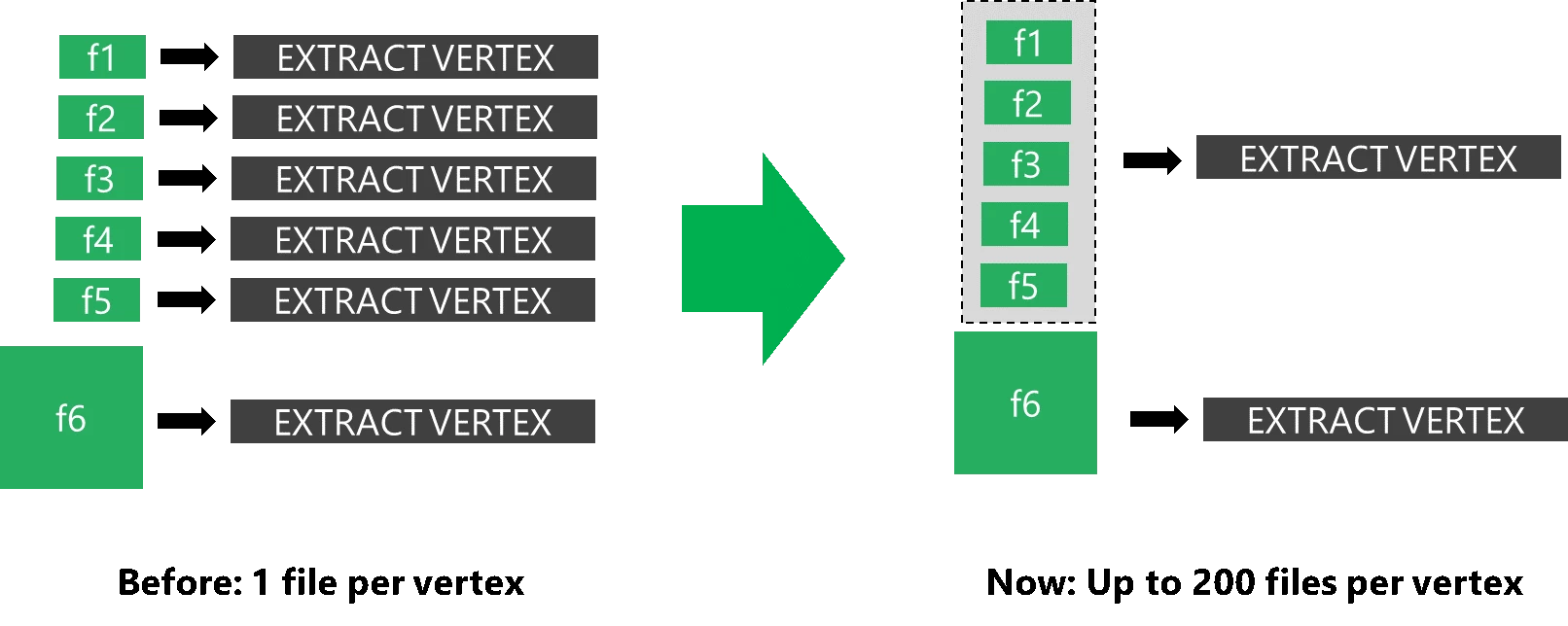
Figure 2: Improving the handling of many small files
ADLA increases the scale limit to schematize and process several hundred thousand files in a single U-SQL job using so-called file sets. In addition, we have improved the handling of many small files (see Figure 2) by grouping up to 200 files of at most 1 GB of data into a single vertex (in preview). Note that the extractor will still handle one file at a time, but now the vertex creation is amortized across more data and the system uses considerably fewer resources (Analytics Units), and costs less, during the extraction phase.
Figure 3 shows on the left how a job spent about 5 seconds to create a vertex and then processed the data in less than 1 second and used many more vertices. In the image on the right, with the improved files sets handling, it was able to spend much fewer resources (AUs) and made better use of the allocated resources.
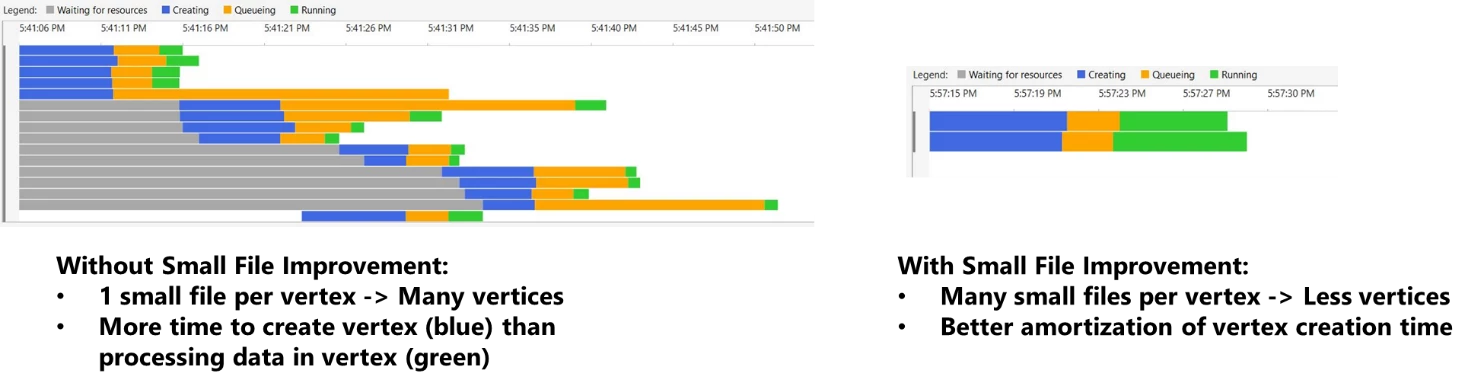
Figure 3: Job Vertex usage when extracting from many small files: without file grouping and with file grouping
Customers who use these file set improvements have seen up to a 10-fold performance improvement in their jobs resulting in a much lower cost, and they can process many more files in a single job!
We still recommend though to maximize the size of the files for processing, because the system will continue to be even better with large files.
Plus today, ADLA now natively supports Parquet files
U-SQL offers both built-in native extractors to schematize files and outputters to write data back into files, as well as the ability for users to add their own extractors. In this latest release, ADLA adds a public preview of the native extractor and outputter for the popular Parquet file format and a “private” preview for ORC, making it easy to both consume and produce these popular data formats at large scale. This provides a more efficient way to exchange data with the open source Big Data Analytics solutions such as HDInsight’s Hive LLAP and Azure DataBricks than previously using CSV formats.
Head over to our Azure Data Lake Blog to see an end-to-end example of how we put this all together to cook a 3 TB file into 10,000 Parquet files and then process them both with the new file set scalability in U-SQL and query them with Azure Databricks’ Spark.
But wait, there’s more!
There are many addition new features such as a preview of dynamically partitioned file generation (the user voice top ask!) a new AU modeler to optimize your jobs cost/performance trade-off, the ability to extract from files that use the Windows code pages, the ability to augment your script with job information through @JobInfo, and even a light-weight, self-contained script development with in-script C# named lambdas and script-scoped U-SQL objects. Go to the spring release notes to see all of the newly introduced capabilities.






