In June, Microsoft Azure added support for Docker containers on Linux VMs, enabling the broad ecosystem of Dockerized Linux applications to run within Azure’s industry-leading cloud. Today, Microsoft and Docker Inc. are jointly announcing we are bringing the Windows Server ecosystem to the Docker community, through 1) investments in the next wave of Windows Server, 2) open-source development of the Docker Engine for Windows Server, 3) Azure support for the Docker Open Orchestration APIs and 4) federation of Docker Hub images in to the Azure Gallery and Portal.
Many customers are running a mix of Windows Server and Linux workloads and Microsoft Azure offers customers the most choice of any cloud provider. By supporting Docker containers on the next wave of Windows Server, we are excited to make available Docker open solutions across both Windows Server and Linux. Applications can themselves be mixed; bringing together the best technologies from the Linux ecosystem and the Windows Server ecosystem. Windows Server containers will run in your datacenter, your hosted datacenter, or any public cloud provider – and of course, Microsoft Azure.

Windows Server Containers
Windows Server containers provide applications an isolated, portable and resource controlled operating environment. This isolation enables containerized applications to run without risk of dependencies and environmental configuration affecting the application. By sharing the same kernel and other key system components, containers exhibit rapid startup times and reduced resource overhead. Rapid startup helps in development and testing scenarios and continuous integration environments, while the reduced resource overhead makes them ideal for service-oriented architectures.
The Windows Server container infrastructure allows for sharing, publishing and shipping of containers to anywhere the next wave of Windows Server is running. With this new technology millions of Windows developers familiar with technologies such as .NET, ASP.NET, PowerShell, and more will be able to leverage container technology. No longer will developers have to choose between the advantages of containers and using Windows Server technologies.
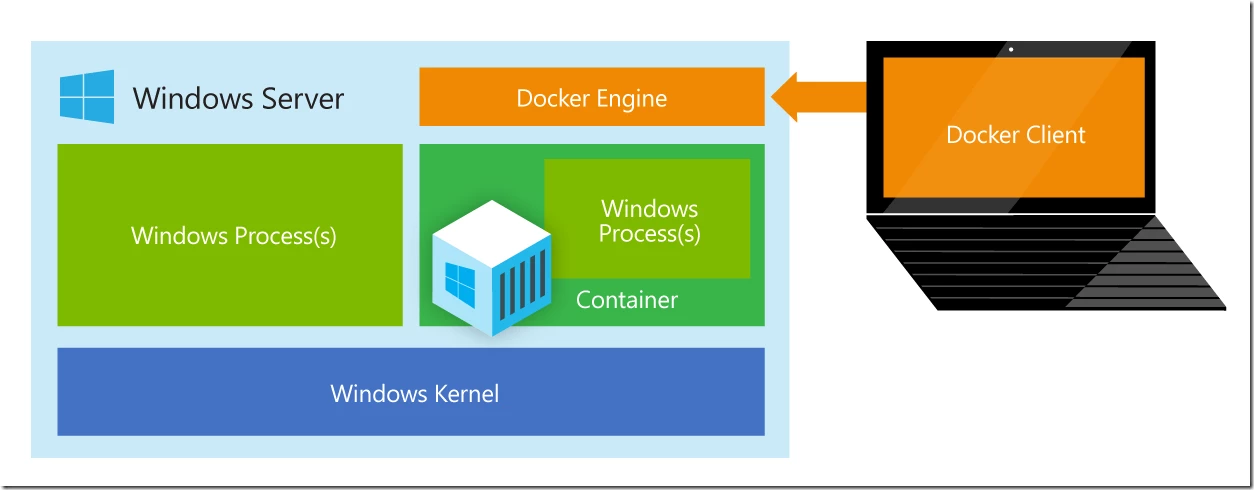
Windows Server containers in the Docker ecosystem
Docker has done a fantastic job of building a vibrant open source ecosystem based on Linux container technologies, providing an easy user experience to manage the lifecycle of containers drawn from a huge collection of open and curated applications in Docker Hub. We will bring Windows Server containers to the Docker ecosystem to expand the reach of both developer communities.
As part of this, Docker Engine for Windows Server containers will be developed under the aegis of the Docker open source project, where Microsoft will participate as an active community member. Windows Server container images will also be available in the Docker Hub alongside the 45,000 and growing Docker images for Linux already available.
Finally, we are working on supporting Docker client natively on Windows Server. As a result, Windows customers will be able to use the same standard Docker client and interface on multiple development environments.
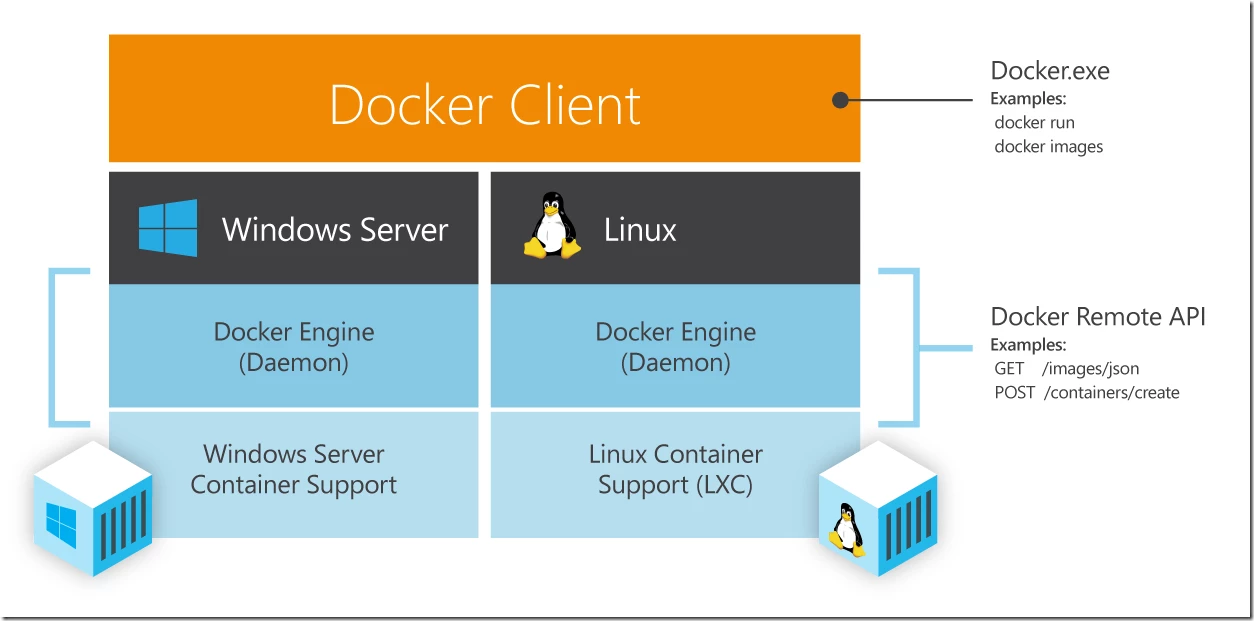
You can find more about Microsoft’s work with the Docker open source project on the MS Open Tech blog here.
Docker on Microsoft Azure
Earlier this year, Microsoft released Docker containers for Linux on Azure, offering the first enterprise-ready version of the Docker open platform on Linux Virtual Machines on Microsoft Azure, leveraging the Azure extension model and Azure Cross Platform CLI to deploy the latest and greatest Docker Engine on each requested VM. We have seen lots of excitement from customers deploying Docker containers in Azure as part of our Linux support.
As part of the announcement today, we will be contributing support for multi-container Docker applications on Azure through the Docker Open Orchestration APIs. This will enable users to deploy Docker applications to Azure directly from the Docker client. This results in a dramatically simpler user experience for Azure customers; we are looking forward to demonstrating this new joint capability at Docker’s Global Hack Day as well as at the upcoming Microsoft TechEd Europe conference in Barcelona.
Furthermore, we hope to energize Windows Server and Linux customers by integrating Docker Hub into the Azure Gallery and Management Portal experience. This means that Azure customers will be able to interact directly with repositories and images on Docker Hub, enabling rich composition of content both from the Azure Gallery and Docker Hub.
In summary, today we announced a partnership with Docker Inc. to bring Windows Server to the Docker ecosystem and improve Azure’s support for the Docker Engine and Orchestration APIs and to integrate Docker Hub with the Azure Gallery and Management Portal.
Azure is placing a high priority on developer choice and flexibility including first-class support for Linux and Windows Server. This expanded partnership builds on the Azure’s current support for Docker on Linux and will bring the richness of the Windows Server and .NET ecosystem to the Docker community. It is an exciting time to be in the Azure cloud!