This week at Ignite, we announced several new Azure networking services and features that makes Azure more powerful than ever before. These capabilities will let you design your network topologies with more control and agility.
ExpressRoute and ExpressRoute Premium Add-on
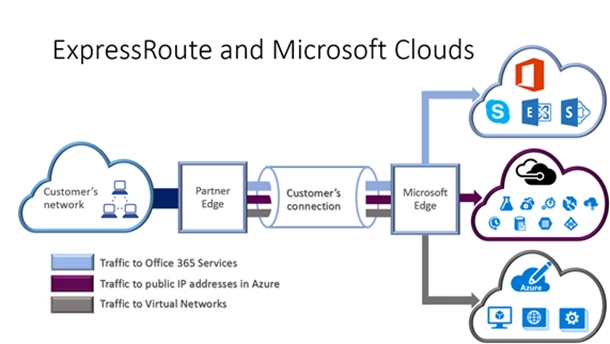
Last year, we launched ExpressRoute which provides direct network connectivity to Azure, bypassing the Internet and providing better network performance, predictability, and privacy. We have seen strong adoption from enterprise customers moving their critical workloads to the cloud. We have learned the challenges that you face in managing global networks. Based on these experiences, we want to help you to run truly global services in the cloud. Therefore, we today are announcing an ExpressRoute premium offering to provide global connectivity. Once your traffic enters an ExpressRoute meet-me site, you can reach ANY Azure region across the globe. This new ExpressRoute premium add-on also supports up to 10,000 routes to seamlessly connect to large global enterprise networks. Both ExpressRoute and ExpressRoute premium will support connectivity to Office 365 including Skype for Business so that you can take full advantage of private network connectivity to Microsoft. Please read the ExpressRoute documentation to learn more.
ExpressRoute for Office 365 and Skype for Business Enterprise Voice
We are expanding ExpressRoute connectivity to other Microsoft Cloud services. Last month, we announced that ExpressRoute will support Office 365 and Skype for Business Enterprise Voice. Enterprises using Office 365 and Skype for Business combined with ExpressRoute will enjoy the ExpressRoute benefits of predicable enterprise network performance, and better privacy by bypassing the Internet. We will be launching this capability with AT&T, British Telecom and Equinix in Q3 of 2015.
New VPN Gateway offers Site-to-Site VPN and ExpressRoute coexistence
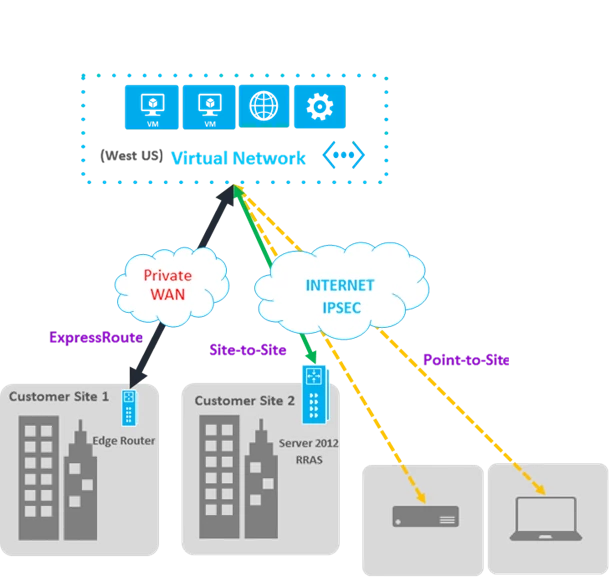
High-Availability and performance are key features for enterprise-grade connectivity. We are introducing a new Standard VPN gateway that will allow you to have Site-to-Site (S2S) VPN connectivity to a Virtual Network that also has a gateway connected to an ExpressRoute circuit. The High Performance gateway also has this capability. This enables new connectivity scenarios.
- You can now use S2S VPN tunnel as a backup for your ExpressRoute connection.
- You can connect branch offices that aren’t part of your WAN to your Azure virtual networks that are also connected via ExpressRoute.
With the new standard VPN gateway, we now have a variety of VPN gateways – pricing for each can be found on our Azure VPN Gateway pricing page.
Virtual Network Enhancements
We continue to enhance the Azure Virtual Network with capabilities such as user defined routes and IP forwarding, reserved IP-mobility, multiple VIPs per cloud service, and public fully qualified domain names (FQDN) resolution for VM instances in a cloud service.
User Defined Routes
With user defined routes, you now have complete control over the traffic flow in your virtual network. Virtual network by default provides system routes for traffic flow between virtual machines. You can now customize the routing table by defining routes allowing you to direct traffic through network appliances. Routes can be defined inside a routing table and applied to subnets. Every VM within a subnet automatically inherits the routes from the routing table. A route within the routing table contains the network address space (destination prefix) and the IP address of the next hop. You can also choose to bring in routes using BGP if you are using ExpressRoute. Within the routing table, a route for a given destination will be selected based on Longest Prefix match (LPM). Additionally, we are enabling ‘IP Forwarding’ so a virtual machine can accept and transmit packets that are not destined or originating from its IP address. VMs can now be inserted in the traffic flow path without any change in the source and destination IP addresses.
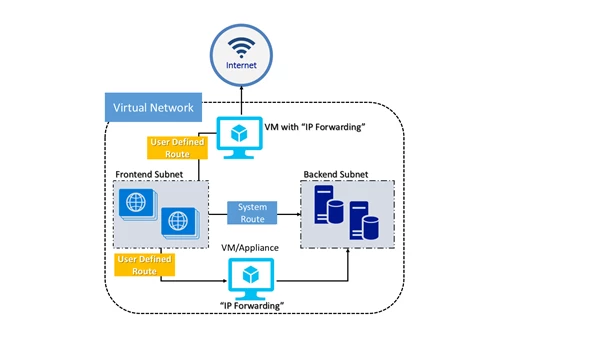
User defined routes let you run a number of virtual appliances such as Application Firewalls, Gateways, NAT devices, IPS and IDS devices. To learn more about user defined routes, please click here.
IP Address Enhancements
We are enhancing Reserved IP addresses to allow you to move reserved IP addresses between services. In less than a minute, you can re-direct traffic from one service (set of one or more VMs) to another service. Additionally, you also have the ability to reserve existing IP address on the running service. You can use this feature in scenarios where you want to reduce the impact of downtime by quickly moving IPs between VMs. For more details please refer to the documentation page. With Instance Level Public IP, you can associate a public IP address to a specific VM. You can now associate a DNS name with these public IP addresses. This will let you to access this VM directly using the FQDN on all the ports. As you add and remove the number of VMs within a service,new domains names are automatically updated.
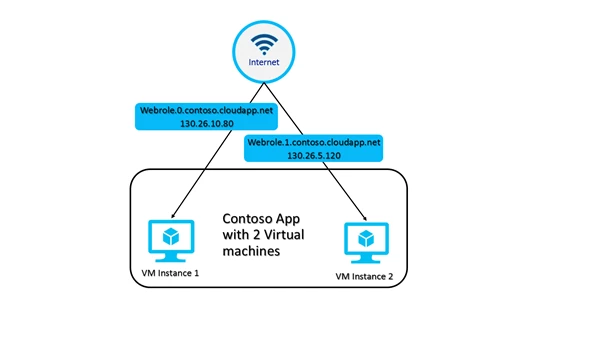
With the new multiple VIPs per cloud service feature, you can get more than one load-balanced public IP address assigned to a set of virtual machines (VMs). This enables scenarios such as, hosting multiple secure websites in a cloud service or allowing multiple SQL Server Always-On Availability Group listeners access to the same set of VMs. You can learn more by clicking here.
New Network Virtual Appliance partners
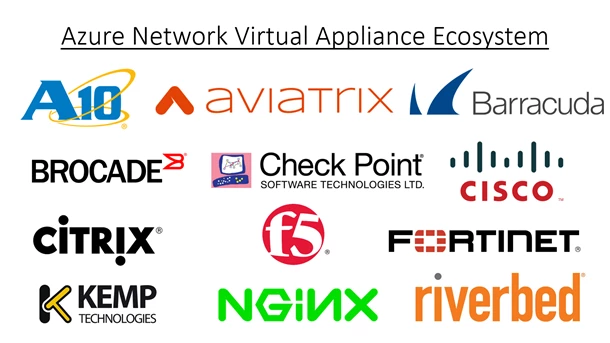
We are excited to welcome A10, Cisco, F5, Fortinet and NGINX to the Azure Network Virtual Appliance ecosystem. They join industry-leading partners such as Barracuda, Checkpoint, Kemp, and Riverbed. You can use network virtual appliances in your virtual networks and get the same functionality that you get in your on-premises networks. This includes Firewalls, Intrusion Prevention Systems, WAN Optimization, and Application Delivery Controllers (ADC/Load Balancing). Now you can design your network topologies with greater security and control. We expect to onboard more partners in the coming months.
Azure DNS
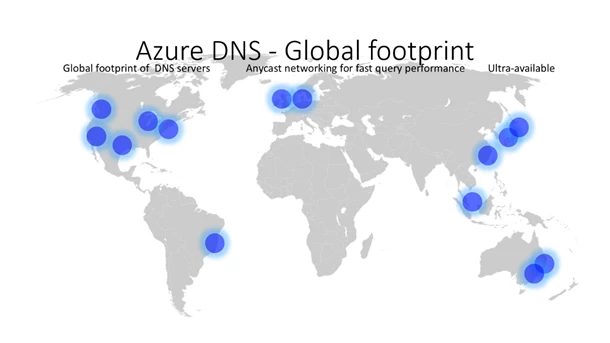
Azure DNS is a new service to host DNS domains and provides name resolution using Microsoft’s global infrastructure. By hosting your domains in Azure, you can manage your DNS records using the same credentials, APIs, tools and billing as your other Azure services. Azure DNS uses anycast networking, so that each DNS query is answered by the closest available DNS server. Azure DNS is also backed by a global foot-print of DNS origin servers, providing you robust performance and fast query times.
This service is now available in Public Preview and we are pleased to offer it at a 50% preview discount.
Networking support for Azure Resource Manager
Azure Resource Manager enables you to build and manage large scale applications in an agile and repeatable manner. Complex networking infrastructures can now be composed using simple JSON templates. You can also use REST based API, PowerShell, .NET SDK, Node.JS SDK, Java SDK, CLI and Azure Portal. Azure Resource Manager enables additional capabilities such as Role Based Access Control (RBAC), tagging of resources, and advanced auditing for resource usage. With these new features and services, we continue to deliver on the vision of enterprise-grade, hybrid and hyper-scale cloud. We hope you’re as excited as we are!