I’m excited to announce the limited preview of the Migration Accelerator (MA), for Azure. Spawned from the technology of our InMage acquisition the MA is designed to seamlessly migrate physical, VMware, Amazon Web Services and Microsoft Hyper-V workloads into Azure. It automates all aspects of migration including discovery of source workloads, remote agent installation, network adaptation and endpoint configuration. With MA, you reduce cost and risk of your migration project.
MA changes the cloud migration paradigm by offering:
- Heterogeneity: With MA you can migrate workloads running on a broad range of platforms such as VMware, Microsoft Hyper-V, Amazon Web Services and/or Physical servers within your environment. MA can support workloads running on Windows Server 2008 R2 sp1, Windows Server 2012 and Windows Server 2012 R2 operating systems.
- Simple, Automated Migration: The MA portal allows you to automatically discover your enterprise workloads, remotely from the cloud. With few clicks you can configure end-to-end migration scenarios. MA allows you to test your workload in the cloud without impacting the existing on premises production workload offering the ability to validate workload functionality before a cutover is performed.
- Migrate Multi-tier Applications: MA boasts the unique ability to migrate multi-tier production system with application level consistency orchestrated across tiers. This ensures multi-tier applications run the same in Azure, as they ran at the source. Application startup order is even honored, without the need for any manual configuration.
- Continuous Replication, Least Cutover Time: MA for Azure provides full-system replication including the OS and application data. This continuous replication and in-memory change tracking reduces the cutover time to mere minutes, minimizing impact to product workloads.
How does MA work
MA uses multiple components to orchestrate your migration project as shown below:
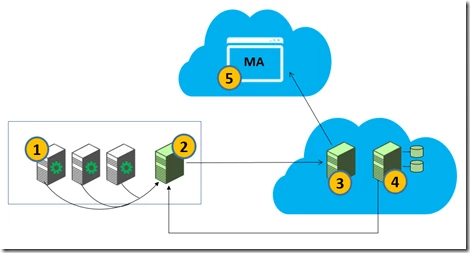
- Mobility Service: A light weight (guest based) centrally deployed agent which gets installed on source servers (on-premises physical or virtual) to be migrated to the target virtual machines on Azure. It is responsible for real time data capture and synchronization of the selected volumes of source servers to target servers.
- Process Server (PS): A physical or virtual server that is installed on premise3. It facilitates the communication between the Mobility Service and target virtual machines in Azure. It provides caching, queuing, compression, encryption and bandwidth management.
- Configuration Server (CS): Manages the communication between the Master Target and the MA Portal. It is installed on a dedicated Azure VM in your Azure subscription. Regular synchronization occurs between the CS and MA Portal.
- Master Target (MT): A target for replicating disks of on premises servers. It is installed within a dedicated Azure VM in your Azure subscription. Disks are attached to the MT to maintain duplicate copies.
- MA Portal: A multitenant portal to discover, configure protection and migrate your on premises workloads into Azure.
MA automates all critical processes required to migrate a source workload within an Enterprise into Azure Cloud. It can discover on premises workloads running in ESX/Hyper-V, AWS or physical servers. The workloads are discovered using a Process Server which is connected to MA portal. The discovered instances are listed in MA portal as shown below:
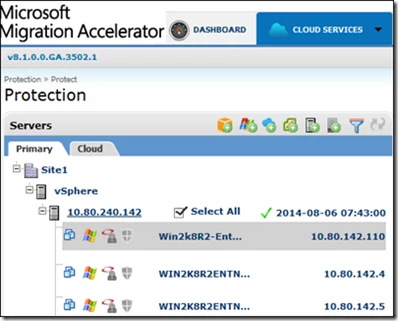
You can choose particular instance(s) from the discovered list of workload for migration. The next step is to install the Mobility Services (agent) on the sources servers. This can be remotely orchestrated from the MA portal by choosing ‘Install Mobility Service’ option as shown below:

After installing the Mobility Service, you can configure replication for the selected servers choosing the Protect option. MA uses the configuration details garnered from the discovery process for the protected source servers to determine and provision the most suitable size for the environment within Azure. In addition, the target VHDs are provisioned on the Master Target. Once replication is setup, synchronization of the on premises server disk to the target VHD in the Azure cloud begins.
Now, that you have configured the initial sync, wait to ensure the initial replication is complete. After initial replication, select the Migration option from the Cloud Services menu.
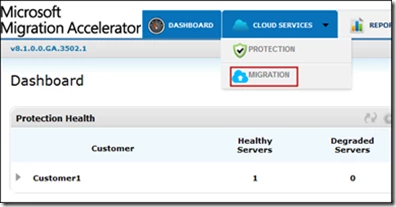
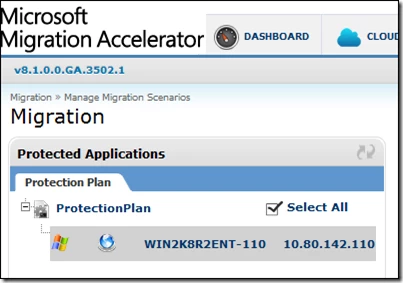
From the list of protected servers that appear under Protected Application, select the Protection Plan that you want to migrate.
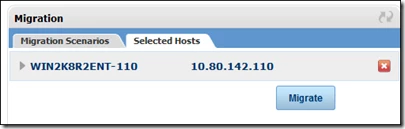
Once you choose a protection plan it will appear under Migration > Selected Hosts. Click Migrate to start the migration process.
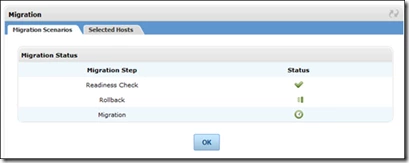
You can now monitor the progress of migration under Migration Scenarios > Migration Status.
After successful migration, Virtual Machines are created in Azure Cloud. You can now logon to the migrated VMs to validate if the running instances on the cloud are identical to your source servers.
Summary
In summary, MA offers an unprecedented level of automation to provide seamless migration of heterogeneous assets, into Azure.
Key Highlights:
- Automated asset discovery and migration – MA portal orchestrates the discovery and migration of workloads from a single pane of glass.
- Migration cutovers to Azure in minutes – continuous replication and in-memory change tracking significantly reduce cutover time.
- Self-provisioned target Azure VM’s – Target VMs are dormant during synchronization saving compute cost and automatically provisioned during cutover.
- Heterogeneous platform support – support for broad range of environments and platforms.
- Continuous replication – lightweight agents on the source servers continuously replicate all changes to target ensuring near zero downtime during migrations.
- Multi-tier application support – migrate your multi-tier production system with application level consistency orchestrated across tiers.
- Target VM Network and Endpoint Adaptation – support for automated network adaptation and endpoint reconfiguration.
- Integrated compression, encryption and bandwidth management.
To get started visit Microsoft Migration Accelerator and sign-up for preview.
Additional Resources: