
Azure Data Lake Analytics combines declarative and imperative concepts in the form of a new language called U-SQL. The idea of learning a new language is daunting. Don’t worry! U-SQL is easy to learn. You can learn the vast majority of the language in a single day. If you are familiar with SQL or languages like C# or Java, you will find that learning U-SQL is natural and that you will be productive incredibly fast.
A common question we get is “How can I get started with U-SQL?” This blog will show you all the core steps you need to get ramped up on U-SQL.
What is U-SQL?
U-SQL is the big data query language and execution framework in the Azure Data Lake Analytics. U-SQL uses familiar SQL concepts and language to scale out your custom code (.NET/C#/Python) from Gigabyte to Petabyte scale. U-SQL offers the usual big data processing concepts such as “schema on reads,” custom processors, and reducers. The language lets you query and combine data from multiple data sources including Azure Data Lake Storage, Azure Blob Storage, Azure SQL DB, Azure SQL Data Warehouse and SQL Server instances running on Azure VMs.
Step 1: Read the U-SQL tutorial
The U-SQL tutorial is best place to start. It will lead you step-by-step, incrementally through the language and tools. You don’t need an Azure subscription or an ADLA account for this step. The tutorial teaches you how to run U-SQL on your own Windows box. Following through this doc will only take one or two days, and afterward you will have a solid grasp on most of the U-SQL code you would ever need to write in practice.
Step 2: Submit a U-SQL job through the Azure Portal
At this point, you’ve got a sense of the language. Now we will explore the mechanics of using the language with Azure. In this step you will learn how to submit a U-SQL script to an ADLA account and monitor its progress. Read the Getting Started guide. The guide will walk through all the steps needed. As an alternative, you could also watch this YouTube video.
Step 3: Run some of the U-SQL samples in the Azure Portal
Since the language is still new to you at this point, you can take advantage of the sample scripts available in the Azure Portal. These samples cover some very common U-SQL scenarios. We find that many users prefer starting with one of our existing samples rather than starting with an empty U-SQL script.
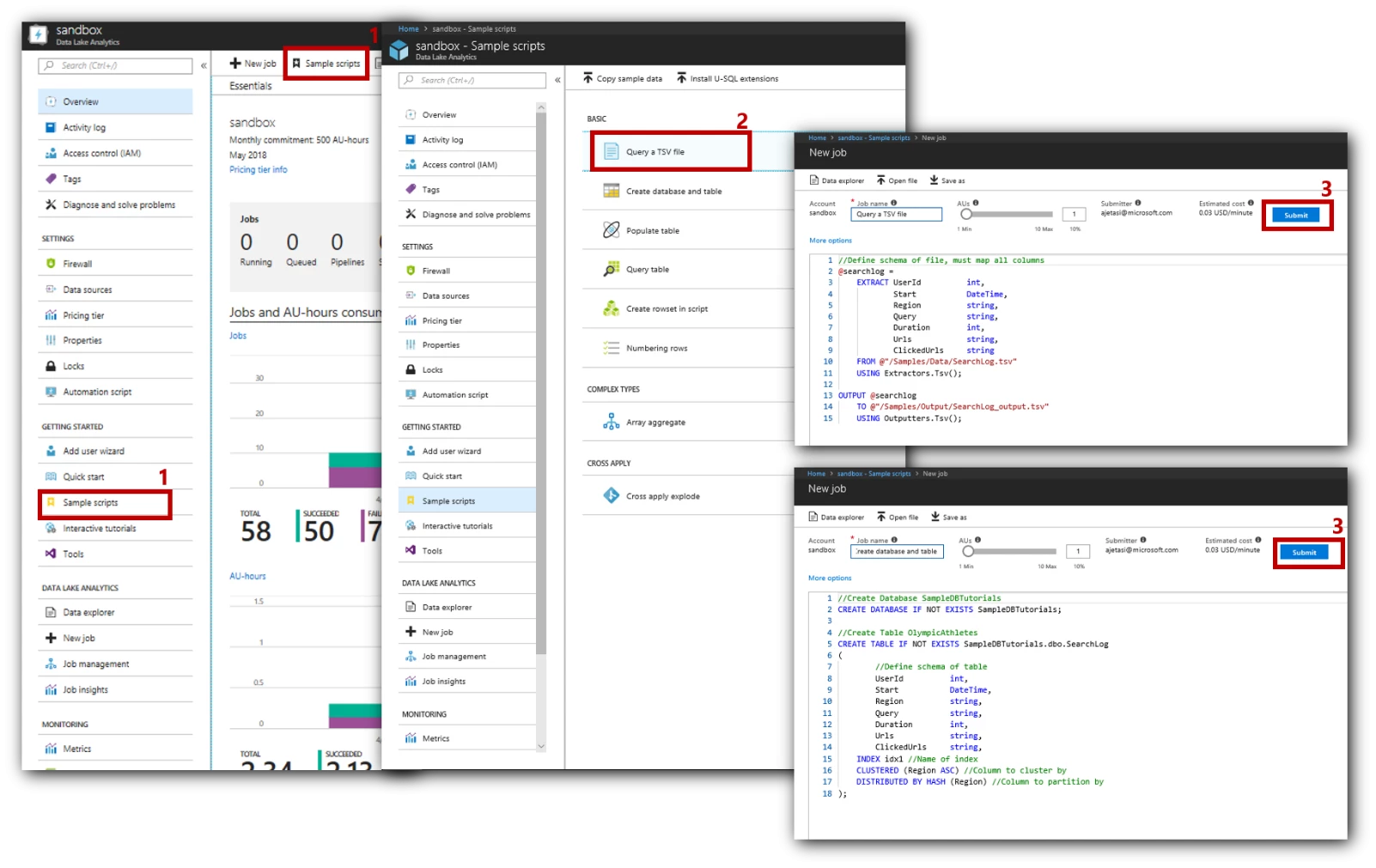
Below are the steps you can follow to start with existing samples in the portal:
- Go to your ADLA account
- Click on Sample Scripts (on the left, or on the top)
- If you are prompted to install sample data, do so. It will copy a few MBs of sample data into your ADLS account
- Select any sample – for example Query a TSV file and click Submit
Step 4: Submit a U-SQL Job with Data Lake Tools for Visual Studio
In step 1, you used Visual Studio to run U-SQL scripts on your own machine. In steps 2 and 3 we switched to using the Azure portal and working with an ADLA account. Now we will return to Visual Studio and submit U-SQL scripts to an ADLA account in Azure. Read this Getting Started guide and follow the steps to run U-SQL script using Visual Studio.
Step 5: Learn how a U-SQL script executes
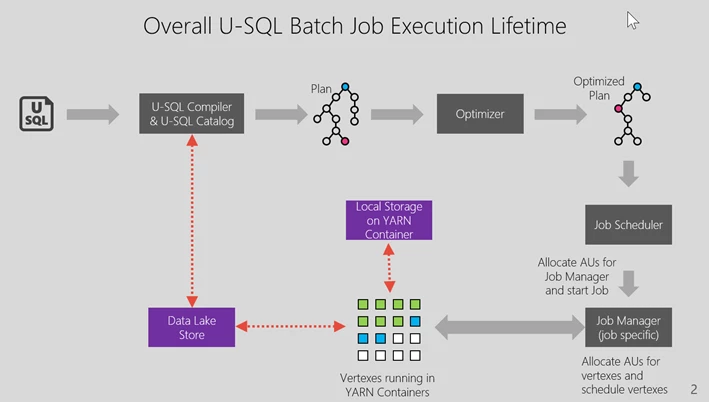
So far, the blog post was focused on using the U-SQL language. Now you should explore what is happening under the covers when a U-SQL script runs. Understanding U-SQL query execution is a MUST DO task for any U-SQL developer. This will help you immensely when debugging problems and optimizing your code to scale.
Watch video: U-SQL Batch Query Execution
Step 6: C# code behind in Visual Studio
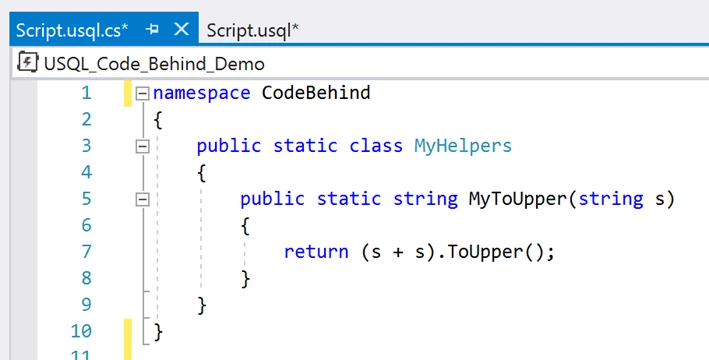
U-SQL makes it easy to use .NET code. If you are a C# developer, our Visual Studio tooling makes it especially easy to reuse C# code directly in your U-SQL scripts through a feature called “U-SQL C# Code-Behind.”
Watch video: C# Code-Behind for U-SQL in Visual Studio
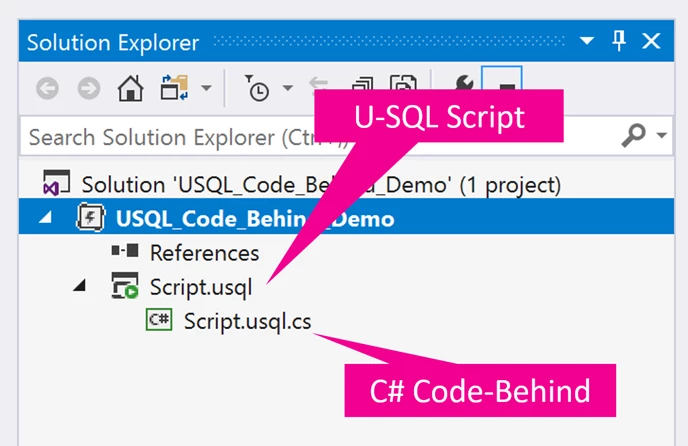
U-SQL Script calling a method in C# Code-Behind:
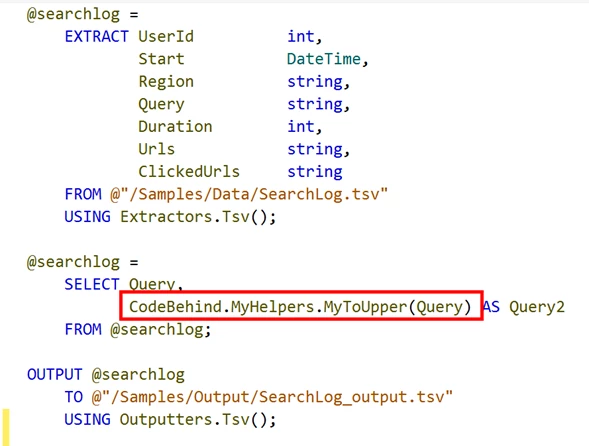
And here’s what’s in the C# Code-behind:
Step 7: User code debugging in Visual Studio
One of the challenges in running your code in a distributed fashion is that it typically is very hard to track down and reproduce failures. Our Visual Studio tooling has simplified the experience. For example, debugging a .NET exception thrown by your code that is being used in a U-SQL script, is just as easy as debugging that exception with a normal C# project on your machine.
Watch video: Debug C# code errors in failed U-SQL jobs
Step 8: Learn about the AU Analyzer
As you begin to use U-SQL scripts against larger amounts of data, you are going to eventually wonder about how to optimize the number of Analytics Units (AUs) for your U-SQL jobs. Fortunately, we’ve built a wonderful tool called the AU Analyzer to help you perform these optimizations.
Watch video: AU analysis for U-SQL jobs
Step 9: Learn how to save money and control costs
As you start working with big data, you will need to think about all the ways in which you can control your costs. Read our cost saving guides.
Step 10: Use GitHub samples
If you are facing a problem that needs solving, likely someone else is facing a similar one too. We use GitHub to share code samples and more with the U-SQL community. We get popular questions on a range of topics. See samples for specific topics below:
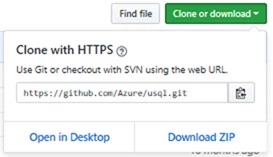
You can find more samples, and to download the Git repo, just click Clone or download, then Download ZIP.
Advanced learning
Read documentation to understand advanced concepts
- How to define and use a UDO in U-SQL
- Python in U-SQL
- R in U-SQL
- Submitting and monitoring U-SQL jobs in the Azure Portal
- USQL programmability guide
- usql.io gives you tutorials, samples and links to developer tools
- USQL-Reference contains reference documentation
Become part of the U-SQL community!
We look forward to welcoming you to our growing community of U-SQL users, and we love to hear your feedback. Especially, let us know when U-SQL is easing your way to write a function that you couldn’t otherwise do or allows you to perform your analytics tasks in a compressed time. Go ahead and run a U-SQL job and share your experiences.
If you have any questions in regard to U-SQL, ask them at U-SQL Stack overflow or Azure Data Lake MSDN.






