Cloud storage often serves as a content source for browser and mobile applications. This is typically achieved using application-issued, pre-authorized URLs which provide time-limited access directly to specific content without requiring a service to proxy this access.
Azure Storage supports this pattern through the use of shared access signature tokens (SAS tokens). These tokens grant specific, time-limited access to storage objects by signing an authorization statement using the storage account access key, which is controlled by account administrators. While this approach provides the required limited access to clients, it sometimes represents an over-provisioning of access to these token-issuing services since this provides full control over the entire account where they may only require read access to specific content.
Today we are launching a preview for a new kind of SAS token, user delegation SAS tokens. By extending the recent release of Azure AD and Azure role-based access control (RBAC) for Azure Storage, lower-privileged users and services can now delegate subsets of their access to clients, using this new type of pre-authorized URL. Clients retrieve a user delegation key tied to their Azure Active Directory (AD) account, and then use it to create SAS tokens granting a subset of their own access rights.
This means, for example, that an application component with only read access to end-user content could be configured to issue short lived read-only URLs to clients without the risks involved with storing and using the powerful account access key. Azure Storage access logs will also reflect client use of these SAS tokens as associated with the Azure AD principal of this application component.
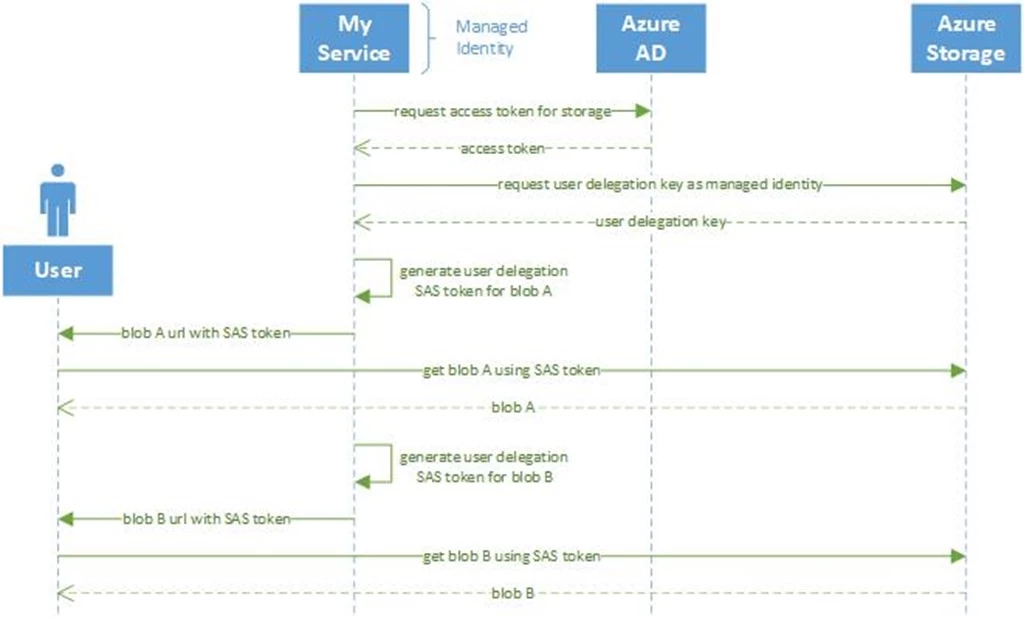
During this preview, you can generate user delegation SAS tokens with your own code or use Azure PowerShell or Azure CLI. Remember, you will first need to grant RBAC permissions to access data to the user account that will generate the SAS token. Learn more about granting RBAC access to your blob data in our documentation here.
How to create a user delegation SAS token
The preview capability is available now for everyone, for non-production use. No registration is required.
For developers, here is an example using .NET code to generate a user-delegation SAS token. It also shows our new .NET client libraries for Storage and integrated Azure.Identity libraries.
client = new BlobServiceClient(accountUri, new DefaultAzureCredential());

//define permission set to read blob, valid from now for a specified number of minutes
BlobSasBuilder builder = new BlobSasBuilder()
{
    ContainerName = containerName,
    BlobName = blobName,
    Permissions = "r",
    Resource = "b",
    StartTime = DateTimeOffset.UtcNow,
    ExpiryTime = DateTimeOffset.UtcNow.AddMinutes(tokenLifetime)
};

//refresh user-delegation key as necessary, valid for up to a maximum of 7 days
if (currentUdk == null || currentUdk.SignedExpiry <= builder.ExpiryTime)
{
    currentUdk = client.GetUserDelegationKey(DateTimeOffset.UtcNow, DateTimeOffset.UtcNow.AddDays(7)).Value;
}

//generate a signed SAS token using the user-delegation key
string sasToken = builder.ToSasQueryParameters(currentUdk, accountName).ToString();
You can find a complete working example in the Azure Storage documentation.
Users can also use our command line tool previews to generate user-delegation SAS tokens. Here is an example using Azure CLI to generate a read-only SAS based on the user’s credentials:
$ az login
$ az storage blob generate-sas
> --account-name myaccount
> --container-name container
> --name file.txt
> --permissions r
> --expiry 2019-08-30
> --auth-mode login
> --as-user
> --full-uri
Argument '--as-user' is in preview. It may be changed/removed in a future release.

https://myaccount.blob.core.windows.net/container/file.txt?se=2019-08-30&sp=r&sv=2018-11-09&sr=b&skoid=8c93ed4c-3e11-43f4-9307-3664c9c16554&sktid=9341f370-b982-47de-b7c1-8dbe61328559&skt=2019-08-28T22%3A57%3A38Z&ske=2019-08-30T00%3A00%3A00Z&sks=b&skv=2018-11-09&sig=7trGEakY86Uj5rXsH2ApiyCZfxFgNnh6NFy4wcnmfmQ%3D
Check out our documentation for more detailed examples in Azure PowerShell and Azure CLI.
User delegation SAS tokens for Azure Blobs allow for issuing pre-authorized URLs from lower privileged identities, and are available in preview in all Azure clouds and locations. Please read more about them in our documentation, and give them a try. We would love to hear your feedback at AzureStorageFeedback@microsoft.com.