Many of our customers have requested the ability to use Azure API Management to create a proxy for their SOAP APIs in the same way that we allow them to for REST/HTTP APIs, enabling developer portal integration, analytics, policies etc. This article will take you through how to set a SOAP API up and show you how the new API works.
Let’s get started! We will need a WSDL file that we will import – SOAP services cannot be created from scratch like REST services in Azure API Management (they are a bit too complex!). Either retrieve the URL of the WSDL of your SOAP service that you would like to use, or use our example Orders SOAP Service. A few things to make you aware of in how we support WSDLs:
- We support SOAP services defined using WS-I Basic Profile 1.1, SOAP 1.1, WSDL1.1 and SOAP 1.2.
- We do not currently support WSDLs containing the elements wsdl:import, or messages with multiple parts
In the publisher portal, browse to the APIs menu and select “Import API”. On the screen that appears, you can now choose from WADL, Swagger or WSDL as your Import format.
Select WSDL, and then either paste link or browse to your WSDL file. Give your API a URL suffix (e.g. “Orders”), and add it to a product if you wish (we will be adding our example to a product so that we can test it in the developer portal). Select ‘Save’.
The next screen that may appear, and that appears here in our demo, is one that occurs when your WSDL file has multiple service endpoints defined (“Port Types” or “Interfaces”). In order for us to treat our SOAP API in a similar manner to other APIs, we need to import only one of the interfaces defined within it (the other interfaces can be imported as separate APIs). Select FazioService::basic to continue.
API Management will now create your SOAP API. When it has been created, you will see the normal API dashboard, except there is an icon to indicate this is a SOAP API. You will see a similar icon when you browse over to the Developer Portal.
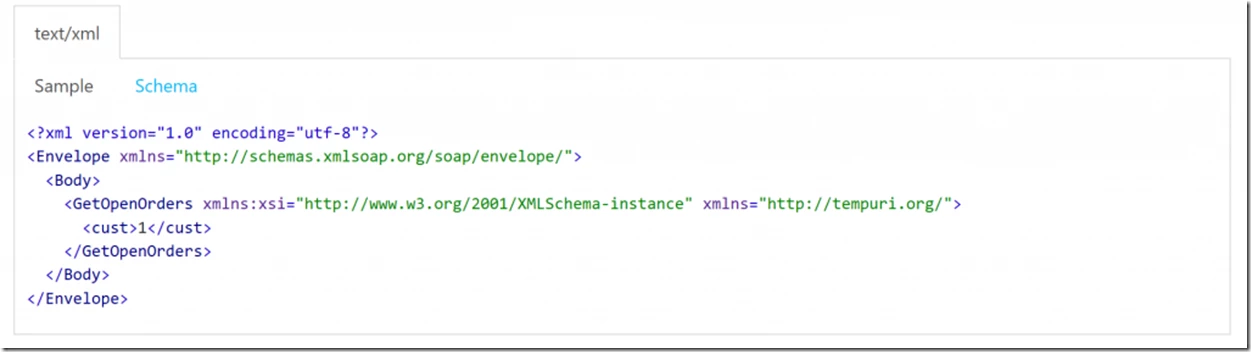
In the Developer Portal, if you click on Orders API, you can now see the operations and documentation we have generated. All the SOAP Actions defined in your SOAP API are treated just like Operations in a REST API You should be able to see schemas and example SOAP messages for each operation. We can also test the API just like you would a REST API. Click on “GetOpenOrders”, hit the “Try It” button, and you will be presented with an example request. For GetOpenOrders, change the customer number (between the “cust” tags) to “1001” to retrieve an example response.
Finally, head back to the Publisher Portal to take a look at the Analytics tab. You should be able to see the call we just made to GetOpenOrders. Analytics for SOAP APIs in Azure API Management work in just the same way as REST APIs.
A few quick notes on working with SOAP. Firstly, we now give you the ability in policy expressions to access the SOAP Body:
https://myservice.test/test

POST

@(context.Request.Body.AsSoap(true).Body.Contents.ToString())
You can also use our management API to upload WSDLs, rather than the publisher portal:
Request without specifying service and endpoint names:
HTTP Verb: Put
Headers:
Content-Type application/wsdl+xml
Authorization
Body: Content of your WSDL
Request with specifying service and endpoint names:
HTTP Verb: Put
Headers:
Content-Type application/wsdl+xml
Authorization
Body: Content of WSDL