This blog has been coauthored by Ashish Shah, Partner Director of Engineering, Azure Developer Experience.
We are announcing the general availability of Azure Load Testing. Azure Load Testing is a fully managed load-testing service that enables you to generate high-scale load, gain-actionable insights, and ensure the resiliency of your applications and services regardless of where they’re hosted. Developers, testers, and engineering teams can use it to optimize application performance, scalability, or capacity.
Get started with Azure Load Testing now, by quickly creating a load test for your web application by using a URL. If you already have load tests leveraging JMeter, you can easily get started by reusing existing Apache JMeter test scripts.
Building resiliency testing into developer workflows
Our goal at Microsoft is to help developers do more with less effort. When performance, scalability, or resiliency issues are identified in production or even close to production they can be extremely difficult and costly to resolve. With Azure Load Testing developers can catch issues closer to code authoring time as part of their developer workflows saving them valuable time and energy.
“As part of our quality shift left initiatives, the Cloud Ecosystem Security teams were able to prevent multiple unique load related bugs from reaching production by gating production builds using Azure Load Testing as part of our CI/CD pipeline. The service teams have also combined the load from Azure Load Testing with fault injection scenarios from Azure Chaos Studio to replicate, root cause and prevent non happy path scenarios that are hard to catch using regular testing frameworks. Along with service resiliency validation, Azure Load Testing has helped uncover the bounds of the distributed system and saved us costs by eliminating unused resources and frameworks.“-Microsoft Cloud Ecosystem Security engineering team
“The Azure Synapse team uses Azure Load Testing to generate different levels of workloads from high concurrency to large input data sequential execution targeting Synapse SQL Serverless endpoints. With the flexibility of JMeter we can start/stop other services within a cluster that can inject different failures, thus truly testing the resiliency of our service.“-Microsoft Azure Synapse engineering team
Pay only for what you need
Optimize your infrastructure while ensuring your application and services are resilient to severe spikes in customer traffic. Leverage Azure Load Testing to optimize your infrastructure before production, planning for the customer traffic you are expecting, paying only for what you need. Then leverage Azure Load Testing to test for unplanned increases in load.
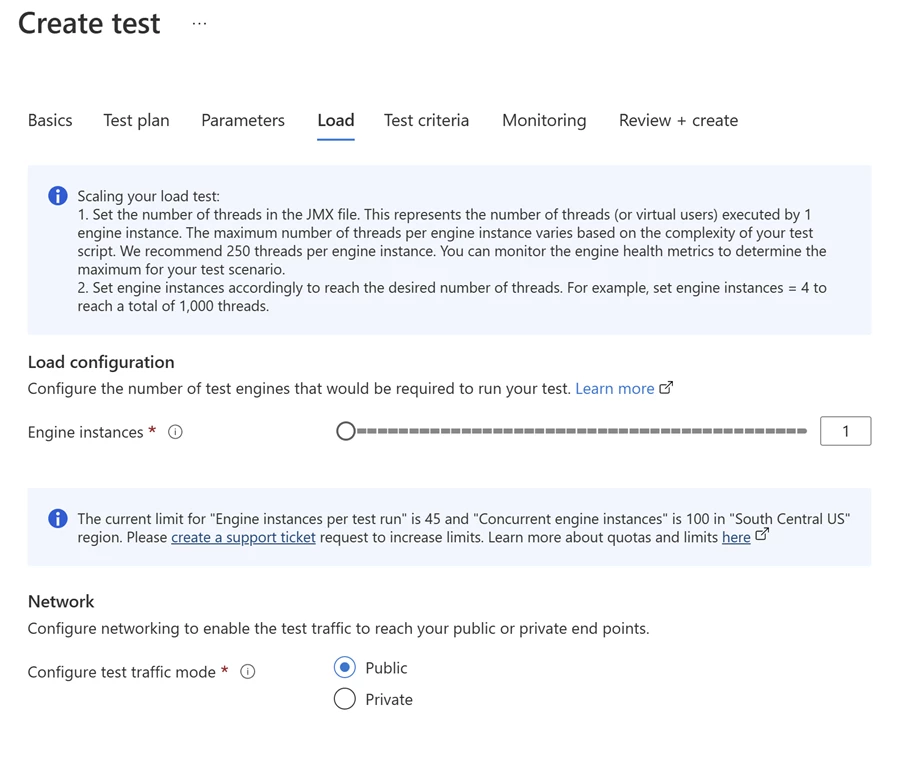
Figure 1: Easily scale load in Azure Load Testing to check the resiliency of your applications and services.
Regression testing
For Azure-based applications, Azure Load Testing collects detailed resource metrics to help you identify performance bottlenecks across your Azure application components. You can automate regression testing by running load tests as part of your continuous integration and continuous deployment (CI/CD) workflow.
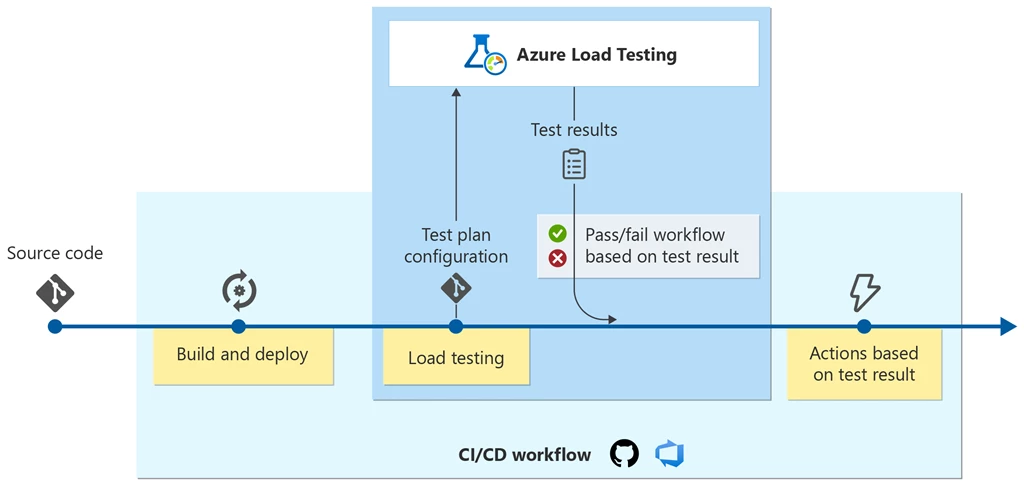
Figure 2: Build Load Testing into your developer workflow with pass/fail criteria.
Azure-specific insights can help you understand how different load scenarios impact all the parts of your application, and you can compare test results across different load tests to understand behavior changes over time.
Azure Load Testing creates monitoring data using Azure Monitor, including Application insights and Container insights, to capture details from the Azure services. Depending on the type of service, different metrics are available. For example, the number of database reads, the type of HTTP responses, or container resource consumption. Both client-side and server-side metrics are available in the Azure Load Testing dashboard.
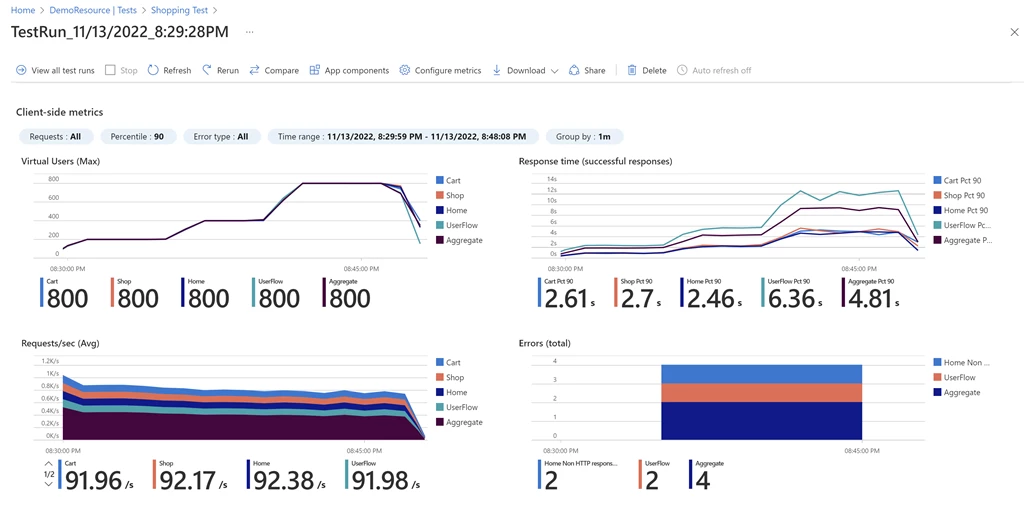
Figure 3: Get performance insights across client and Azure service side metrics with Azure Load Testing.
Enable advanced load testing scenarios
For more advanced load testing scenarios, you can create a JMeter-based load test, a popular open-source load and performance tool. For example, your test plan might consist of multiple application requests, or input data and parameters to make the test more dynamic. And if you already have existing JMeter test scripts you can reuse them to create load tests with Azure Load Testing.
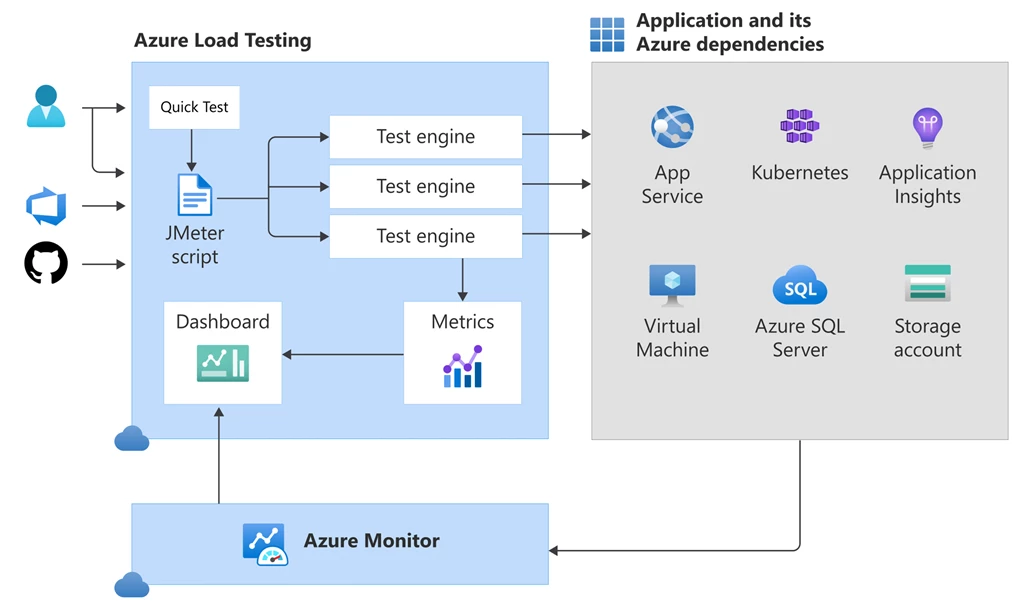
Figure 4: Azure Load Testing architecture overview.
What has changed since preview?
Since we debuted Azure Load Testing, we have enabled several new capabilities based on customer feedback.
Quick test creation
- Quick test creation of Azure Load Testing with URL. Quick test creation lets you create a load test without a JMeter script, enabling you to set up, run, and test your URL in less than five minutes.
Azure SDK Load Testing Libraries
- .NET Azure Load Testing Library
- Java Azure Load Testing Library
- JavaScript Azure Load Testing Library
- Python Azure Load Testing Library
JMeter capabilities
- Support for user specified JMeter properties. Support for user-specified JMeter properties, making load tests more configurable.
- Splitting input data across multiple test engines. If you’re using CSV data in your JMeter script, you can process the input data in parallel across multiple test engines. Azure Load Testing enables you to configure a test to split the data evenly across all engine instances.
Authentication, user-managed identities, and customer-managed keys
- Authenticate with Client Certificates. Azure Load Testing now enables you to authenticate application endpoints which require a client certificate.
- Test Private Endpoints or applications hosted on-premises. Azure Load Testing enables you to test private application endpoints or applications that you host on-premises.
- System assigned and user-assigned managed identities. Azure Load Testing now supports both system-assigned and user-assigned managed identities.
- Customer managed keys. Azure Load Testing support for customer-managed keys.
Additional metrics
- Additional Client-side metrics for pass/fail criteria. Azure Load Testing enables you to leverage pass/fail criteria metrics including additional client-side metrics of requests per second and latency.
- View load engine metrics. Ability to view engine health metrics to understand the performance of the test engine during the run, enabling confidence in the test results and improve test configuration.
Compliance and regional availability
- Azure Load Testing is HITRUST certified.
- Azure Load Testing Regional availability. Azure Load Testing is now available in 11 regions; Australia East, East Asia, East US, East US2, North Europe, South Central US, Sweden Central, UK South, West Europe, West US2, and West US3.
Get started with Azure Load Testing
You can get started with Azure Load Testing by creating an Azure Load Testing resource in the Azure portal. Check out the Azure Load Testing documentation and create your first load test.
Learn more about pricing details on the Azure Load Testing pricing page.
Watch the new DevOps Lab episode, “What’s new in Azure Load Testing?“
Azure Load Testing on DevOps Lab
Figure 5: What’s new in Azure Load Testing with April Edwards and Nikita Nallamothu.
Share your feedback
We’d love to hear from you through our feedback forum.