Skip to main content Explore View all products (200+) Microsoft Foundry Azure Copilot GitHub Copilot Azure Kubernetes Service (AKS) Azure Cosmos DB Azure Database for PostgreSQL Azure Arc Microsoft Fabric Linux virtual machines in Azure Foundry Models Foundry Agent Service Foundry IQ Foundry Tools Foundry Control Plane Observability in Foundry Control Plane Azure OpenAI in Foundry Models Azure Speech in Foundry Tools Azure Machine Learning View all databases Azure Cosmos DB Azure DocumentDB Azure SQL Azure Database for PostgreSQL Azure Managed Redis Microsoft Fabric Azure Databricks Linux virtual machines in Azure Windows Server on Azure Azure Functions Azure Virtual Machine Scale Sets Azure API Management Azure Container Apps Azure Kubernetes Service (AKS) Azure Kubernetes Fleet Manager Azure Container Registry Azure Red Hat OpenShift Azure Container Instances Azure Container Storage Azure Arc Azure Local Microsoft Defender for Cloud Azure Monitor Microsoft Sentinel Azure Migrate View all solutions (40+) Cloud solutions for small and medium businesses Cloud migration and modernization center Data analytics for AI Azure Databases AI apps and agents Microsoft Marketplace Microsoft Sovereign Cloud AI apps and agents Responsible AI with Azure AI Infrastructure Data analytics for AI Machine learning operations (MLOps) Low-code application development on Azure Integration Services Serverless computing DevOps Migration and modernization center .NET apps migration Databases on Azure Linux on Azure Oracle on Azure SAP on the Microsoft Cloud Adaptive cloud High-performance computing (HPC) Infrastructure as a service (IaaS) Resiliency Azure Essentials Frontier Accelerate for Azure FinOps on Azure Microsoft Marketplace Azure pricing overview Create an Azure account Free Azure services Flexible purchase options Pricing calculator FinOps on Azure Maximize ROI from AI Azure savings plans Azure reservations Azure Hybrid Benefit Virtual Machines Azure SQL Microsoft Foundry Microsoft Fabric Azure Kubernetes Service (AKS) Microsoft Defender for Cloud View more Software Development Companies Microsoft Marketplace Find a partner Resources for Azure partners Get started with Azure Customer stories Analyst reports, white papers, and e-books Videos Learn more about cloud computing Documentation Explore Azure portal Developer resources Quickstart templates Resources for startups Developer community Students Azure for partners Blog Events and Webinars Learn Support Contact Sales Get started with Azure Sign in

We are encouraged by the response to the introduction of Managed Disks. Since the announcement, we’ve seen many customers take advantage of this new way to manage persistent storage for their Virtual Machines. Here are some of the benefits Managed Disks provides:

  • The ability to scale your application without worrying about storage account limits
  • Achieve high-availability across your compute and storage resources with aligned fault domains
  • Create VM Scale Sets with up to 1,000 instances
  • Integrate disks, snapshots, and images as first-class resources into your architecture
  • Secure your disks, snapshots, and images through Azure Role Based Access Control (RBAC)

To read more about the benefits of Managed Disks, see Azure Managed Disks Overview.

We’re constantly improving the Managed Disks platform and working to bring new features to market based on customer feedback including:

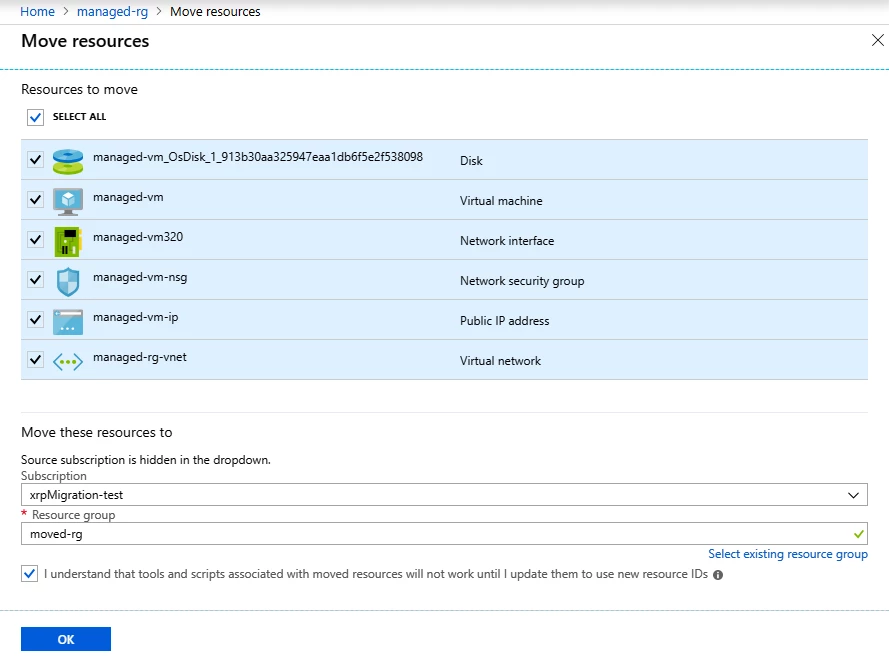
Another feature I’m excited to announce today is the availability of moving Managed Disks and VMs across resource groups and subscriptions with a single click. This also enables you to move Managed Images and Snapshots.

Get started

To use this capability, you’ll need register for the feature using the PowerShell or CLI instructions below.

PowerShell

Register-AzureRmProviderFeature -FeatureName ManagedResourcesMove -ProviderNamespace Microsoft.Compute
Register-AzureRmResourceProvider -ProviderNamespace Microsoft.Compute

CLI

az feature register --namespace Microsoft.Compute --name ManagedResourcesMove
az provider register --namespace Microsoft.Compute

Move the resources

Portal
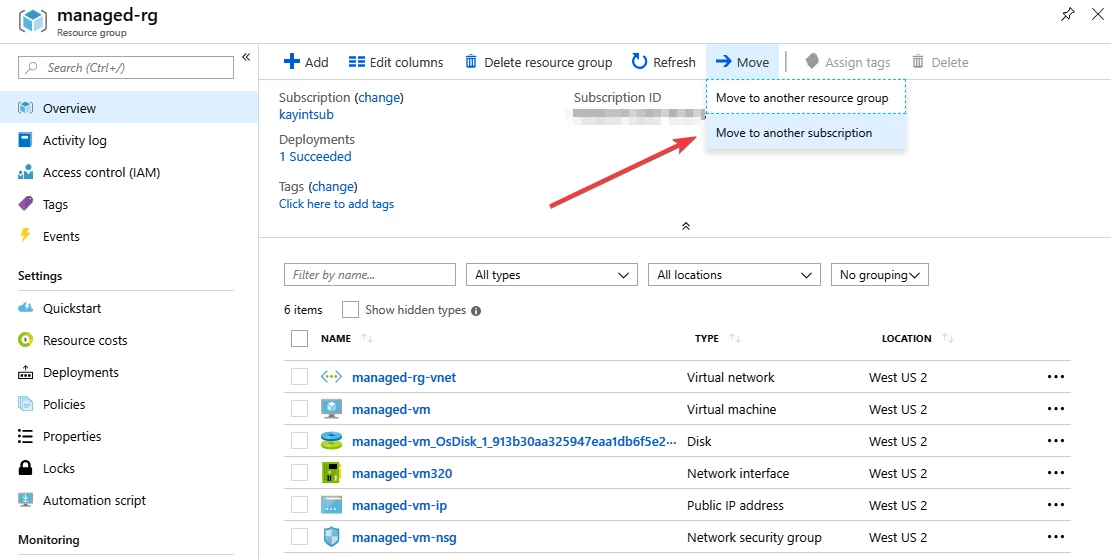
Move the resources-portal

Move resources

To learn more about moving resources with PowerShell or CLI, read our documentation.

Constraints

This new capability does not yet support:

  • Managed VMs enabled for Azure Backup. You can move such VMs by following these instructions.
  • Managed VMs referencing Azure Key Vault

WE ARE MICROSOFT

Explore Microsoft Foundry

The future of AI starts here. Envision your next great AI app with the latest technologies. Get started with Azure.