When we announced high availability (HA) ports for Azure Load Balancer, we enabled you to leverage network virtual appliances with more flexibility in Azure. HA ports is a unique capability that makes network virtual appliances (NVA) flexible as you deploy them in Azure—a first in the industry, it changed how you deploy NVAs at scale.
At Microsoft Ignite, we announced the preview of Gateway Load Balancer, a fully managed service enabling you to deploy, scale, and enhance the availability of third-party NVAs in Azure, that builds on that capability. You can add your favorite third-party appliance whether it is a firewall, inline DDoS appliance, deep packet inspection system, or even your own custom appliance into the network path transparently—all with a single click.
With Gateway Load Balancer, you can easily add or remove advanced network functionality without the additional management overhead. You can think of Gateway Load Balancer, as providing the bump-in-the-wire technology you need to ensure all traffic to a public endpoint is first sent to the appliance before your application. What makes Gateway Load Balancer even more powerful is ensuring symmetrical flows or ensuring a consistent route to your network virtual appliance—without having to update routes manually. As a result, packets that traverse the same network path in both directions to function are able to do so.
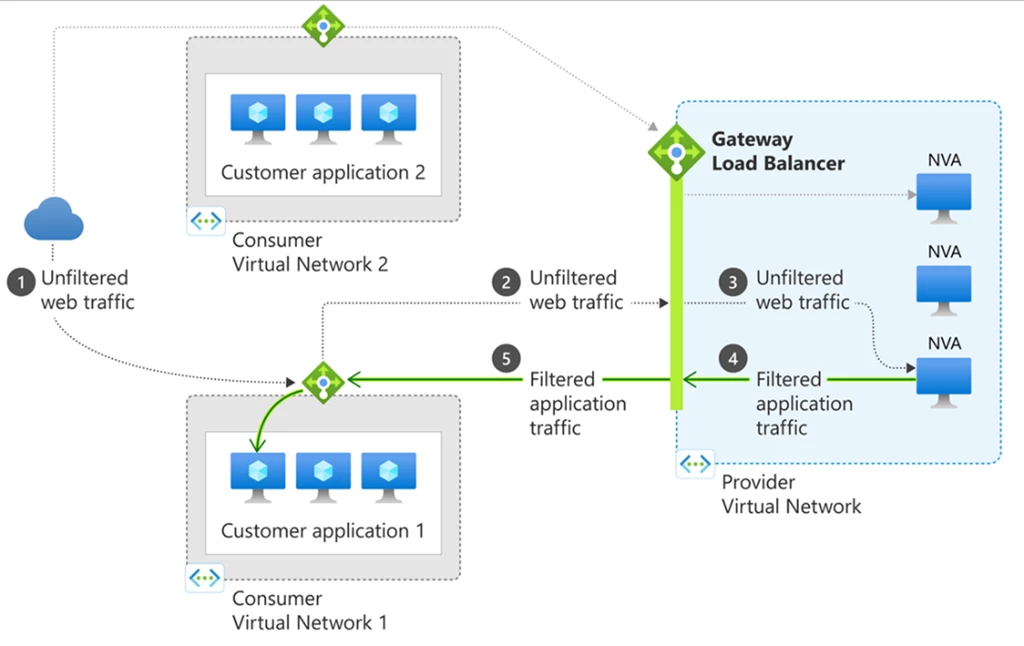
Inserting network virtual appliances in the path transparently is also known as service chaining. With Gateway Load Balancer, you can enable service chaining in Azure. Once chained to a Standard Public Load Balancer frontend or IP configuration on a virtual machine, no additional configuration is needed to ensure traffic to and from the application endpoint is sent to the Gateway LB. Traffic flows from the consumer virtual network to the provider virtual network and then returns to the consumer virtual network. Gateway Load Balancer exchanges application traffic with the appliance in its backend pool using VXLAN encapsulation. This allows preservation of the content of the traffic. The consumer virtual network and provider virtual network can be in different subscriptions, tenants, or regions enabling greater flexibility and ease of management.
Gateway Load Balancer brings together a pass-through load balancer to distribute your traffic at scale and a single entry and exit point for your traffic with a single click. All you need to do is chain your application to a Gateway Load Balancer. You can scale up or scale down as needed. You can also leverage auto-scale with virtual machine scale sets.
To get started with Gateway Load Balancer:
- Find your favorite virtual appliance in the Azure Marketplace
- Deploy the NVA instances
- Create a Gateway Load Balancer and place them in the backend pool
- Chain the Gateway Load Balancer to your public IP or standard Load Balancer frontend
Gateway Load Balancer Launch partners
Azure’s Network Virtual Appliance partners are able to offer their managed solutions through software as a Service (SaaS) with Gateway Load Balancer. Appliance providers do not need to worry about scale, load balancing, or even availability, they can rely on Gateway Load Balancer to take care of that. Gateway Load Balancer has a rich ecosystem of partners within the Azure Marketplace available, so you can start leveraging the solution today. You can choose from a plethora of industry-leading appliances in the Azure Marketplace. Learn more from our partners by visiting their recent blogs posts.
- A10 Networks: Introducing L3-7 DDoS Protection for Microsoft Azure Tenants
- Check Point: CloudGuard is a launch partner for Azure Gateway Load Balancer
- Cisco: Secure Firewall Integration with Azure Gateway Load Balancer
- Citrix: Citrix ADC integration with Azure Gateway Load Balancer
- cPacket: cPacket Networks Extends Cloud Visibility with Azure Gateway Load Balancer
- Fortinet: Deploy FortiGate with Azure Gateway Load Balancer
- F5: BIG-IP integration with Azure Gateway Load Balancer
- Glasnostic: Announcing Glasnostic for Azure Gateway Load Balancer
- Palo Alto Networks: VM series Virtual Firewalls Integrate with Azure Gateway Load Balancer
- Trend Micro: Broad Security Instantly with Azure Gateway Load Balancer
- Valtix: Valtix Integrates with Gateway Load Balancer
Deploy Gateway Load Balancer today
Customers are already using Gateway Load Balancer for many scenarios: firewalls, advanced network security functions, deep packet inspection, analytics, IoT and so many more. Gateway Load Balancer integration with standard DDoS has also enabled inline DDoS, you can read more from our recent blog post, “Protect workloads with inline DDoS protection from Gateway Load Balancer partners.”
Gateway Load Balancer is available across all Azure public regions, government cloud regions, and China cloud regions. Learn more and get started with Gateway Load Balancer through the Azure portal, Azure CLI, PowerShell, templates, or Terraform today.