Microsoft Azure Files offers fully managed file shares in the cloud that are accessible via the industry standard Server Message Block (SMB) protocol. For users of Azure Files, share snapshots have offered a read-only version of file shares from a previous point in time. Share snapshots are also incremental in nature, making their storage usage efficient. Although customers can simply use these share snapshots to go back in time, managing snapshots using scripts or automation is a labor-intensive process. Microsoft Azure Backup offers a simple and reliable way to backup and protect Azure Files using share snapshots.
Today, we are announcing the general availability of snapshot management for Azure Files by Azure Backup. Apart from being available natively in the cloud, Azure Backup offers significant benefits while protecting file shares using Recovery Services vault.

Key benefits
- Simple configuration: You can use the +Backup option from Recovery Services vault to discover all unprotected file shares in storage accounts, select multiple file shares if necessary, choose a policy, and configure backup for all file shares at once. Once configured, you can manage your backups directly from the Azure Files portal.
- Zero infrastructure solution: Being an Azure native solution, using Azure Backup means that you don’t need to run any additional compute. This saves you from setting up infrastructure to schedule snapshots or maintain or modify them periodically.
Azure File Sync users do not need to back up their data from on-premises servers as the entire data is available in cloud. You can enable cloud tiering on your on-premises servers or machines and continue to use Azure Backup to protect the cloud data.
- Flexible backup policy: Azure Backup provides you with the ability to create and modify policies of choice to define the schedule for snapshots.
You’re already used to creating daily snapshots as part of the Azure Backup policy. As part of the general availability release, we have also introduced the ability to create weekly, monthly, and yearly snapshots. You can also choose retention for these snapshots for up to 10 years. The backup policy automatically takes care of pruning expired snapshots, allowing you to stay within the 200 snapshots limit per file share.
- Comprehensive restore capabilities: Azure Backup offers a variety of options to restore your file share data. You can choose to restore the entire file share or individual files and folders. Restores can also be done to the original location or to alternate file shares in the same or different storage accounts. Azure Backup also preserves and restores all access control lists (ACLs) of files and folders.
Apart from the options above, Azure Backup ensures that the restores are sync-aware. We coordinate with the Azure File Sync service to trigger a resync back to on-premises servers once we complete restore to the associated file shares in the cloud.
- Protection against accidental deletion: Accidental deletion can happen at multiple levels.
- Individual files and folders: The lowest level is a file or folder. This is also the most common scenario. Using scheduled snapshots and being able to restore individual files and folders addresses this issue.
- Snapshot: Azure Backup becomes the initiator of the snapshot that it takes using the backup policy. However, administrators can still delete specific snapshots in their file shares. These deletions are not recommended as the restore points become invalid. We’re actively working on a mechanism that will allow Azure Backup to prevent you from any accidental snapshot deletions.
- File share: You could delete your file share and end up wiping out all snapshots taken for the file share. Azure Backup is currently working on protecting against accidental deletion of your file shares and the solution should be available in the first few regions soon.
- Storage account: Deleting storage accounts can wipe out all file shares inside the storage account along with its snapshots. Customer conversations indicate that, although this is a less common scenario, there needs to be protection against it. Hence, Azure Backup takes a delete lock on a storage account as soon as the first file share in the storage account is configured for backup.
- On-demand snapshots: Apart from the backup policy option to schedule snapshots, you can also choose to create up to four on-demand backups every day. Taking multiple on-demand backups in a day reduces the recovery point objective (RPO) for customers. Although Azure Backup purges these snapshots based on the retention set during backup, you need to ensure that you do not exceed the 200 snapshots per file share limit while using this capability.
- Alerts and reports: Integration with Azure Backup alerts enables you to configure email notifications for critical failures. Once the general availability release is available across all regions, you will start seeing backup related data in Azure Backup reports.
What’s next?
Based on our conversations with customers, we‘re working to deliver functionality above and beyond snapshot management using Azure Backup, including the ability to copy file share data to Recovery Services vault. We welcome this and all feedback from customers that help us align our work on features you will value. You can help us by filling out this survey.
Getting started
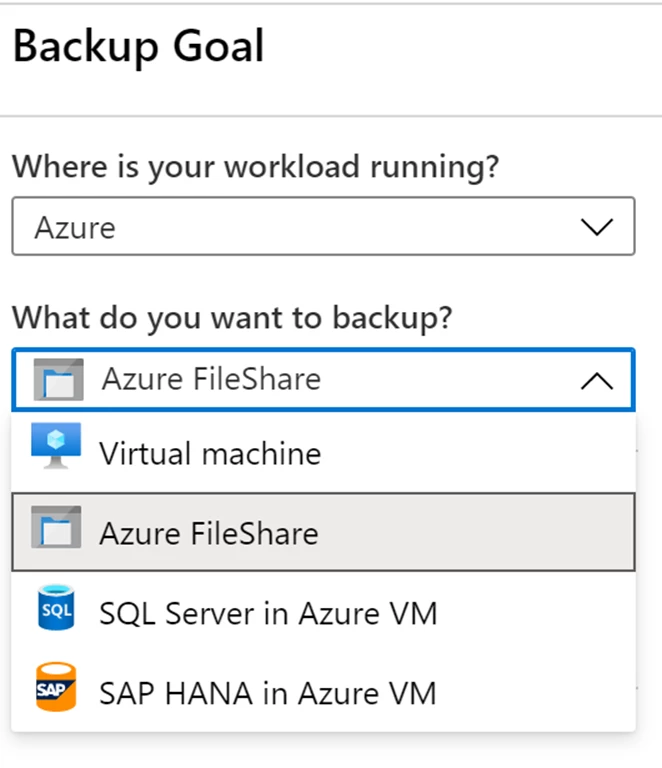
Start protecting your file shares by using the Recovery Services vaults in your region. For the list of supported regions, please refer to the support matrix. The backup goal option in the vault overview will let you choose Azure File shares to back up from storage accounts in your region. You can refer to our documentation for more details.
Pricing
For pricing details, please follow the Azure Backup pricing page for updates as we are currently rolling out the regional prices. Snapshot management using Azure Backup will not be chargeable for customers until September 1, 2020. All users can access and trial the feature without added cost through August 2020. You can write to AskAzureBackupTeam@microsoft.com for any feedback and queries.
Related links and additional content
- Support matrix for Azure Files snapshot management using Azure Backup.
- If you are new to Azure Backup, start configuring the backup on the Azure portal.
- Want more details? Check out Azure Backup documentation.
- Need help? Reach out to the Azure Backup forum for support.
- Tell us how we can improve Azure Backup by contributing new ideas and voting up existing ones.
- Follow us on Twitter @AzureBackup for the latest news and updates.