
Starting today, customers of Azure Front Door (AFD) can take advantage of new rules to further customize their AFD behavior to best meet the needs of their customers. These rules bring the specific routing needs of your customers to the forefront of application delivery on Azure Front Door, giving you more control in how you define and enforce what content gets served from where.
Azure Front Door provides Azure customers the ability to deliver content fast and securely using Azure’s best-in-class network. We’ve heard from customers how important it is to have the ability to customize the behavior of your web application service, and we’re excited to announce Rules Engine, a new functionality on Azure Front Door, in preview today. Rules Engine is for all current and new Azure Front Door customers but is particularly important for customers looking to streamline security and content delivery at the edge.
New scenarios in Azure Front Door
Rules Engine allows you to specify how HTTP requests are handled at the edge.
The malleable nature of Rules Engine makes it the ideal solution to address legacy application migrations, where you don’t want to worry about users accessing old applications or not knowing how to find content in your new apps. Similarly, geo match and device identification capabilities ensure that your users are always seeing the best content for where they are and what device they are accessing it on. Implementing security headers and cookies with Rules Engine can also ensure that no matter how your users come to interact with the site, that they’re doing so over a secure connection, preventing browser-based vulnerabilities from impacting your site.
Different combinations of match conditions and actions give you fine-grained control over which users get which content and make the possible scenarios that you can accomplish with Rules Engine endless. Some of the technical capabilities that empower these new scenarios on AFD include the following:
- Enforce HTTPS, ensure all your end users interact with your content over a secure connection.
- Implement security headers to prevent browser-based vulnerabilities, like HTTP Strict-Transport-Security (HSTS), X-XSS-Protection, Content-Security-Policy, X-Frame-Options, as well as Access-Control-Allow-Origin headers for CORS scenarios. Security-based attributes can also be defined with cookies.
- Route requests to mobile or desktop versions of your application based on the patterns in the contents of request headers, cookies, or query strings.
- Use redirect capabilities to return 301/302/307/308 redirects to the client to redirect to new hostnames, paths, or protocols.
- Dynamically modify the caching configuration of your route based on the incoming requests.
- Rewrite the request URL path and forward the request to the appropriate backend in your configured backend pool.
Rules Engine is designed to handle a full breadth of scenarios. To learn more, a full list of match conditions and AFD Rules Engine actions can be found in our documentation.
How Rules Engine works
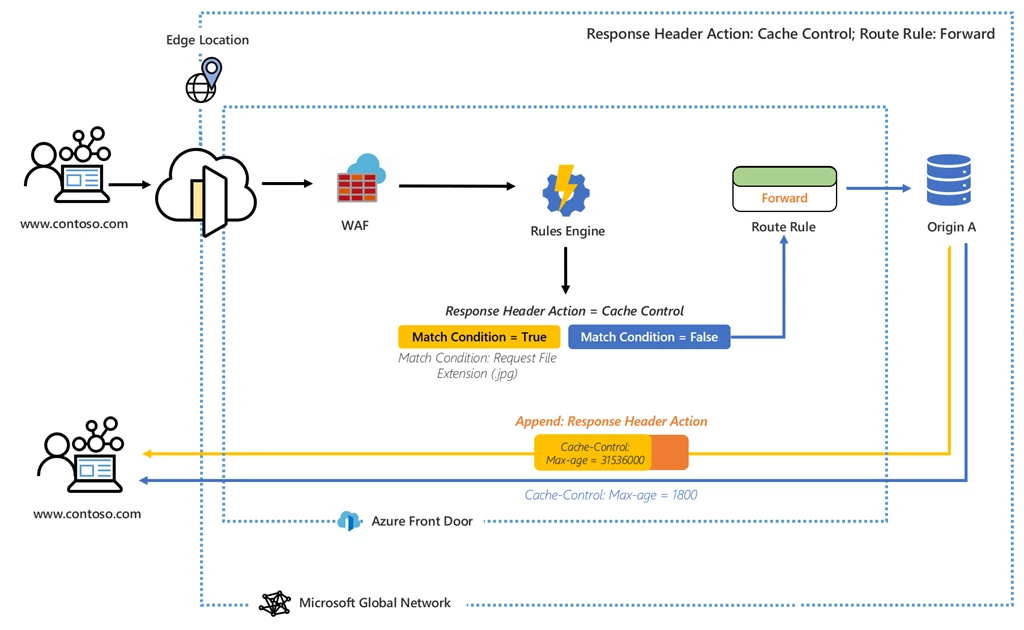
Rules Engine handles requests at the edge. Once configuring Rules Engine, when a request hits your Front Door endpoint, Web Application Firewall (WAF) will be executed first, followed by the Rules Engine configuration associated with your frontend or domain. When a Rules Engine configuration is executed, it means that the parent routing rule is already a match. Whether all actions in each of the rules within the Rules Engine configuration are executed is subject to all of the match conditions within that rule being satisfied. If a request matches none of the conditions in your Rule Engine configuration, then the default Routing Rule is executed.
For example, in the configuration below, a Rules Engine is configured to append a response header which changes the max-age of the cache control if the match condition is met.
In another example, we see that Rules Engine is configured to send a user to a mobile version of the site if the match condition, device type, is true.
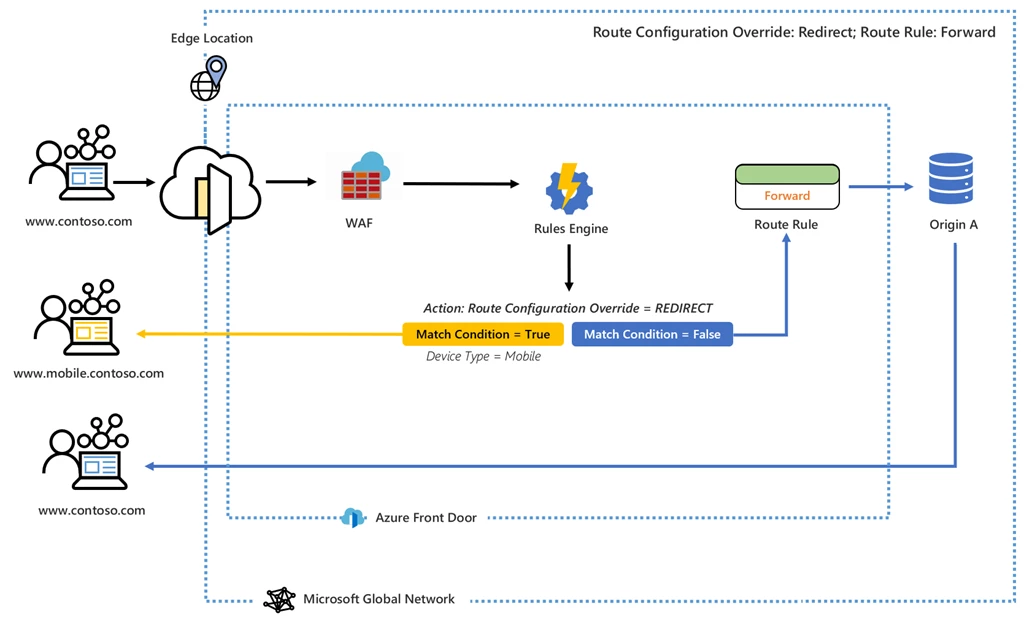
In both examples, when none of the match conditions in Rules Engine are met, the default behavior specified in the Route Rule is what gets executed.
Next steps
We look forward to seeing how Rules Engine helps you unlock further capabilities in Azure Front Door. To learn more about what’s available today, check out the documentation for Azure Front Door Rules Engine.






