Skip to main content Explore View all products (200+) Microsoft Foundry Azure Copilot GitHub Copilot Azure Kubernetes Service (AKS) Azure Cosmos DB Azure Database for PostgreSQL Azure Arc Microsoft Fabric Linux virtual machines in Azure Foundry Models Foundry Agent Service Foundry IQ Foundry Tools Foundry Control Plane Observability in Foundry Control Plane Azure OpenAI in Foundry Models Azure Speech in Foundry Tools Azure Machine Learning View all databases Azure Cosmos DB Azure DocumentDB Azure SQL Azure Database for PostgreSQL Azure Managed Redis Microsoft Fabric Azure Databricks Linux virtual machines in Azure Windows Server on Azure Azure Functions Azure Virtual Machine Scale Sets Azure API Management Azure Container Apps Azure Kubernetes Service (AKS) Azure Kubernetes Fleet Manager Azure Container Registry Azure Red Hat OpenShift Azure Container Instances Azure Container Storage Azure Arc Azure Local Microsoft Defender for Cloud Azure Monitor Microsoft Sentinel Azure Migrate View all solutions (40+) Cloud solutions for small and medium businesses Cloud migration and modernization center Data analytics for AI Azure Databases AI apps and agents Microsoft Marketplace Microsoft Sovereign Cloud AI apps and agents Responsible AI with Azure AI Infrastructure Data analytics for AI Machine learning operations (MLOps) Low-code application development on Azure Integration Services Serverless computing DevOps Migration and modernization center .NET apps migration Databases on Azure Linux on Azure Oracle on Azure SAP on the Microsoft Cloud Adaptive cloud High-performance computing (HPC) Infrastructure as a service (IaaS) Resiliency Azure Essentials Frontier Accelerate for Azure FinOps on Azure Microsoft Marketplace Azure pricing overview Create an Azure account Free Azure services Flexible purchase options Pricing calculator FinOps on Azure Maximize ROI from AI Azure savings plans Azure reservations Azure Hybrid Benefit Virtual Machines Azure SQL Microsoft Foundry Microsoft Fabric Azure Kubernetes Service (AKS) Microsoft Defender for Cloud View more Software Development Companies Microsoft Marketplace Find a partner Resources for Azure partners Get started with Azure Customer stories Analyst reports, white papers, and e-books Videos Learn more about cloud computing Documentation Explore Azure portal Developer resources Quickstart templates Resources for startups Developer community Students Azure for partners Blog Events and Webinars Learn Support Contact Sales Get started with Azure Sign in

User interface design process involves a lot a creativity that starts on a whiteboard where designers share ideas. Once a design is drawn, it is usually captured within a photograph and manually translated into some working HTML wireframe to play within a web browser. This takes efforts and delays the design process. What if a design is refactored on the whiteboard and the browser reflects changes instantly? In that sense, by the end of the session there is a resulting prototype validated between the designer, developer, and customer. Introducing Sketch2Code, a web based solution that uses AI to transform a handwritten user interface design from a picture to a valid HTML markup code.
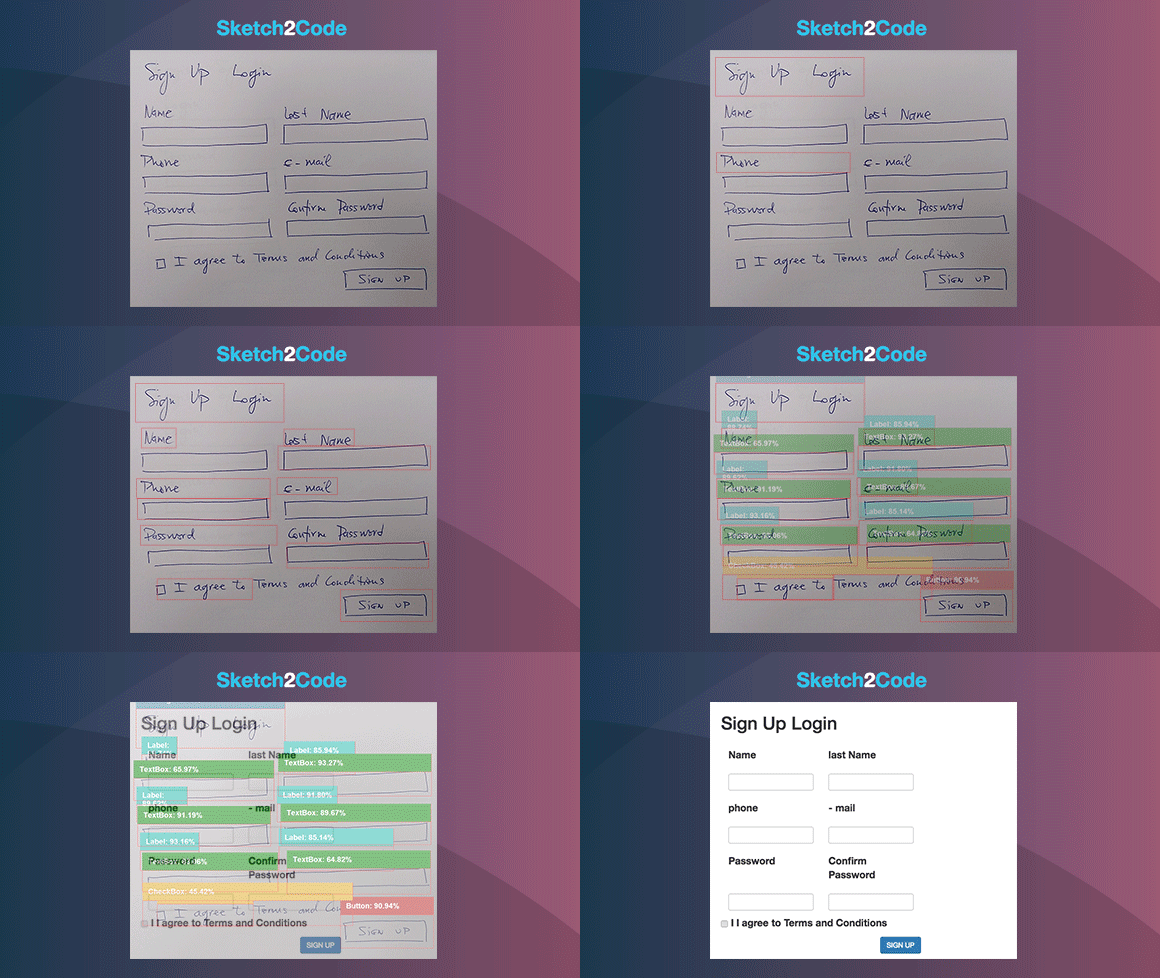
Sketch2Code

Let’s understand the process of transforming handwritten image to HTML using Sketch2Code in more details.

  • First the user uploads an image through the website.
  • A custom vision model predicts what HTML elements are present in the image and their location.
  • A handwritten text recognition service reads the text inside the predicted elements.
  • A layout algorithm uses the spatial information from all the bounding boxes of the predicted elements to generate a grid structure that accommodates all.
  • An HTML generation engine uses all these pieces of information to generate an HTML markup code reflecting the result.

Below is the the application workflow:
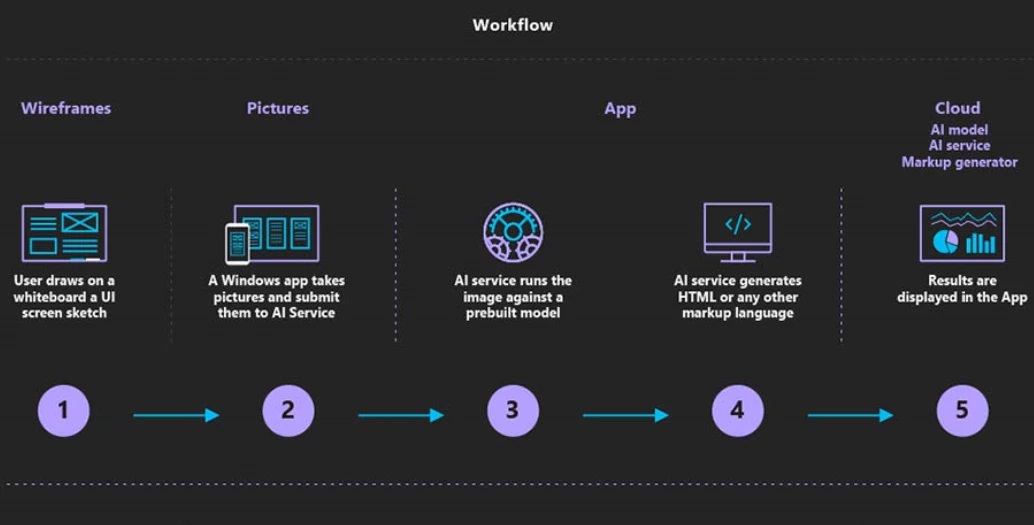
Application workflow

The Sketch2Code uses the following elements:

  • A Microsoft Custom Vision Model: This model has been trained with images of different handwritten designs tagging the information of most common HTML elements like buttons, text box, and images.
  • A Microsoft Computer Vision Service: To identify the text written into a design element a Computer Vision Service is used.
  • An Azure Blob Storage: All steps involved in the HTML generation process are stored, including the original image, prediction results and layout grouping information.
  • An Azure Function: Serves as the backend entry point that coordinates the generation process by interacting with all the services.
  • An Azure website: User font-end to enable uploading a new design and see the generated HTML results.

The above elements form the architecture as follows:
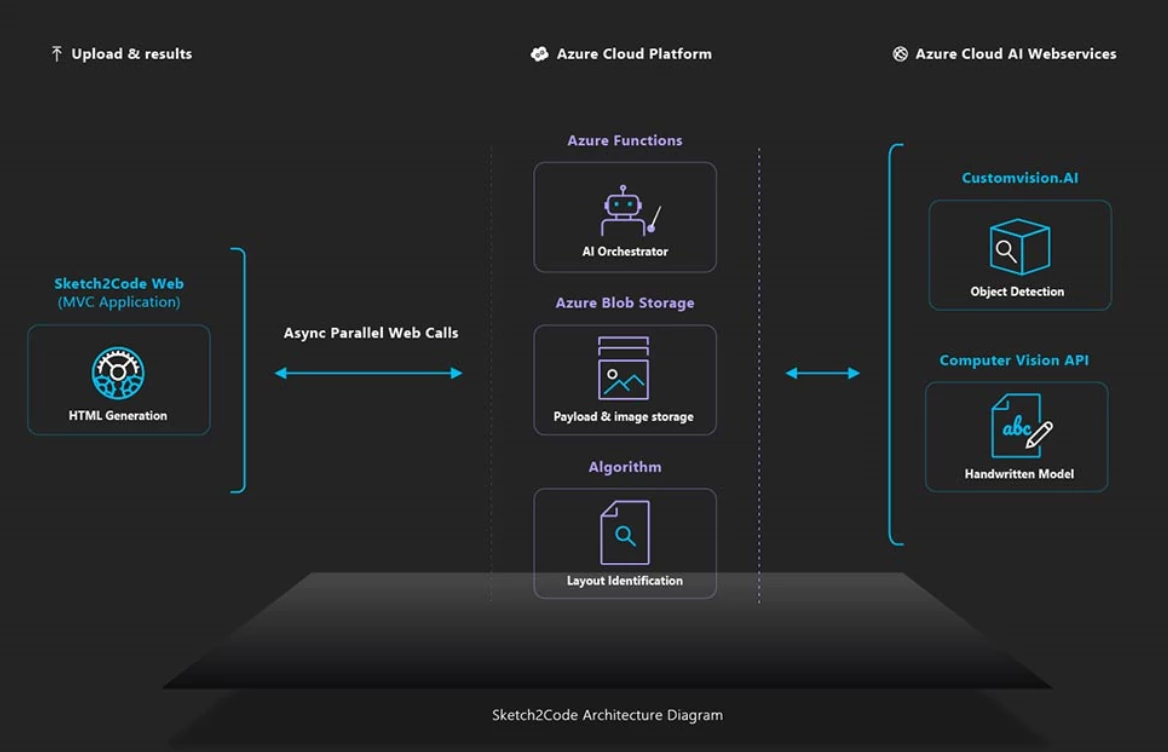
Architecture elements

You can find the code, solution development process, and all other details on GitHub. Sketch2Code is developed in collaboration with Kabel and Spike Techniques.

We hope this post helps you get started with AI and motivates you to become an AI developer.

Tara

Twitter  LinkedIn

WE ARE MICROSOFT

Explore Microsoft Foundry

The future of AI starts here. Envision your next great AI app with the latest technologies. Get started with Azure.