
This blog post was co-authored by Parashar Shah, Senior Program Manager, Applied AI Developer COGS.
When data scientists work on building a machine learning model, their experimentation often produces lots of metadata: metrics of models you tested, actual model files, as well as artifacts such as plots or log files. They often try different models and parameters, for example random forests of varying depth, linear models with different regularization rates, or deep learning models with different architectures trained using different learning rates. With all the bookkeeping involved, it is easy to miss a test case, or waste time by repeating an experiment unnecessarily. After they finalize the model that they want to use for predictions, they have to do multiple things in order to create a deployment environment and then create a webservice (http endpoint) from their model.
For small proof-of-concept machine learning projects, data scientists might be able to keep track of their project using manual bookkeeping with spreadsheets and versioned copies of training scripts. However, as their project grows, and they work together with other data scientists as a team, they’ll need a better tracking solution that allows them to:
- Analyze the performance of the model while tuning parameters.
- Query the history of experimentation to find the best models to take to production.
- Revisit and follow up on promising threads of experimentation.
- Automatically link training runs with related metadata.
- View snapshots and audit previous training runs.
Once a data scientist has created a model, a model management, and model deployment solution is needed. This solution should allow for:
- Storing multiple models and multiple versions of the same model in a common workspace.
- Easy deployment and creation of a scalable web service.
- Monitoring the deployed web service.
Azure Machine Learning and MLflow
Azure Machine Learning service provides data scientists and developers with the functionality to track their experimentation, deploy the model as a webservice, and monitor the webservice through existing Python SDK, CLI, and Azure Portal interfaces.
MLflow is an open source project that enables data scientists and developers to instrument their machine learning code to track metrics and artifacts. Integration with MLflow is ideal for keeping training code cloud-agnostic while Azure Machine Learning service provides the scalable compute and centralized, secure management and tracking of runs and artifacts.
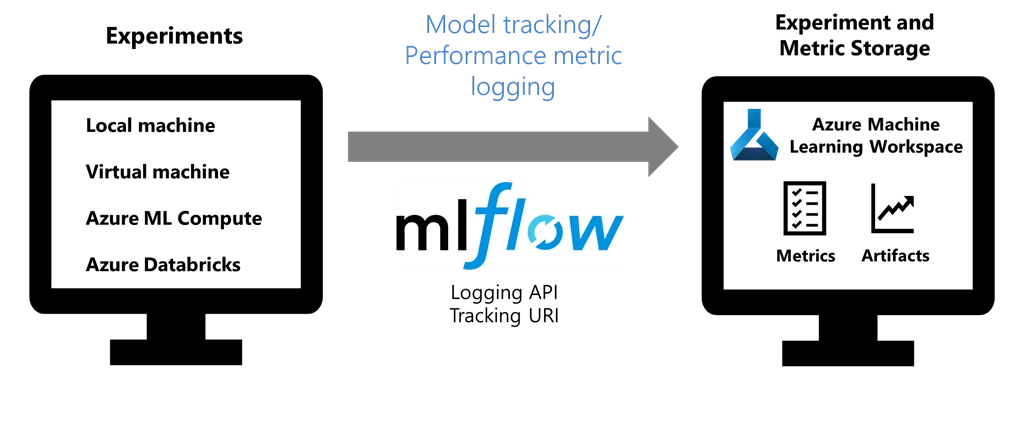
Data scientists and developers can take their existing code, instrumented using MLflow, and simply submit it as a training run to Azure Machine Learning. Behind the scenes, Azure Machine Learning plug-in for MLflow recognizes they’re within a managed training run and connects MLflow tracking to their Azure Machine Learning Workspace. Once the training run has completed, they can view the metrics and artifacts from the run at Azure Portal. Later, they can query the history of your experimentation to compare the models and find the best ones.
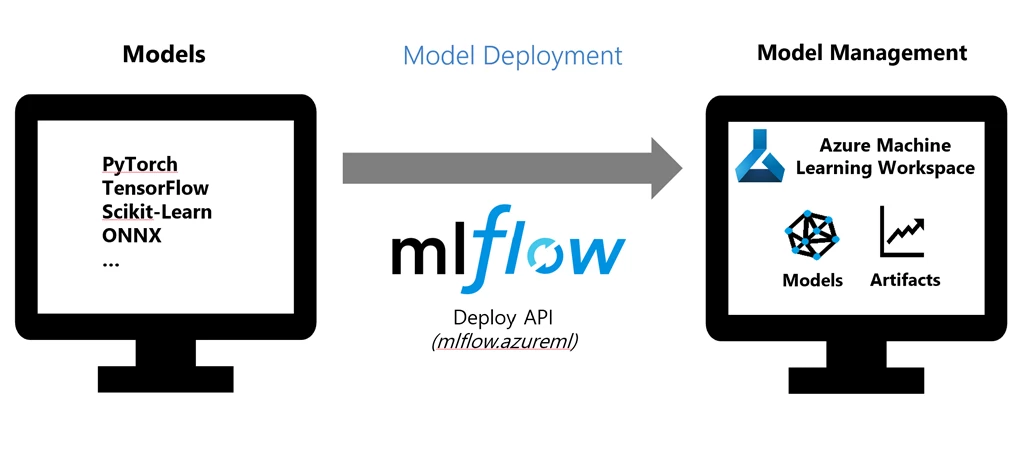
Once the best model has been identified it can be deployed to a Kubernetes cluster (Azure Kubernetes service), from within the same environment using MLflow.
Example use case
At Spark + AI Summit 2019, our team presented an example of training and deploying an image classification model using MLflow integrated with Azure Machine Learning. We used the PyTorch deep learning library to train a digit classification model against MNIST data, while tracking the metrics using MLflow and monitoring them in Azure Machine Learning Workspace. We then saved the model using MLflow’s framework-aware API for PyTorch and deployed it to Azure Container Instance using Azure Machine Learning Model Management APIs.
Where can I use MLflow with Azure Machine Learning?
One of the benefits of Azure Machine Learning service is that it lets data scientists and developers scale up and scale out their training by using compute resources on Azure cloud. They can use MLflow with Azure Machine Learning to track runs on:
- Their local computer
- Azure Databricks
- Machine Learning Compute cluster
- CPU or GPU enabled virtual machine
MLflow can be used with Azure Machine Learning to deploy models to:
- Azure Container Instance (ACI)
- Azure Kubernetes Service (AKS)
Getting started
The following resources give instructions and examples how to get started:
- Microsoft documentation “How to use MLflow with Azure Machine Learning service (preview).”
- MLflow documentation including a quickstart guide, tutorials, and other key concept information.
- Example Jupyter Notebooks from our GitHub repository.






