Skip to main content Explore View all products (200+) Microsoft Foundry Azure Copilot GitHub Copilot Azure Kubernetes Service (AKS) Azure Cosmos DB Azure Database for PostgreSQL Azure Arc Microsoft Fabric Linux virtual machines in Azure Foundry Models Foundry Agent Service Foundry IQ Foundry Tools Foundry Control Plane Observability in Foundry Control Plane Azure OpenAI in Foundry Models Azure Speech in Foundry Tools Azure Machine Learning View all databases Azure Cosmos DB Azure DocumentDB Azure SQL Azure Database for PostgreSQL Azure Managed Redis Microsoft Fabric Azure Databricks Linux virtual machines in Azure Windows Server on Azure Azure Functions Azure Virtual Machine Scale Sets Azure API Management Azure Container Apps Azure Kubernetes Service (AKS) Azure Kubernetes Fleet Manager Azure Container Registry Azure Red Hat OpenShift Azure Container Instances Azure Container Storage Azure Arc Azure Local Microsoft Defender for Cloud Azure Monitor Microsoft Sentinel Azure Migrate View all solutions (40+) Cloud solutions for small and medium businesses Cloud migration and modernization center Data analytics for AI Azure Databases AI apps and agents Microsoft Marketplace Microsoft Sovereign Cloud AI apps and agents Responsible AI with Azure AI Infrastructure Data analytics for AI Machine learning operations (MLOps) Low-code application development on Azure Integration Services Serverless computing DevOps Migration and modernization center .NET apps migration Databases on Azure Linux on Azure Oracle on Azure SAP on the Microsoft Cloud Adaptive cloud High-performance computing (HPC) Infrastructure as a service (IaaS) Resiliency Azure Essentials Frontier Accelerate for Azure FinOps on Azure Microsoft Marketplace Azure pricing overview Create an Azure account Free Azure services Flexible purchase options Pricing calculator FinOps on Azure Maximize ROI from AI Azure savings plans Azure reservations Azure Hybrid Benefit Virtual Machines Azure SQL Microsoft Foundry Microsoft Fabric Azure Kubernetes Service (AKS) Microsoft Defender for Cloud View more Software Development Companies Microsoft Marketplace Find a partner Resources for Azure partners Get started with Azure Customer stories Analyst reports, white papers, and e-books Videos Learn more about cloud computing Documentation Explore Azure portal Developer resources Quickstart templates Resources for startups Developer community Students Azure for partners Blog Events and Webinars Learn Support Contact Sales Get started with Azure Sign in

Today, we’re announcing a new integration between Azure Boards and GitHub. Development teams using GitHub can now take advantage of the rich project management capabilities offered by Azure Boards, including Kanban boards, backlogs, sprint planning tools, queries, and multiple work item types.

Azure Board and GitHub logos

Code links when and where you need them

By linking GitHub commits and pull requests to your work items in Azure Boards, your code changes become just a click away from your planning artifacts. The development section of each work item (bug, story, task, etc.) shows the latest status of changes, and when more information is needed you can easily drill through to see more detail on GitHub.
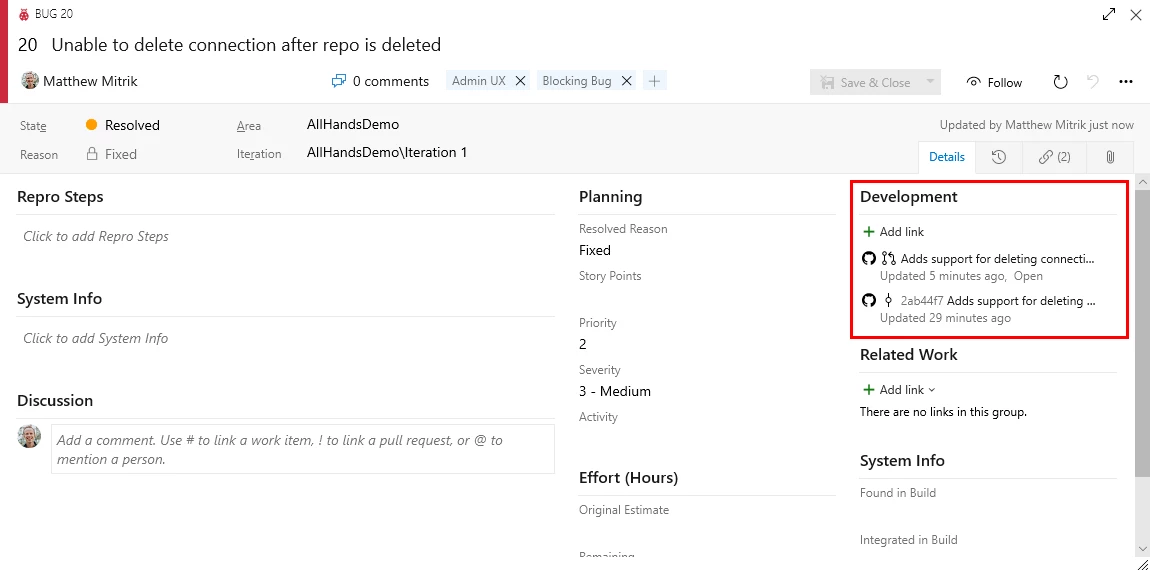
Code links example in Azure Boards

Automatically link Azure Boards items from GitHub pull requests and commits

Keeping code and work items connected should be easy, which is why Azure Boards uses workflows known and loved by GitHub users. When you’re working on a code change and you want to relate it to the task you’re working on, simply mention the ID of the Azure Boards work item in the commit message, PR title, or PR description. The syntax used is “AB#[Work Item ID]” as shown below.
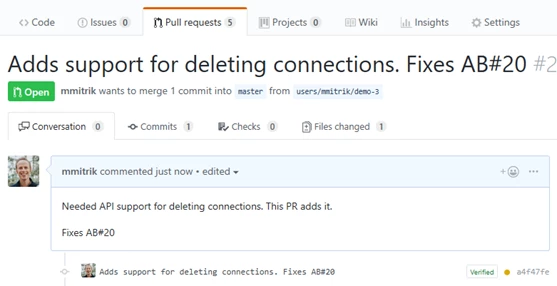
Linking Azure Boards items from GitHub pull request commits

When the commit is pushed to GitHub or the PR is created, Azure Boards will automatically create a link to the work item. If the PR or commit fix the bug, or complete the task you’re working on, simply just include the word “Fixes” before mentioning the work item, and Azure Boards will update the work item state automatically when the changes reach the master branch.
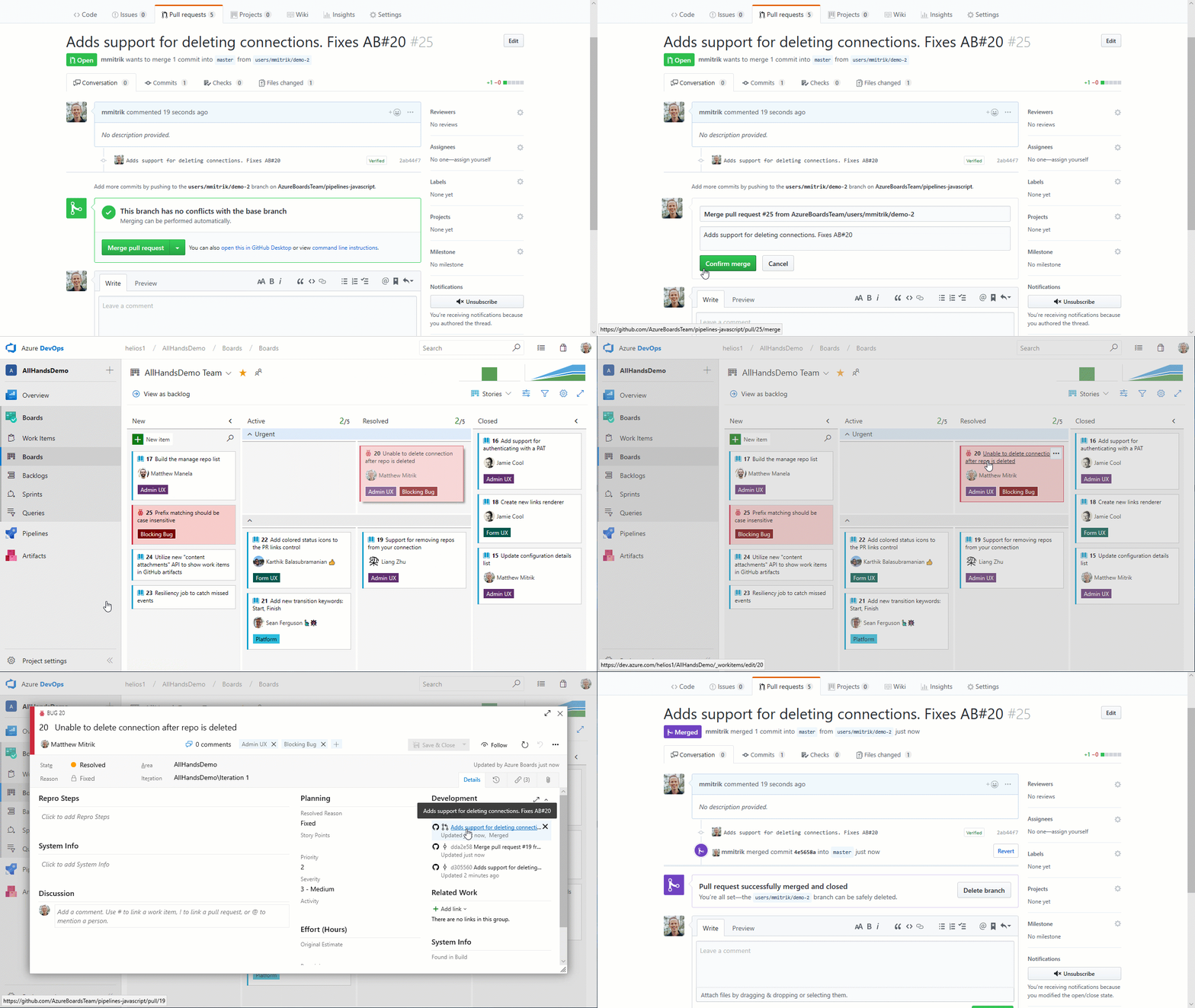
Azure Board fixes on GitHub

Integrating Azure Boards, GitHub, and Azure Pipelines for a winning combination

Teams using Azure Pipelines to continuously build and deploy their code already have a deep integration between their code and their CI/CD pipelines. Adding Azure Boards to the mix deepens the integration, providing links from the build summary to the related code and work items for end-to-end traceability.
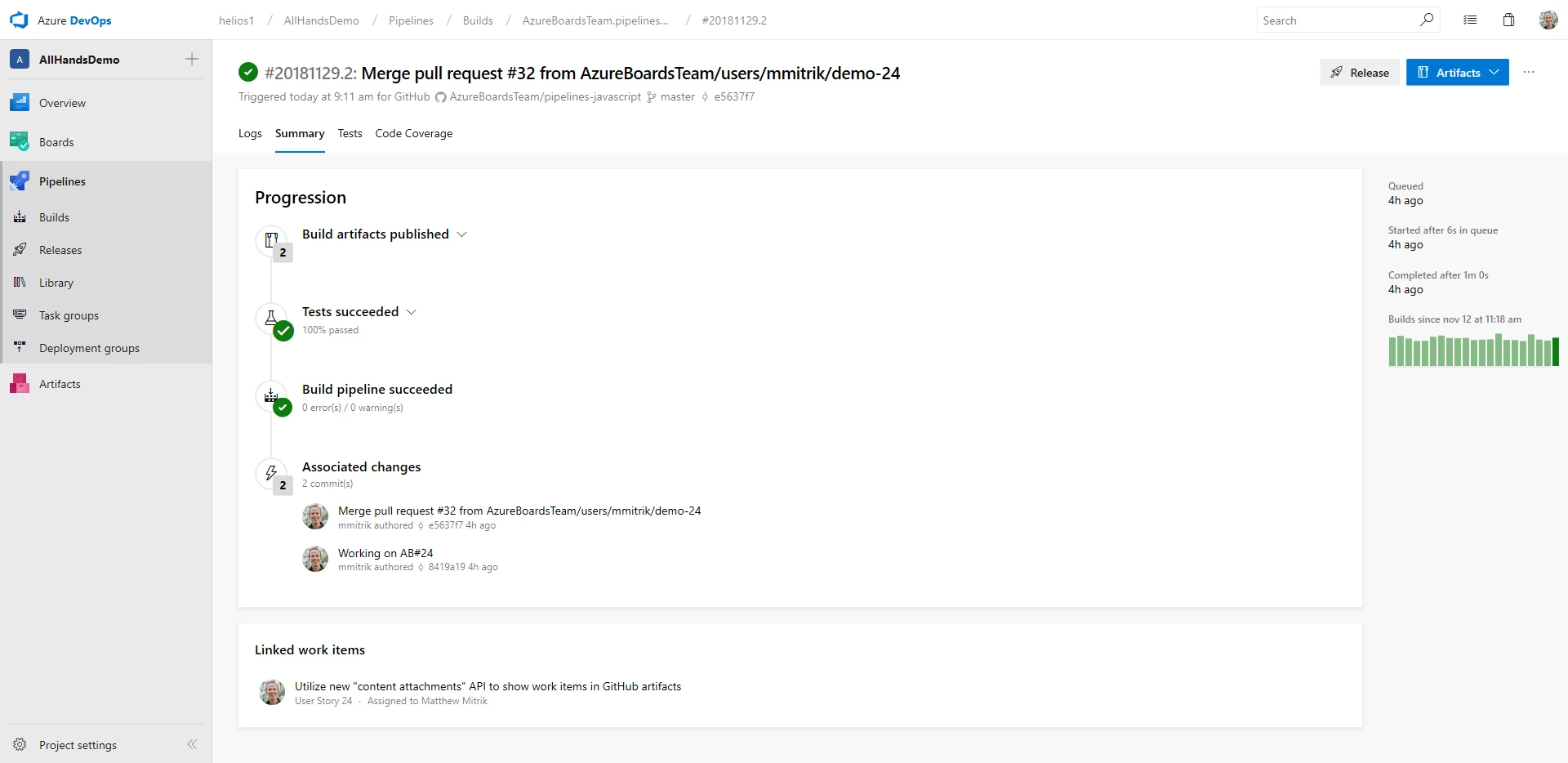
Azure Boards, GitHub and Azure Pipelines integration

Link GitHub commits to Azure Boards

If you’re new to Azure Boards, hop over to our homepage and click start free with Boards to create your first project. After creating your project (or if you already have a project), follow our simple guide to connect to your GitHub repos. If you have any feedback to share, or questions that need answering, please reach out on Twitter at @AzureDevOps.


WE ARE MICROSOFT

Explore Microsoft Foundry

The future of AI starts here. Envision your next great AI app with the latest technologies. Get started with Azure.




