
Azure offers built-in disaster recovery (DR) solution for Azure Virtual Machines through Azure Site Recovery (ASR). In addition to the broadest global coverage, Azure has the most comprehensive resiliency strategy in the industry from mitigating rack level failures with Availability Sets and data center failures with Availability Zones to protecting against large-scale events with failover to separate regions with ASR. A common question we get is about costs associated with configuring DR for Azure virtual machines. We have listened and prioritized.
Configuring disaster recovery for Azure VMs using ASR will incur the following charges.
- ASR licensing cost per VM.
- Network egress costs to replicate data changes from the source VM disks to another Azure region. ASR uses built-in compression to reduce the data transfer requirements by approximately 60 percent.
- Storage costs on the recovery site. This is typically the same as the source region storage plus any additional storage needed to maintain the recovery points as snapshots for recovery.
You can look at this sample cost calculator for estimating DR costs for a three-tier application using 6 virtual machines. All of the services are pre-configured in the cost calculator. The 6 virtual machines have 12 Standard HDD disks and 6 Premium SSD disks. Therefore, there will be 18 disks created in the DR region. Each standard disk is expected to have data change at a rate of 10 GB per day and each premium disk is expected to have data change at a rate of 20 GB per day. The daily data change rate will be the storage snapshot charges considering the recovery point retention to be 24 hours, which is the default value.
ASR uses compression to reduce the data to be transferred from source region to target region and the compression ratio usually is around 50 percent. So, 40 percent of the total data changes will be transferred between regions, which comes out to be about 3 TB per month across all the 6 VMs. The sample cost calculator has all these charges listed.
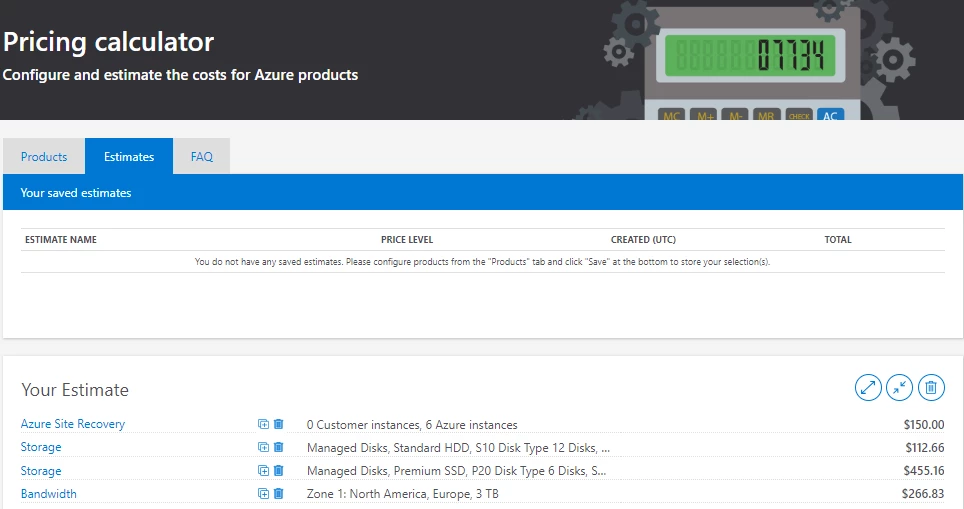
To see how the pricing would change for your particular use case, change the appropriate variables to estimate the cost. You can key in the number of VMs for the ASR license cost. You can use the number of managed disks, along with type, and the total data change rate expected across all the VMs to get the estimated storage costs in DR region. Additionally, you can use the total data change rate in a month after applying the compression factor of 0.4 to get the bandwidth costs incurred for transferring data between regions.
In addition to the above costs, you will incur additional Compute costs for the VMs created as part of a disaster recovery drill using Test failover operation or the actual disaster recovery using failover operation. You also pay for any resources such as load balancers and public IPs created beforehand which are required for the application along with the VMs to work properly when failed over.
Disaster Recovery between Azure regions is available in all Azure regions where ASR is available. Get started with ASR today. Follow us on twitter to get latest updates and share your feedback.
Related links and additional content
- Get started by configuring disaster recovery for Azure VMs.
- Learn more about the supported configurations for replicating Azure VMs.
- Need help? Reach out to ASR forum for support.
- Tell us how we can improve ASR by contributing new ideas and voting up existing ones.






