Today we’re excited to share the first release candidate (RC) of Azure DevOps Server 2019. Azure DevOps Server 2019 delivers the codebase of Microsoft Azure DevOps while being optimized for customers who prefer to self-host. This may be the case for some customers because they require Azure DevOps run on-premises, they require a guaranteed isolated instance of Azure DevOps, or because they want to run in regions where a hosted version of Azure DevOps is not available.
You can download Azure DevOps Server 2019 RC1 today.
Like the evolution of Team Foundation Server (TFS), Azure DevOps Server includes the new, fast, and clean Azure DevOps user interface with a multitude of new features. We’ll discuss some of the most beneficial features for our customers below, but you can check out our extensive release notes for all the features and information included in this initial release.
Added support for Azure SQL
Azure DevOps Server includes support for Azure SQL in addition to existing SQL Server support. This enables enterprises to self-host Azure DevOps in their own datacenter using an on-premises SQL Server. Customers now also have the option to self-host Azure DevOps in the cloud and take advantage of all the fantastic Azure SQL capabilities and performance. With this release, Azure DevOps now provides best in class hybrid-cloud development collaboration capabilities allowing customers to install on-premises, self-host in the cloud, or use the globally available Microsoft hosted service to take advantage of automatic updates and automatic scaling.
Release management improvements
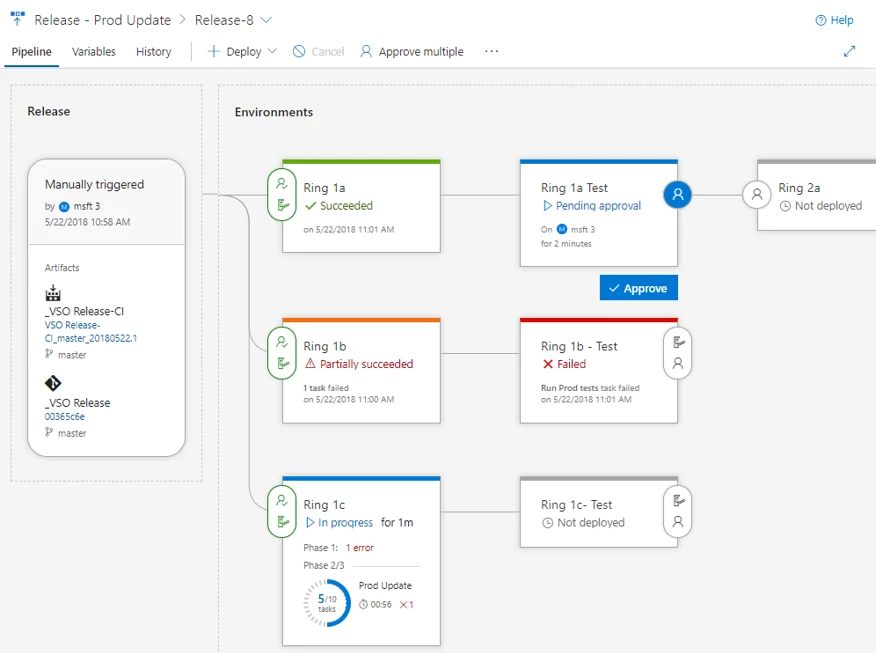
With Azure DevOps Server 2019 the new release management interface is also available, making it easier than ever to see how your deployment is going. The unique end-to-end traceability in Azure DevOps allows you to easily understand which bits are deployed to which environments and why. You can also mix and match agents self-hosted on-premises and in any cloud on Windows, Mac, or Linux . You can easily deploy to IaaS or PaaS in Azure as well as on-premises infrastructure.
While the new navigation and improved user experience in Azure DevOps has undergone significant testing and feedback in our hosted service, we recognize that for self-hosting customers the new navigation model may require updates to internal documentation and training. Therefore, you should plan accordingly because once you do the upgrade all your Azure DevOps Server users will see the new UI. Previous versions of Team Foundation Server will stay on the old user interface.
Upgrading and licensing
To get more information see the Azure DevOps Server requirements and compatibility page to get on the dependencies required for your self-hosted installation. If you are able to run TFS 2018 you can easily upgrade to Azure DevOps Server, as we will continue all operating systems and SQL Server support in this release.
A direct upgrade to Azure DevOps Server is supported from any version of TFS, which includes Team Foundation Server 2012 and newer. If your TFS deployment is on TFS 2010 or earlier, you will need to perform some interim steps before upgrading to Azure DevOps Server 2019. Please see the install page for more information.
While Azure DevOps Server 2019 RC1 includes a go-live license making it suitable for production use today, we are keen to get your feedback regarding Azure DevOps running in a self-hosted configuration, either on-premises or in the cloud. We’d also love to get feedback from people upgrading their TFS instances to Azure DevOps Server.
If you have questions or feedback please let us know via the Azure DevOps developer community site.