
Azure SQL Database and Data Warehouse offer encryption-at-rest by providing Transparent Data Encryption (TDE) for all data written to disk, including databases, log files and backups. This protects data in case of unauthorized access to hardware. TDE provides a TDE Protector that is used to encrypt the Database Encryption Key (DEK), which in turn is used to encrypt the data. With the TDE and Bring Your Own Key (BYOK) offering currently in preview, customers can take control of the TDE Protector in Azure Key Vault.
Taking advantage of TDE with BYOK for databases that are geo-replicated to maintain high availability requires to configure and test the scenario carefully. This post will go over the most common configuration options.
To avoid creating a single point of failure in active geo-replicated instances or SQL failover groups, it is required to configure redundant Azure Key Vaults. Each geo-replicated server requires a separate key vault, that must be co-located with the server in the same Azure region. Should a primary database become inaccessible due to an outage in one region and a failover is triggered, the secondary database is able to take over using the secondary key vault.
For Geo-Replicated Azure SQL databases, the following Azure Key Vault configuration is required:
- One primary database with a key vault in region and one secondary database with a key vault in region.
- At least one secondary is required, up to four secondaries are supported.
- Secondaries of secondaries (chaining) are not supported.
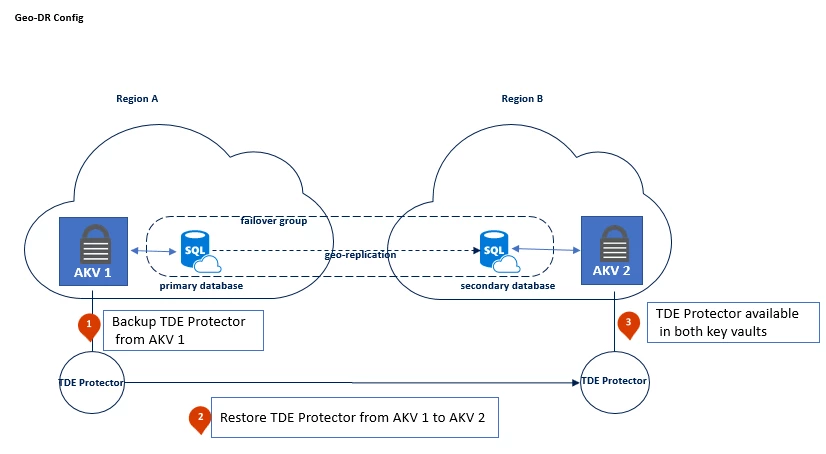
When starting out with a new Geo-DR configuration, it is important to ensure that the same TDE Protectors are present in both key vaults, before proceeding to establish the geo-link between the databases.
When working with an existing Geo-DR deployment, it is required to assign the key vault to the secondary server first. After the secondary server was configured with Azure Key Vault this step can be completed for the primary server and after that TDE Protector gets updated. The existing Geo-DR link will continue to work because at this point the TDE Protector used by the replicated database is available to both servers.
Please visit our documentation for detailed step-by-step configuration guidance.
Summary
Before enabling TDE with customer managed keys in Azure Key Vault for a SQL Database Geo-DR scenario, it is important to create and maintain two Azure Key Vaults with identical contents in the same regions that will be used for SQL Database geo-replication. “Identical contents” specifically means that both key vaults must contain copies of the same TDE Protector(s) so that both servers have access to the TDE Protectors used by all databases. Going forward, it is required to keep both key vaults in sync. This means both key vaults must contain the same copies of TDE Protectors after key rotations, maintain old versions of keys used for log files or backups. In addition, the TDE Protectors must keep the same key properties and the key vaults must maintain the same access permissions for SQL. A best practice is to test and trigger failovers on a regular basis to ensure the scenario continues to work. More information on how to manage and trigger failovers is outlined in the failover groups documentation page.






