Transparency is an important virtue of any cloud service. Azure Cosmos DB is the only cloud service that offers 99.99% SLAs on availability, throughput, consistency, and <10ms latency, and we transparently show you metrics on how we perform against this promise. Over the past year, we have made a number of investments to help you monitor and troubleshoot your Azure Cosmos DB workloads. Today we’re announcing a few more metrics we added recently, as well as integration of our metrics with the Azure Monitor, OMS, and a preview of Diagnostics logs.
Elastic scale, partition key heatmaps, and “hot” partitions
Azure Cosmos DB offers limitless elastic scale. We don’t ask you how many VMs or instances you want, etc. Instead, we just ask you how much throughput you need, and we transparently and elastically scale your collections as your data grows. To enable elastic scale, we ask you what partition key you would like us to use.
The latter is a very important piece of information. Our promise to you is: if you select a partition key that has data evenly distributed over the partition key value space, we will ensure that you’re taking advantage of the entire provisioned throughput. However, if all your records come in with the same partition key value, say you forgot to set it, so the value is null, you will only get 1/Nth of the provisioned throughput, where N is the current number of physical partitions created for your collection. So, if you provisioned 10000 RU/s for your collection that has 10 physical partitions, did not choose the partition key wisely, you may end up with only 1000 RU/s provisioned throughput available for your requests.
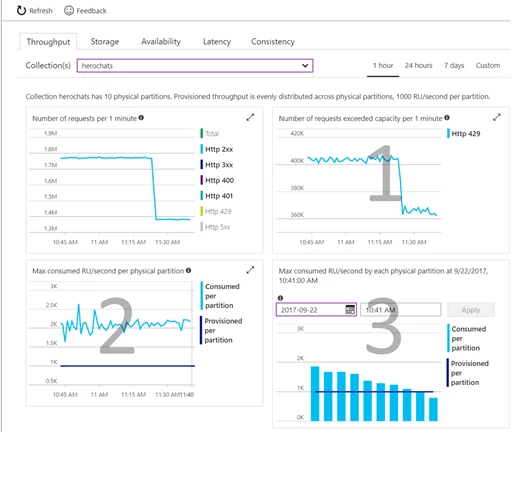
How do you know if your partition key choice is good? We help you figure it out in three simple steps.
- Check if your operations are getting throttled. Look at the “Requests exceeding capacity” chart on the throughput tab.
- Check if consumed throughput exceeds the provisioned throughput on any of the physical partitions (partition key ranges), by looking at the “Max RU/second consumed per partition” metric.
- Select the time where the maximum consumed throughput per partitions exceeded provisioned on the chart “Max consumed throughput by each partition” to investigate the per-partition distribution of the consumed throughput at that time.
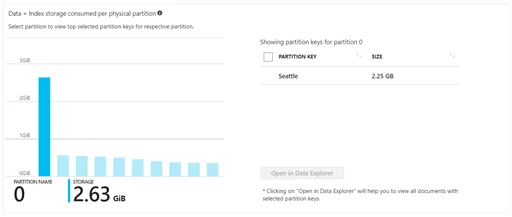
Sometimes it’s also helpful to look at the data distribution across partitions. You can see this chart on the storage tab. You can click on individual partition key ranges and find out the dominant partition keys in that range. You can further select a key and click “Open in Data Explorer” to see the corresponding data.
Here is a quick Azure Friday video on this topic:
For more information on using the new metrics, see Monitoring and debugging with metrics in Azure Cosmos DB.
Database audit and OMS integration
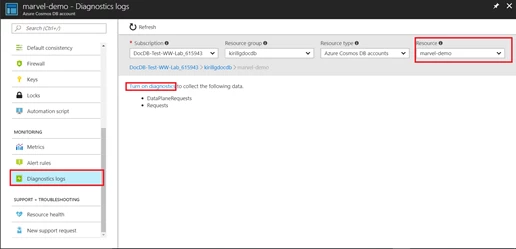
We are excited to announce Diagnostics Logs for data plane operations, which enable you to get a full audit of who accessed your Azure Cosmos DB collections and when. In the Azure portal, navigate to the Diagnostics Log menu on the left navigation bar, select your Azure Cosmos DB account, and turn the diagnostics log on. You can also export these logs to an Azure Storage account, stream them to an Event Hub, or send them to Log Analytics and an Operations Management Suite. For instructions on turning on diagnostic logs, see Azure Cosmos DB diagnostic logging.
Azure Monitor
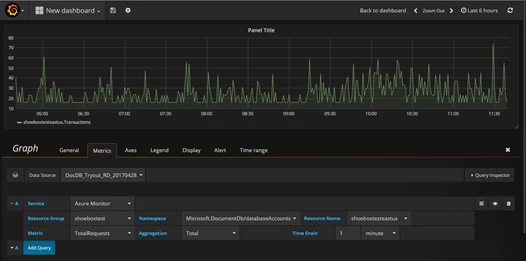
Today we also announced the availability of a subset of Azure Cosmos DB metrics via Azure Monitor API. Now you can use tools like Grafana to access your metrics, with Operations Management Suite integration coming soon.
Play with Azure Cosmos DB and let us know what you think
Azure Cosmos DB is the database of the future. It’s what we believe to be the next big thing in the world of massively scalable databases! It makes your data available close to where your users are, worldwide. It is a globally distributed, multi-model database service for building planet-scale apps with ease, using the API and data model of your choice. You can try Azure Cosmos DB for free today, no subscription or credit card required.
If you need any help or have questions or feedback, please reach out to us on the developer forums on Stack Overflow. Stay up-to-date on the latest Azure Cosmos DB news and features by following us on Twitter using #CosmosDB, or @AzureCosmosDB.
– Your friends at Azure Cosmos DB