Recently we released several updates to the Azure DocumentDB portal experience. We added a new consolidated metrics experience with several new metrics available including new availability, throughput, consistency, and latency metrics which allows you to track how DocumentDB is meeting its SLA’s. We also streamlined collection management by surfacing all collection operations and experiences on the left navigation bar, and eliminated excessive horizontal scrolling.
New metrics blade and SLA metrics
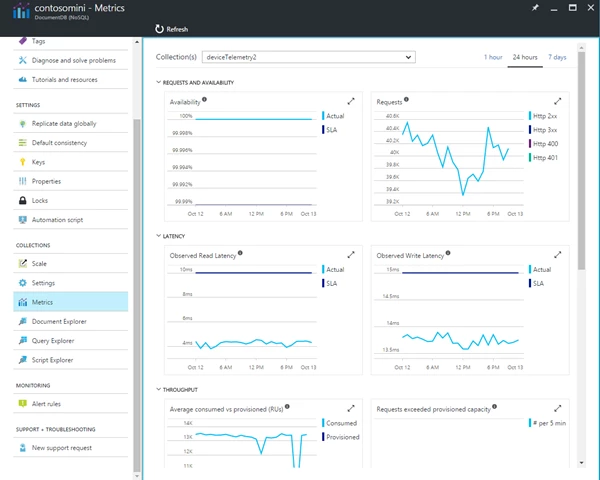
Azure DocumentDB is a globally distributed managed NoSQL database as a service that offers 99.99% guarantees for availability, throughput, <10ms read latency and <15ms write latency at 99th percentile, and guarantees 100% consistency. We believe it is important for you to know how the service is performing against these guarantees. We also heard how important it is for you to have all metrics information readily available without browsing through multiple windows. In response to this feedback, we have added several new metrics to reflect service performance vs SLA, as well as introduced a new at-a-glance metrics experience for DocumentDB collections. If you click on the Metrics node under Collections, you will see all metrics DocumentDB provides for each of your collections on a single surface, including:
- Actual collection availability vs. SLA
- Requests rate grouped by status code
- Consumed and provisioned throughput capacity measured in Request Units/second, as well as percentage of requests exceeding capacity
- Observed latency in the regions where your collection is located
- Percentage of requests that met consistency guarantees
- Storage consumed vs. capacity
You can also zoom in and navigate to the standard metrics experience for the individual charts via zoom-in gesture.
Streamlined collections management
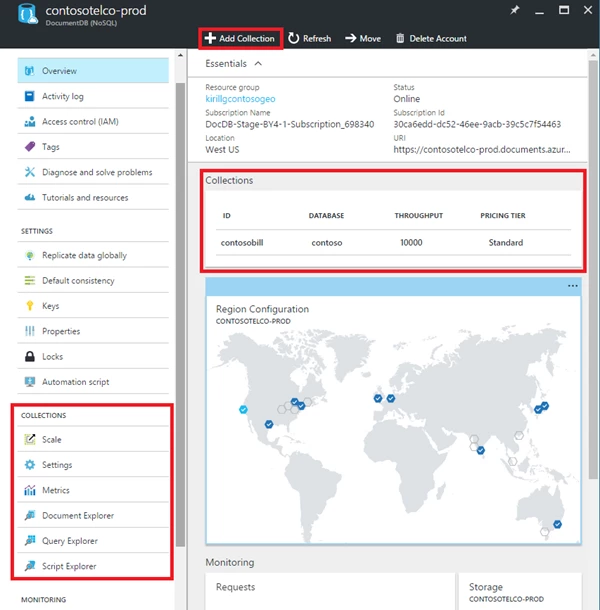
DocumentDB stores data in collections, and majority of your time working with DocumentDB is spent working with collections. With this portal change, we bring collections front and center in the portal experience and eliminate the excessive horizontal scrolling you used to encounter when working in the portal.
- The overview blade now provides one-click access to collections, as well as “Add Collection” command.
- All collection management experiences and tools are now available on the left navigation menu.
- With this update, we eliminated the need for horizontal scrolling when working with DocumentDB in Azure portal.
We hope these new features will make your time in the Azure portal more efficient and provide you with the monitoring information that’s most important to you. As always, let us know how we are doing and what improvements you’d like to see going forward through Uservoice, StackOverflow #azure-documentdb, or Twitter @documentdb.