The healthcare industry has started to embrace mobile apps and cloud technologies, and not just to optimize internal operations. Cincinnati Children’s Hospital Medical Center wants to make visits to hospitals and doctors’ offices easier for patients and families. Cincinnati Children’s serves a diverse population, but people typically have one thing in common—they’re stressed out. Parents are worried about their children, and children can be scared and overwhelmed by all the hustle and bustle around them. So the hospital came up with the idea of a mobile digital concierge who could provide basic information and also answer specific questions about a family’s appointments and the child’s procedures.
The Cincinnati Children’s development team didn’t have expertise building mobile apps, but they did have lots of experience developing in .NET. The team also knew it needed a cloud deployment platform that would support the functionality they had in mind and would also grow with them as they expand and scale the app. Cincinnati Children’s was already using Azure DevOps, so it went with Microsoft Visual Studio Tools for Xamarin for cross-platform app development and chose Azure as its cloud platform. Azure offered a wide variety of services they could use without purchasing third-party tools, and it had the capability to interoperate with the hospital’s on-premises systems for electronic health records and parking—a necessity for two of the features planned for the app.
This was the Cincinnati Children’s development team’s first real step into Azure development, and once they began, everyone got up to speed quickly. The team was churning out ten to fifteen builds a day in App Center and pushing them out to devices for testing. This rapid iteration allowed for very quick feedback and a sense that they were really getting things done. With App Center the team had a build server that it didn’t have to patch and maintain, and that gave team members high confidence that the final builds didn’t have little outlier bugs that might appear on one device and not another—the results were repeatable from device to device. With App Center, developers could focus on development and not on how to get something compiled. This shaved a couple weeks off development time.
Cincinnati Children’s finished the initial pilot project in about three months with a pretty lean team—about six developers total—and then invited patients’ families to participate in beta testing. The hospital named the app Caren and aimed to make its personality part of the app. Developers did that by incorporating a chatbot based on Azure Bot Services and Azure Cognitive Services Language Understanding. If a family can’t find the answers they need in the app, they can type questions into a text box and Caren will reply to them. And if they’re just looking for a quick laugh to destress, Caren can tell them a joke.
Because Cincinnati Children’s tied the app to its parking system, parents no longer need to worry about keeping track of parking vouchers during a hospital visit. Caren gives them a QR code they can scan, and it helps them remember their parking place. This may seem like a small thing, but parents report that it really reduces their stress level when they have so much else on their minds. Using Azure made it easy for the hospital to have that sort of hybrid system, with key data stored on-premises and application logic in the cloud.
Cincinnati Children’s uses a hybrid model for interaction with its on-premises electronic health record (EHR) system, as well, so that Caren has access to the most current information about procedures. For families waiting during an outpatient surgery, Caren updates them about when their child will be ready for visitors. This frees parents up to take a walk or get something to drink, knowing that that won’t miss their child’s return to the recovery room.
The EHR system has the ability to push out events, and Cincinnati Children’s wanted to be able to respond to those quickly and update app users with new information on same day surgery cases. The hospital solved the challenge using Azure Event Grid, Azure Functions, and Azure Cosmos DB. Caren uses two Azure Functions to process same-day surgery events. The first takes an event from the EHR system and checks to see if it exists in Azure Cosmos DB. If it does exist, the system puts it into an Event Grid payload and puts it on the Event Grid.

Figure 1: Overview architecture of the Caren infrastructure and its use of Azure services.
The second Azure Function pulls the event off of the grid and queries the EHR system for full details, processes the data, and updates Azure Cosmos DB with the latest information. From there, the system generates a push notification to the mobile device that there’s new data. When the device calls back into the Azure API hosted in Azure Kubernetes Service (AKS), the system returns the latest surgical update. Cincinnati Children’s knew that once it started scaling out the Caren deployment, there would be more hits against the API, so developers had the idea to Dockerize them and put them in Kubernetes—that way the infrastructure team can manage the performance and scaling of the containers, and developers just need to focus on the code.
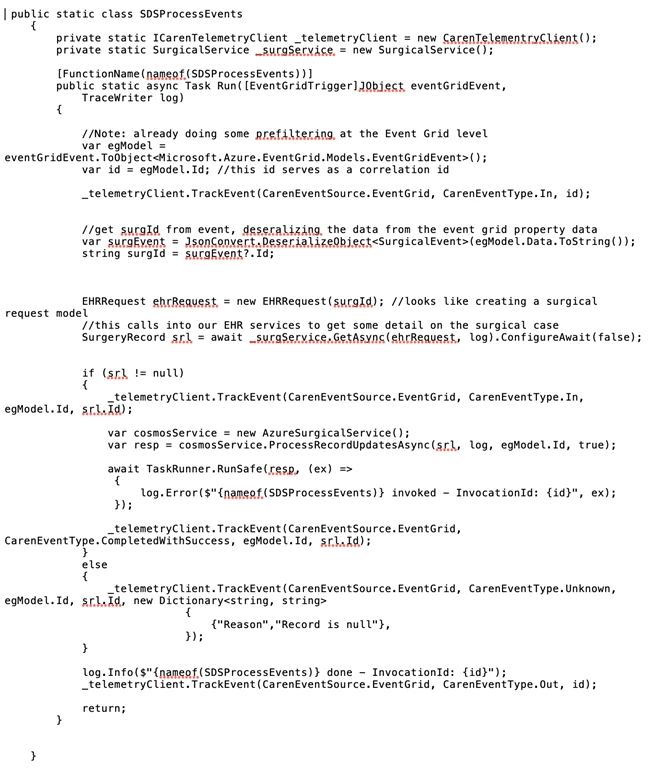
Figure 2: A Caren Azure function that pulls an event off the grid, queries the EHR system for full details, processes the data, and then updates Azure Cosmos DB with the latest information.
Developers found that using the Microsoft chatbot SDK and code samples made it really easy to get going with the chatbot portion of Caren, because they didn’t have to worry about building everything from the ground up. All they had to do was program the intents, and Language Understanding service took care of the rest. According to the developers, it was very straightforward to bring Language Understanding service into the bot and they’ve been excited to see people’s reaction to the natural language interface.
Through the bot, parents can cancel visits, notify the hospital they’re running late, and find out whether they should take their child to urgent care or the emergency room based on symptoms. It’s all about making life a little easier for these parents. Language Understanding service also logs the questions parents ask Caren that she can’t answer definitively. Cincinnati Children’s goes through that list and figures out what the responses should be and trains the models accordingly. That way the bot continues to improve over time. Using Language Understanding service, developers were able to give Caren a personality, so it’s more than just a generic question-and-answer bot.
The development team found the Caren project to be an interesting change of pace—being at a hospital, most of the projects they work on are for clinicians and internal business use, so it was novel to work on a mobile app for patients and their families. They also had the chance to work with new technologies, like building Azure Functions and incorporating Azure Cosmos DB. Privacy and security are a key part of any medical app, and Cincinnati Children’s knew that Microsoft has invested heavily security and regulatory compliance, so as long as developers stayed within the boundaries of Azure, they could trust that data would be safe.
Some people think the healthcare industry has lagged behind in terms of technology. But this type of project—using modern tools and modern practices—should open their eyes to see that healthcare can be on the cutting edge and can even contribute to moving that cutting edge forward. At Cincinnati Children’s, developers are looking forward to expanding their team and their efforts to deliver on ideas that contribute to the community and the welfare of children everywhere.
Read the case study for more about Cincinnati Children’s and its interactive app for families.