Skip to main content Explore View all products (200+) Microsoft Foundry Azure Copilot GitHub Copilot Azure Kubernetes Service (AKS) Azure Cosmos DB Azure Database for PostgreSQL Azure Arc Microsoft Fabric Linux virtual machines in Azure Foundry Models Foundry Agent Service Foundry IQ Foundry Tools Foundry Control Plane Observability in Foundry Control Plane Azure OpenAI in Foundry Models Azure Speech in Foundry Tools Azure Machine Learning View all databases Azure Cosmos DB Azure DocumentDB Azure SQL Azure Database for PostgreSQL Azure Managed Redis Microsoft Fabric Azure Databricks Linux virtual machines in Azure Windows Server on Azure Azure Functions Azure Virtual Machine Scale Sets Azure API Management Azure Container Apps Azure Kubernetes Service (AKS) Azure Kubernetes Fleet Manager Azure Container Registry Azure Red Hat OpenShift Azure Container Instances Azure Container Storage Azure Arc Azure Local Microsoft Defender for Cloud Azure Monitor Microsoft Sentinel Azure Migrate View all solutions (40+) Cloud solutions for small and medium businesses Cloud migration and modernization center Data analytics for AI Azure Databases AI apps and agents Microsoft Marketplace Microsoft Sovereign Cloud AI apps and agents Responsible AI with Azure AI Infrastructure Data analytics for AI Machine learning operations (MLOps) Low-code application development on Azure Integration Services Serverless computing DevOps Migration and modernization center .NET apps migration Databases on Azure Linux on Azure Oracle on Azure SAP on the Microsoft Cloud Adaptive cloud High-performance computing (HPC) Infrastructure as a service (IaaS) Resiliency Azure Essentials Frontier Accelerate for Azure FinOps on Azure Microsoft Marketplace Azure pricing overview Create an Azure account Free Azure services Flexible purchase options Pricing calculator FinOps on Azure Maximize ROI from AI Azure savings plans Azure reservations Azure Hybrid Benefit Virtual Machines Azure SQL Microsoft Foundry Microsoft Fabric Azure Kubernetes Service (AKS) Microsoft Defender for Cloud View more Software Development Companies Microsoft Marketplace Find a partner Resources for Azure partners Get started with Azure Customer stories Analyst reports, white papers, and e-books Videos Learn more about cloud computing Documentation Explore Azure portal Developer resources Quickstart templates Resources for startups Developer community Students Azure for partners Blog Events and Webinars Learn Support Contact Sales Get started with Azure Sign in

We are excited to announce that Azure SQL Database and Azure SQL Data Warehouse VNET Service Endpoints are now in public preview in all Azure Public Cloud regions.

This feature allows you to isolate connectivity to your SQLDB to only a given Subnet or set of Subnets within your VNET(s). Even though the connectivity will be on Azure SQL Databases public endpoint, the traffic will stay within the Azure backbone network. This direct route will be preferred over any forced-tunneling route to take Internet traffic back to on-premises. We also provide for separation of roles with the ability to provision VNET Service Endpoints either on the Network Admin, the Database Admin, splitting the roles between these two, or the ability to create a new entity with the help of custom RBAC roles. The following diagram gives more information on the architecture:
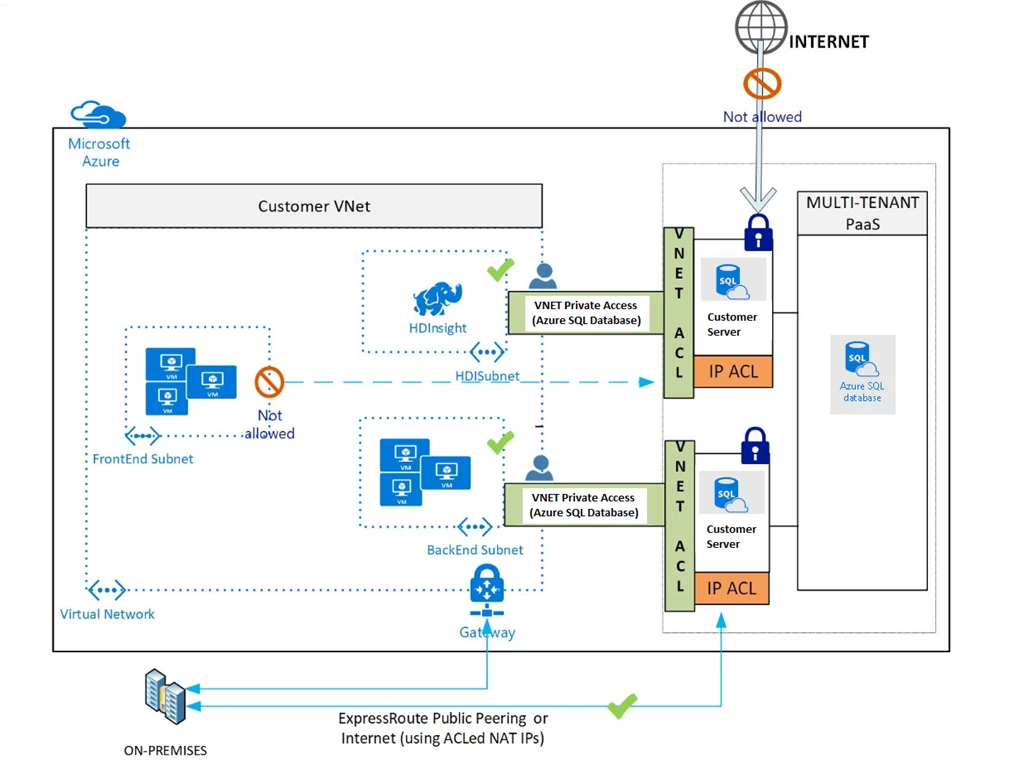
SQL Database VNET Service Endpoints

Limitations

  1. Each SQL Server can have up to 128 Virtual Network based ACLs
  2. Applies only to ARM VNETs

Does not extend to on-premises via Private Peering Express Route (Public Peered Express Route to Azure SQLDB is still supported), Site-to-Site (S2S) VPN, or Peered VNets.

Considerations

At the time of this preview, Network Security Groups (NSGs) should be opened to the Internet to allow Azure SQL Database traffic. In future, NSGs could be opened to only IP ranges for the PaaS services. IP tags for Azure SQL Database are on the roadmap for CY17.

With VNET Service Endpoints, source IP addresses of resources in your VNet’s subnet will switch from using public IPV4 addresses to VNet’s private addresses, for traffic to Azure SQL Database. Any existing open TCP connections to your databases service may be closed during this switch. Please make sure no critical tasks are run when Service Endpoints is turned on or off.

If traffic to Azure SQL Database is to be inspected by a network virtual appliance (NVA), it is recommended that VNET Service Endpoints is turned on for the NVA subnet, instead of the subnet where the Azure SQL Database is originating from in the given VNET.

When Service Endpoints is turned on, a Subnet it is sequentially applied to all VMs in that Subnet. The call commits only when Service Endpoints is successfully applied to all VMs. You will be able to ACL given VNET/Subnet your Server only after Service Endpoints from the VNET/Subnet is successfully applied. So there can be potential downtime after the Service Endpoints call is issued until when you ACL the Server.

To learn more check out VNet Service Endpoints and rules for Azure SQL Database.

WE ARE MICROSOFT

Explore Microsoft Foundry

The future of AI starts here. Envision your next great AI app with the latest technologies. Get started with Azure.





