
The tech world is fast-paced, and cloud services like Azure Cosmos DB get frequent updates with new features, capabilities, and improvements. It’s important—but also challenging—to keep up with the latest performance and security updates and assess whether they apply to your applications. To make it easier, we’ve introduced automatic and tailored recommendations for all Azure Cosmos DB users. A large spectrum of personalized recommendations now show up in the Azure portal when you browse your Azure Cosmos DB accounts.
Some of the recommendations we’re currently dispatching cover the following topics
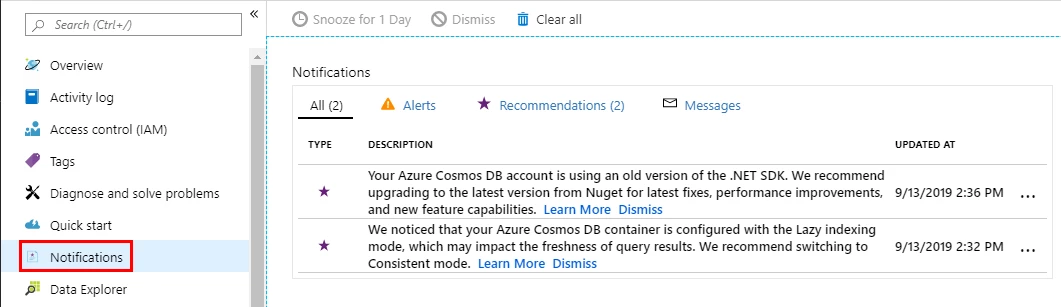
- SDK upgrades: When we detect the usage of an old version of our SDKs, we recommend upgrading to a newer version to benefit from our latest bug fixes and performance improvements.
- Fixed to partitioned collections: To fully leverage Azure Cosmos DB’s massive scalability, we encourage users of legacy, fixed-sized containers that are approaching the limit of their storage quota to migrate these containers to partitioned ones.
- Query page size: We recommend using a query page size of -1 for users that define a specific value instead.
- Composite indexes: Composite indexes can dramatically improve the performance and RU consumption of some queries, so we suggest their usage whenever our telemetry detects queries that can benefit from them.
- Incorrect SDK usage: It’s possible for us to detect when our SDKs are incorrectly used, like when a client instance is created for each request instead of being used as a singleton throughout the application; corresponding recommendations are provided in these cases.
- Lazy indexing: The purpose of Azure Cosmos DB’s lazy indexing mode is rather limited and can impact the freshness of query results in some situations. We advise using the (default) consistent indexing mode instead of lazy indexing.
- Transient errors: In rare occurrences, some transient errors can happen when a database or collection gets created. SDKs usually retry operations whenever a transient error occurs, but if that’s not the case, we notify our users that they can safely retry the corresponding operation.
Each of our recommendations includes a link that brings you directly to the relevant section of our documentation, so it’s easy for you to take action.
3 ways to find your Azure Cosmos DB recommendations
1. Click on this message at the top of the Azure Cosmos DB blade:
2. Head directly to the new “Notifications” section of your Cosmos DB accounts:

3. Or even find them through Azure Advisor, making it easier to receive our recommendations for users who don’t routinely visit the Azure portal.
Over the coming weeks and months, we’ll expand the coverage of these notifications to include topics like partitioning, indexing, network security, and more. We also plan to surface general best practices to ensure you’re making the most out of Azure Cosmos DB.
Have ideas or suggestions for more recommendations? Leave feedback using the smiley on the top-right corner of the Azure portal!






