
In this article, you will learn how to use partition keys to efficiently distribute data, improve application performance, and enable faster look-up. The pre-requisites of this article are general knowledge of Azure Cosmos DB and a good understanding of change feed, request unit (RU), and Azure Functions.
Imagine you have data which you would like to insert with high throughput and query on two or more different keys. In this scenario, suppose you work for an airline company and need to store user reservation information in a collection. User data is defined as:
{
     UserId: user@email.com,
     FirstName: John,
     LastName: Doe,
     PNR: 2345423,
     CityOfOrigin: Seattle,
     CityOfDestination: London,
     DOB: 12.2.76,
     other details ….
}
Out of many possible values, you choose “UserId” (user email address) as the partition key. This is a good choice for a partition key because “UserId” is unique for every user, ensuring your data remains well distributed. Your data is distributed evenly among all partitions, as shown in Figure 1. However, when you are querying the data you do not always have a “UserId”. Sometimes you want to query the data by user last name or user Passenger Name Record (PNR) number.
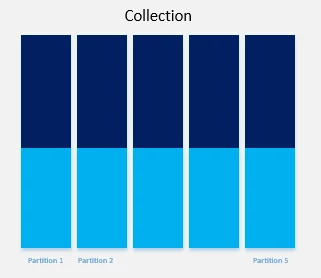
Figure 1: Data distributed evenly across partitions
Azure Cosmos DB indexes all data by default. If you try to query the data by “LastName”, you will get the result, but it will cost you more request units (RU/s) because queries without partition key become fan-out queries. Fan-out queries check all partitions, which will cost you extra RU/s and may affect the performance of your application. If you have a small number of partitions with less data, you may not perceive any significant side effects of fan-out queries, but when you start getting in high numbers of partitions and large amounts of data, fan-out queries can be detrimental to your applications. Infrequent cross partition query is fine, but if it is a frequent query, then what is the solution?
One option is to have two more lookup collections PNR and “LastName” for the mapping of PNR to “UserId”, and “LastName” to “UserId”. The PNR collection will have PNR as the partition key and row key and “UserId” as the value.
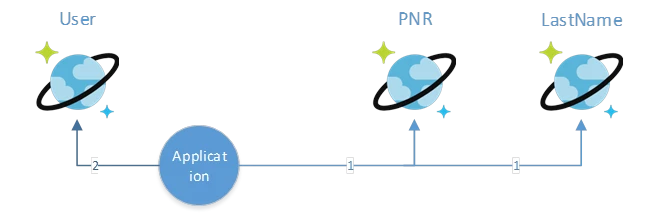
These different lookup collections will make your application more efficient. To lookup detail by PNR, first query the PNR collection to get the “UserId”. Then use “UserId” to query user collection for all details. These two calls can complete within a few milliseconds and will consume fewer RU/s than a single fan-out query. Most of the point lookup can complete within one to two milliseconds. Even after two lookups, you can be done within 10 milliseconds for most of the queries.
You may not want a few extra milliseconds added to calls and instead may decide to duplicate the data in the PNR and “LastName” collections. While this will enable fast look-up, it isn’t recommended because it may add complexity and costs when data is updated. Ultimately, you must balance requirements, performance, and complexity. Starting with a simple solution is often the best approach.
Now let’s look at the distribution of your data in different collections. For example, if you look at the “LastName” collection you will find that the data is not equally distributed because there are more people with the last name “Smith” than “Zubrkee”. In this case, the data will look very much like Figure 2.
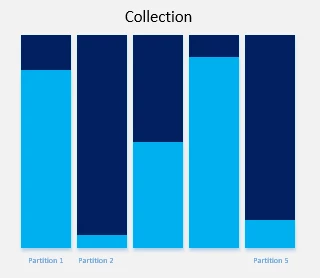
Figure 2: Data unevenly distributed across partitions
The data in this scenario is distributed unevenly, with some full partitions and others greatly underused. This type of data distribution creates many problems.
- The total RU/s for a collection is divided amongst all partitions. This means that 1000 RU/s will be distributed across five partitions as 200 RU/s for each partition. If you try to write more than 200 RU/s to any of these partitions, calls will begin to fail as you cross the threshold. If a developer finds they’re getting throttled on 300 RU/s despite having 1000 RU/s allocated at the collection level, the issue is often that a bad partition key is hitting only one partition.
- A partition key can currently have 10 GB of data at maximum (this may change in future), making it important to use a partition key which fills all partitions efficiently. In the example of “LastName”, a more granular partition key is needed to evenly distribute data. Since the data also includes “Origin City”, a new partition key can be made from “LastName” and “Origin City” and the results will look like Figure 3 below.
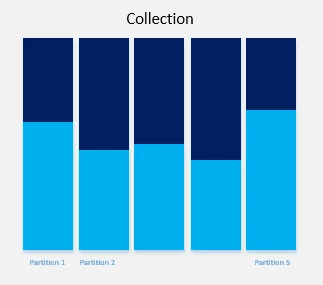
Figure 3: Data distribution after applying granular partition key
This looks much better. The data is distributed more evenly, and travelers can easily and quickly look-up their reservations by simply entering their last name and city of origin.
Now that you’ve distributed your data evenly, how do you populate the other collection? For this, we need to understand change feed. Change feed exposes all the internal changes happening inside a collection. Change feed support in Azure Cosmos DB works by listening to an Azure Cosmos DB collection for any changes. It then outputs the sorted list of documents that were changed in the order in which they were modified. The changes are persisted, can be processed asynchronously and incrementally, and the output can be distributed across one or more consumers for parallel processing.
The change feed is available for each partition key range within the document collection and thus can be distributed across one or more consumers for parallel processing. Whenever a record is inserted into the user collection it will appear in change feed. The easiest way to consume change feed is Azure Function. Azure Functions is a serverless compute service that enables you to run code-on-demand without having to explicitly provision or manage infrastructure. Use Azure Functions to run a script or piece of code in response to a variety of events.
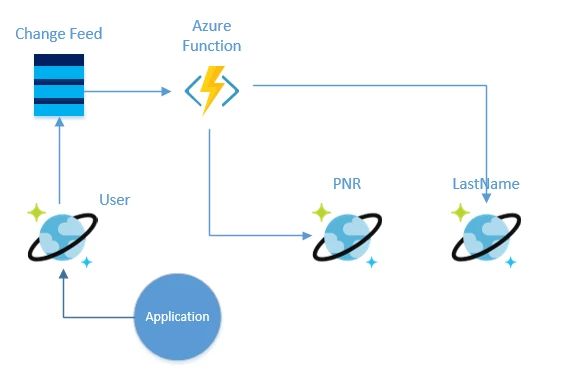
When you consume change feed through Azure function, all the inserted/changed documents come in your function as a parameter of your function.
public static async Task Run(IReadOnlyListinput, TraceWriter log)
Once you have the whole document in your function, you can update the PNR and “LastName” collection accordingly.
Watch this screencast to learn more about how to use Azure Cosmos DB, Azure Function and change feed or read about change feed:






